Rii RK907 Ultra-Slim
4.5Editor score
Low-profile quiet keys
Plug and play USB
Splash resistant design
This guide compares the top lightweight keyboards for travel and daily use, reviewing features, battery life, and portability to help you choose the perfect
Finding a lightweight keyboard can transform your workflow whether you travel frequently or simply need more desk space. These compact devices offer the functionality of full-size boards without the bulk, making them ideal for digital nomads and office workers alike.
We evaluated ten top-rated models based on portability, build quality, connectivity options, and typing comfort. Each product was assessed for its weight, dimensions, battery performance, and overall user experience to ensure they meet the demands of modern computing needs.
Every pick highlights specific strengths like wireless versatility or ultra-slim profiles to help you find the right fit. Please note that product prices and availability can change frequently, so check the current listings before making your final purchase decision today.
4.5Editor score

4.4Editor score

4.3Editor score
The following table provides a side-by-side comparison of all ten selected lightweight keyboards. Review each specification carefully to understand the differences in connectivity, battery life, and physical dimensions before selecting the model that best suits your specific requirements.



The GEODMAER 65% Gaming Keyboard offers a budget-friendly entry into compact typing solutions with its 68-key layout. It holds a solid 4.3-star rating from users who appreciate its ability to save desk space while maintaining full functionality through dedicated arrow keys.
We may earn a commission when you buy through this link, at no additional cost to you.
Its standout quality lies in the anti-ghosting technology which ensures accurate inputs during intense gaming sessions. The detachable Type-C cable provides a stable connection with ultra-low input latency, making it reliable for both office tasks and fast-paced gaming.
While it uses a membrane mechanism, it mimics a mechanical feel through imitations technology which provides a satisfying tactile response without the high cost. The two-color injection molded keycaps ensure characters remain visible even in low-light conditions thanks to the transparent luminous design.
This keyboard is ideal for gamers and professionals who need a portable device that does not compromise on core features. Its lightweight build allows for easy transport in a backpack while the LED backlighting ensures visibility in any environment.
The 65% compact design removes the numpad to free up significant desktop space allowing more room for mouse movement or additional peripherals.
Users can toggle backlighting on and off or adjust brightness levels and breathing frequency using dedicated function keys for a personalized visual experience.
We may earn a commission when you buy through this link, at no additional cost to you.
The Logitech Pebble Keys 2 K380s is designed for users who need to switch between multiple devices seamlessly. It holds a 4.3-star rating and features Easy-Switch buttons that allow you to hop between Windows, macOS, and mobile devices with a single click.
We may earn a commission when you buy through this link, at no additional cost to you.
Its key strength is the incredible battery life which promises up to three years on two standard AA batteries. This eliminates the need for constant recharging and ensures you are always ready to work without worrying about power levels.
The keyboard is crafted with at least 49% certified post-consumer recycled plastic which appeals to environmentally conscious buyers. The quiet scooped keys offer a laptop-like typing experience that is comfortable and silent making it perfect for shared workspaces.
Ideal for students and remote workers, this keyboard combines style with practical functionality. The minimalist design fits easily into laptop bags while the reliable Bluetooth connection ensures stable typing across all your essential devices.
Compatible with Windows, macOS, iPadOS, and ChromeOS systems ensuring you can use it with virtually any device you own.
The use of recycled plastic in construction reduces environmental impact while maintaining durability and a premium feel in the hand.
We may earn a commission when you buy through this link, at no additional cost to you.
The Arteck 2.4G Wireless Keyboard delivers a full-size typing experience in an ultra-slim and lightweight package. With a 4.4-star rating, it is a favorite for users who need a numeric keypad for data entry but still want to reduce desk clutter and weight.
We may earn a commission when you buy through this link, at no additional cost to you.
Its premium stainless steel construction provides a heavy-duty feeling that contrasts with its light weight of just 14.9 ounces. This durability ensures it can withstand daily transport and use without compromising on structural integrity or aesthetic appeal.
The keyboard runs on a rechargeable lithium battery that lasts up to six months on a single charge based on typical usage. This eliminates the need for disposable batteries while ensuring consistent performance over long periods of time.
Best for office professionals who rely on number pads this keyboard offers a robust solution for heavy typing tasks. The low-profile keys provide quiet and comfortable typing which reduces finger fatigue during long work sessions.
The stainless steel material not only looks elegant but also adds rigidity to prevent flex during intense typing sessions.
A single charge lasts for months and you can recharge it easily with the included USB cable when the battery runs low.
We may earn a commission when you buy through this link, at no additional cost to you.
The ProtoArc XK01 is a remarkable engineering feat that brings a full 105-key layout into a compact foldable design. It holds a 4.3-star rating and is perfect for travelers who refuse to compromise on the number of keys or the comfort of a standard keyboard.
We may earn a commission when you buy through this link, at no additional cost to you.
Its tri-fold design allows it to fold down into a slim rectangle that fits easily into a laptop bag. The internal aluminum hinges are tested for over 10,000 folds ensuring that the mechanism remains sturdy and reliable even with frequent travel use.
Equipped with Bluetooth 5.1 it can connect to three different devices and switch between them with one button press. This feature helps remote workers move between a laptop, tablet, and phone without breaking their workflow or losing productivity.
Ideal for consultants and digital nomads this keyboard offers the best of both worlds in a desktop and portable setup. The quiet scissor-switch keys ensure that typing does not disturb others in coffee shops or quiet offices.
Internal aluminum hinges are stress-tested to withstand thousands of folds ensuring long-term reliability for frequent travelers.
Dedicated media and function keys provide quick access to volume and app switching allowing for faster daily tasks.
We may earn a commission when you buy through this link, at no additional cost to you.
The TECKNET 2.4G Wireless Keyboard is a compact solution designed for portability and ease of use. With a 4.4-star rating it offers a lightweight form factor that weighs only 10.4 ounces making it easy to slip into a pocket or small bag.
We may earn a commission when you buy through this link, at no additional cost to you.
Its chocolate keycap design delivers smooth and quiet tapping which reduces finger fatigue during long typing sessions. The layout is compact but includes dedicated media hotkeys that give you quick control over volume and playback without complex shortcuts.
Powered by two AAA batteries this keyboard promises up to twelve months of life on a single set. While it is not rechargeable the long battery life means you will rarely need to change batteries unless you use it constantly.
This keyboard is best suited for home users or those who need a secondary keyboard for media consumption and light typing. Its plug-and-play setup ensures you can start typing immediately without needing to install drivers or software.
Dedicated media hotkeys provide direct access to volume and playback controls enhancing your experience when streaming content.
Simply plug the nano receiver into a USB port and the keyboard is ready for immediate use without any software configuration.
We may earn a commission when you buy through this link, at no additional cost to you.
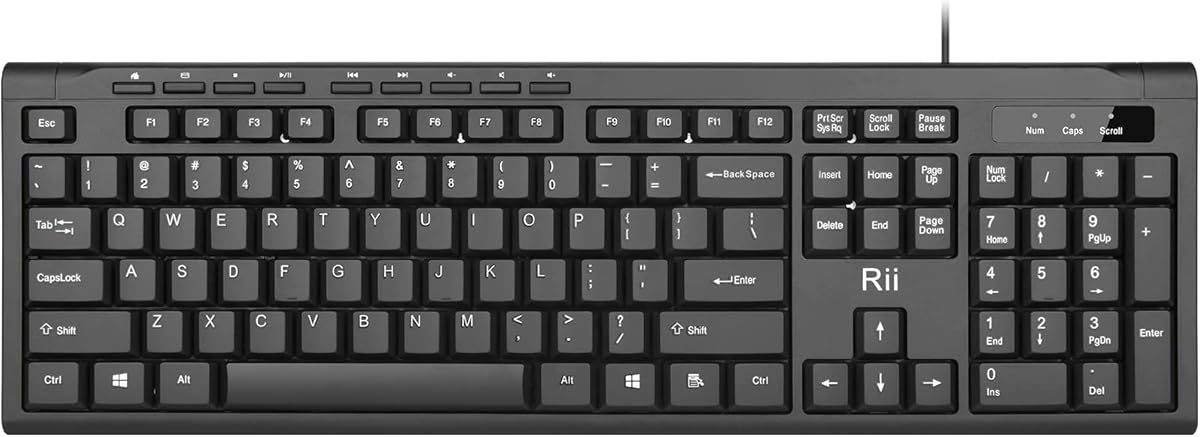
The Rii RK907 Ultra-Slim Keyboard is the perfect choice for those seeking a budget-friendly and reliable typing tool. It holds an impressive 4.5-star rating and offers a simple yet effective solution for office work and basic computing tasks.
We may earn a commission when you buy through this link, at no additional cost to you.
Its low-profile keys provide a quiet and comfortable typing experience that is ideal for shared environments where noise is a concern. The compact design saves space on your desk while maintaining enough room for comfortable typing and mouse movement.
The keyboard features a splash-resistant design which adds a layer of protection against accidental spills. This durability makes it a practical choice for daily use in kitchens, classrooms, or busy offices where liquids might be near the workspace.
Best for students and budget-conscious buyers this keyboard delivers solid performance without any unnecessary bells and whistles. The wired connection ensures zero latency and stable performance making it reliable for essential typing tasks.
Low-profile keys are designed to minimize noise allowing for a peaceful working environment in shared or quiet spaces.
The simple construction and wired connectivity keep costs low without sacrificing essential typing functionality or comfort.
We may earn a commission when you buy through this link, at no additional cost to you.
The Logitech MX Keys Mini is a premium compact keyboard designed for professionals who demand precision and style. With a 4.4-star rating it features Perfect Stroke keys that are shaped to match your fingertips for a satisfying and efficient typing experience.
We may earn a commission when you buy through this link, at no additional cost to you.
Its smart illumination system lights up the moment your hands approach and automatically adjusts to suit changing lighting conditions. This feature ensures you can see your keys clearly in any environment without wasting battery life on unnecessary lighting.
The keyboard can pair with up to three devices and switch between them seamlessly via Bluetooth Low Energy. This multi-device capability allows you to control your computer, tablet, and phone from one compact and ergonomic workspace setup.
Ideal for tech enthusiasts and executives this keyboard combines elegance with high-end functionality. The USB-C rechargeable battery provides up to ten days of use on a single charge making it a reliable companion for long work days.
Sensors detect your hands to turn on backlighting and adjust brightness automatically ensuring visibility while saving power.
The spherical keycaps are designed to cradle your fingertips providing a comfortable feel that reduces fatigue during long typing sessions.
We may earn a commission when you buy through this link, at no additional cost to you.
The ProtoArc XK04 is a pocket-sized keyboard designed specifically for on-the-go typing on mobile devices. It holds a 4.4-star rating and offers a unique two-fold design that folds into a small form factor weighing just 7.8 ounces.
We may earn a commission when you buy through this link, at no additional cost to you.
This keyboard is optimized for phones and tablets allowing you to type comfortably on a 10.76-inch unfolded layout. The 0.55-inch keycaps are compact enough to fit on airplane trays and cafe tables while still providing a decent typing experience.
It includes a premium PU leather protective cover that shields the keyboard from scratches and adds a sleek look. The cover allows you to carry the keyboard in bags without needing additional cases making it a true all-in-one travel companion.
Best for travelers who need extra typing power on their phones this keyboard offers practical connectivity. The Bluetooth 5.1 connection provides a reliable range allowing you to switch between three devices easily without pairing hassles.
The integrated PU leather cover protects the keyboard from daily wear and tear while adding a premium aesthetic to the device.
The layout is specifically tuned for mobile devices making it easier to type messages and notes on the go.
We may earn a commission when you buy through this link, at no additional cost to you.
The Arteck 2.4G Wireless Keyboard combines a premium stainless steel build with an ultra-slim profile for a versatile typing tool. It has a 4.4-star rating and stands out for its ability to provide a full-size typing experience in a package that weighs just 10.2 ounces.
We may earn a commission when you buy through this link, at no additional cost to you.
The stainless steel material gives the keyboard a heavy-duty and elegant feel that matches modern desktop setups. Despite its sturdy appearance the keyboard remains incredibly thin at 0.16 inches making it easy to slip into a bag for travel.
Its rechargeable lithium battery offers an industry-high capacity that lasts up to six months on a single charge. This long lifespan ensures you can use it extensively without frequent interruptions for recharging or battery replacement.
Best for professionals who value aesthetics and weight this keyboard delivers a high-quality feel at a reasonable price. The low-profile keys provide quiet and comfortable typing which makes it suitable for both office and home environments.
The stainless steel body provides a sleek and modern look that complements any contemporary desk setup.
With a six-month battery life you can use the keyboard extensively without needing to worry about frequent charging.
We may earn a commission when you buy through this link, at no additional cost to you.
The Logitech K400 Plus Wireless Touch TV Keyboard is designed to simplify your entertainment experience from the comfort of your couch. It holds a 4.4-star rating and eliminates the clutter of a separate keyboard and mouse by integrating a large touchpad.
We may earn a commission when you buy through this link, at no additional cost to you.
The integrated touchpad allows for easy navigation of media menus and web browsing without needing a mouse. This feature makes it the ultimate tool for controlling a PC-connected TV setup or any living room media center efficiently.
With a battery life of up to eighteen months this keyboard is ready for long-term use without frequent battery changes. The spill-resistant design adds durability ensuring it can withstand accidents common in living room environments.
Best for home theater enthusiasts this keyboard provides seamless control for streaming and browsing. The wireless connectivity allows you to control your system from up to 33 feet away offering freedom of movement in your living space.
The large touchpad allows you to navigate menus and browse the web without needing a separate mouse.
Media-friendly keys give you quick access to volume and playback making it easy to manage your entertainment experience.
We may earn a commission when you buy through this link, at no additional cost to you.
Choosing the right lightweight keyboard requires balancing portability with functionality. Consider the following factors to ensure your new keyboard meets both your travel needs and daily typing requirements effectively.
When selecting a lightweight keyboard, check its dimensions and weight to ensure it fits easily in your bag. Look for models under 15 ounces and consider folding options if you need maximum space savings during transit.
Prioritize size and weight above all else to ensure the keyboard fits comfortably in your backpack or laptop case without adding bulk.
Decide between wireless Bluetooth and wired USB connections based on your usage. Bluetooth offers freedom and multi-device switching, while wired connections provide zero latency and eliminate battery concerns for gaming.
Match the connection type to your devices and whether you prioritize battery life or consistent wired performance.
For wireless keyboards, check the battery life and whether it uses replaceable or rechargeable cells. Rechargeable models save money and reduce waste, but AA batteries might be convenient for long trips without outlets.
Choose a power source that aligns with your access to outlets and your willingness to manage charging or battery replacement.
Determine if you need a full-size layout with a numpad or a compact tenkeyless model. Full-size offers data entry convenience, while compact saves space and weight for better portability in tight areas.
Select a layout that supports your most frequent tasks without sacrificing the space-saving benefits of a lightweight design.
Evaluate the key switches and travel distance to ensure they match your typing style. Low-profile scissor switches offer quiet and short travel, while membrane or mechanical feel provides more tactile feedback.
Test the typing experience if possible to ensure the keys are comfortable for your hand size and typing speed.
Look for sturdy materials like aluminum or high-grade plastic that can withstand the rigors of travel. Splash resistance is also a valuable feature to protect against accidental spills in various environments.
Invest in a keyboard with a durable build to ensure it lasts through frequent packing and unpacking cycles.
Ensure the keyboard is compatible with your operating system whether Windows, macOS, or Android. Multi-device compatibility allows you to switch between different computers and mobile devices seamlessly.
Verify that the keyboard supports your specific OS to avoid function key issues or connection problems.
Consider additional features like backlighting, media keys, or programmable keys that enhance productivity. Backlighting is useful for low-light travel scenarios, while media keys simplify entertainment control.
Prioritize extra features that add real value to your workflow rather than those that might go unused.
To maximize the lifespan of your lightweight keyboard, always store it in a protective case or sleeve when not in use. This prevents scratches and dust accumulation which can degrade the keys and casing over time.
Clean the keyboard regularly by turning it upside down and gently shaking it to remove debris. Use a soft brush or compressed air to clean between the keycaps and wipe the surface with a slightly damp microfiber cloth.
If your keyboard is wireless, ensure you turn it off or let it enter sleep mode when not in use to conserve battery life. For rechargeable models, try not to let the battery drain completely to maintain its overall health and capacity.
The lightest wireless keyboards often come from compact models like the TECKNET or ProtoArc XK04 which weigh under 8 ounces. These are designed specifically for portability while maintaining enough keys for essential typing tasks.
Many lightweight keyboards are designed with travel in mind and feature foldable designs or reinforced plastics. Look for models with splash resistance and sturdy hinges to ensure they survive the wear and tear of a busy lifestyle.
Whether you need a numpad depends on your data entry needs. If you type numbers frequently, a full-size compact model is better. Otherwise, a tenkeyless design saves significant space and weight for better portability.
Battery life varies from six months to several years depending on the technology. Rechargeable models typically last ten days to months on a charge, while AA battery models can last over a year with regular use.
Yes, most modern lightweight keyboards support Bluetooth which connects easily to tablets like iPads and Android devices. Ensure you check the compatibility list for your specific tablet operating system before purchasing.
For lightweight keyboards, membrane or low-profile switches are more common as they reduce weight and thickness. Mechanical feel is available in some options but adds weight. Choose based on your preference for tactile feedback.
The Logitech K400 Plus is highly recommended for TV setups because it includes a built-in touchpad and media keys. This combination replaces the need for a mouse and remote making it ideal for living room use.
Turn the keyboard upside down immediately and blot the liquid with a cloth. Let it dry completely before turning it on or charging it to prevent damage to the internal electronics.
We have reviewed ten top-rated lightweight keyboards ranging from ultra-portable folding models to slim full-size options. Whether you choose the Logitech MX Keys Mini for its smart illumination or the ProtoArc XK01 for its full-size travel design, there is a perfect fit for every need.
When making your final decision prioritize your specific use case such as travel frequency and typing requirements. Consider factors like battery life and connectivity options to ensure the keyboard supports your workflow effectively without interruptions.
Remember that prices and availability can change quickly so always check the latest listings before buying. A lightweight keyboard can transform your productivity and comfort making it a worthwhile investment for your daily digital life.