
Marspark 2 Pcs Heated Mouse Pad
3.6Editor score
Two pack value
Large internal space
USB powered warmth
This guide compares the top hand warmer mouse pad options for warmth and comfort during winter work or gaming sessions in 2026.
Cold hands can slow down your productivity and make long work sessions uncomfortable. A hand warmer mouse pad provides consistent heat directly to your hands while you type or game. Choosing the right one ensures safety and comfort without taking up too much desk space.
We compared ten real products based on heating technology, safety features, and ease of use. Each item was evaluated for its ability to maintain a steady temperature and protect your hands during extended use. The list includes both compact personal warmers and larger desk mats.
Each pick shows specific features like temperature control, auto shut-off timers, and build quality. You will find details on power sources and portability to match your setup. Keep in mind that prices and availability can change frequently on online marketplaces.
3.6Editor score

4.2Editor score
4.5Editor score
This side-by-side comparison highlights key specifications for each of the ten hand warmer mouse pad products. It helps you quickly identify differences in power, size, and safety features to find the best fit for your desk setup.


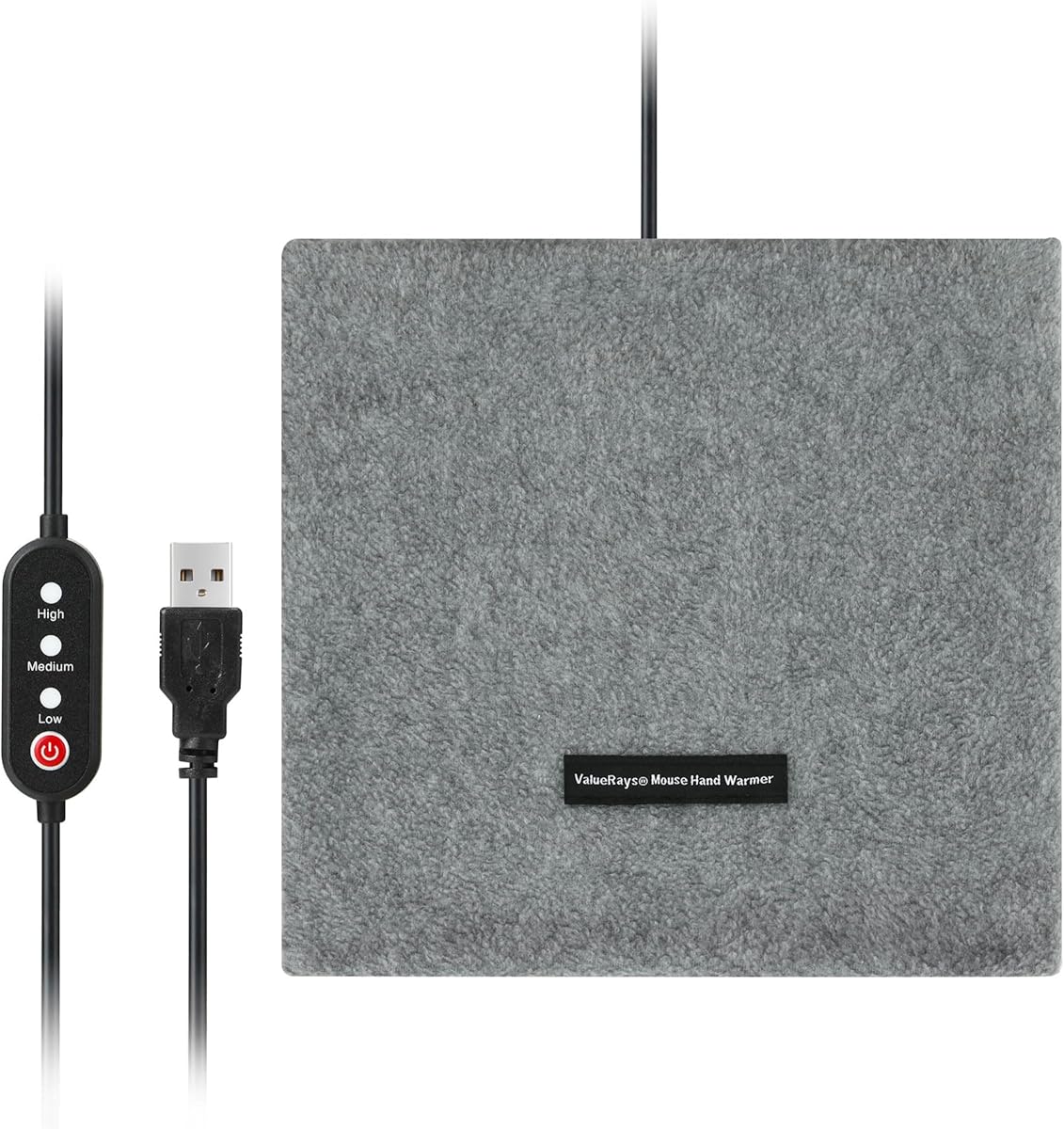
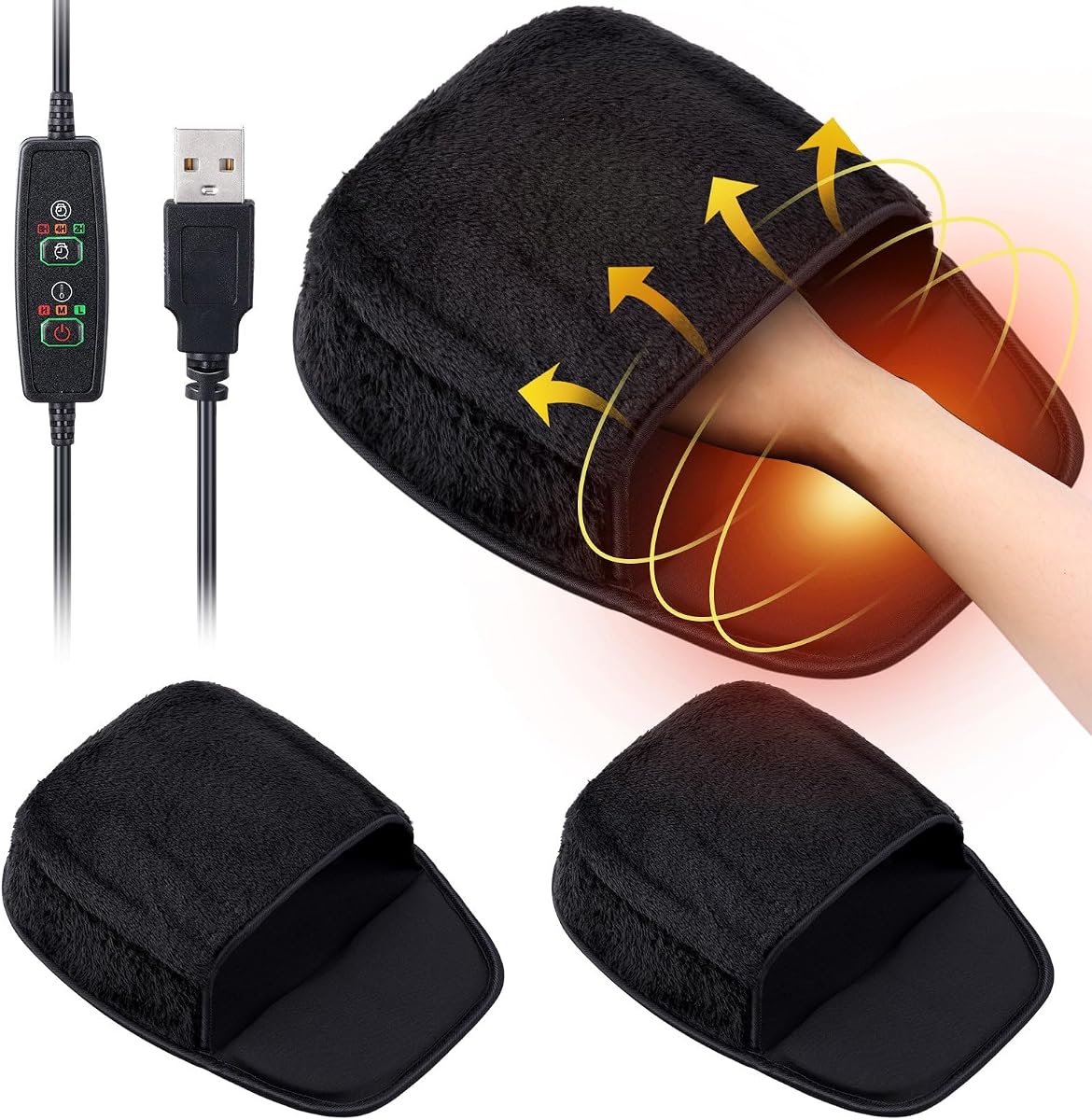

This USB heated mouse pad hand warmer offers a unique enclosed design that wraps your entire hand in warmth. With a rating of 4.2 stars, users appreciate the three temperature levels and the included wrist rest for comfort during long sessions.
We may earn a commission when you buy through this link, at no additional cost to you.
The PTC heating element distributes heat evenly and safely, making it ideal for cold home offices or anyone with circulation issues. The built-in wrist rest supports your wrist in a neutral position, reducing strain. It works with any mouse type without needing drivers or setup.
While it requires a USB connection, the 1.5m cable offers flexible placement. The heating element is removable for easy washing, and the non-slip base keeps it stable. The auto shut-off timers provide peace of mind when you forget to turn it off.
This product is best for PC users who want full hand coverage without bulky desk heaters. It makes a thoughtful gift for remote workers or gamers. If you need reliable warmth that fits on most desks, this is a top choice.
The cocoon design ensures your fingers and knuckles stay warm, not just your wrist.
Three auto shut-off timers allow you to set it and forget it without safety worries.
We may earn a commission when you buy through this link, at no additional cost to you.
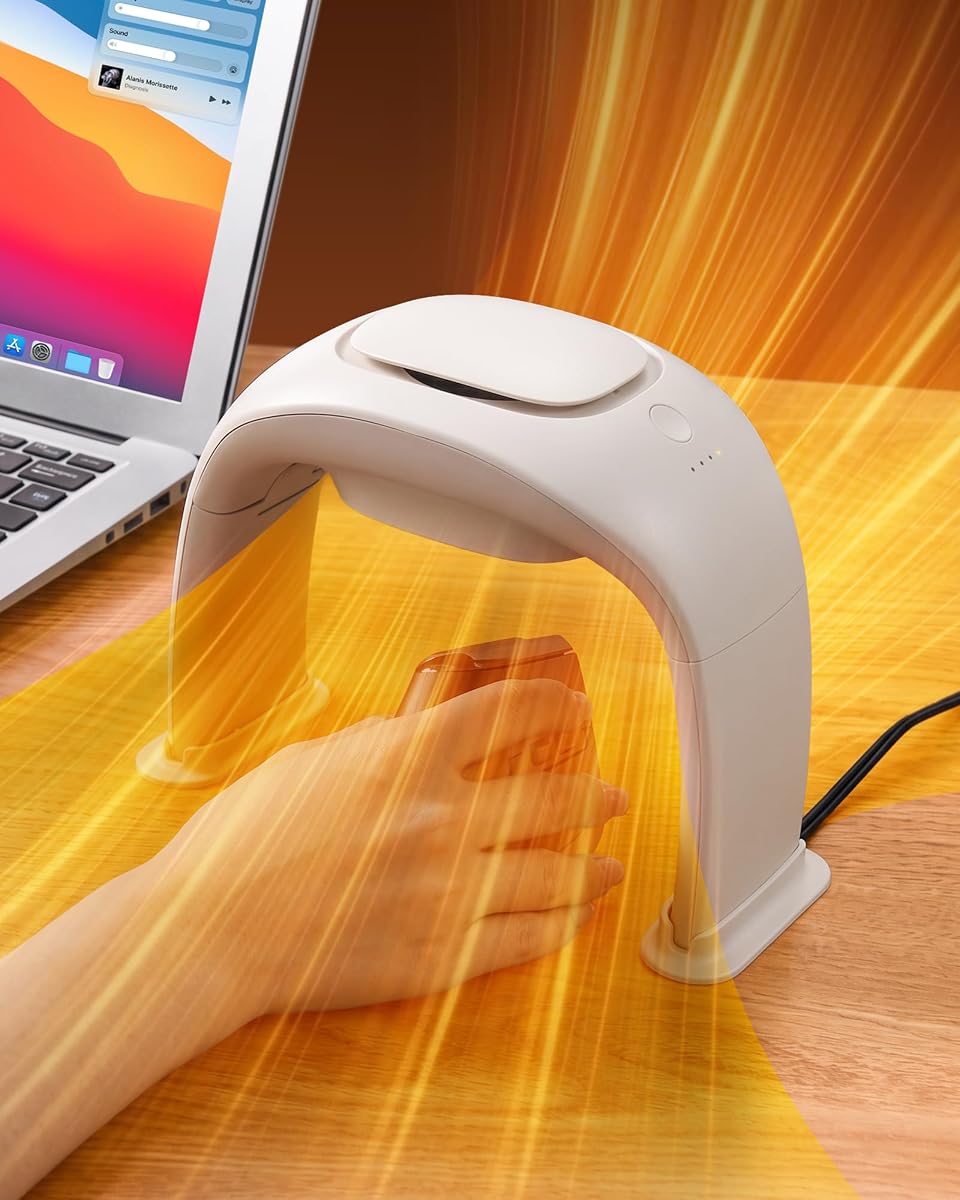
This desk hand warmer provides powerful warmth with a 100W ceramic heating element. Rated at 4.5 stars, it features three heating modes and operates quietly at less than 20dB. The design allows free mouse operation without pressing against your hand.
We may earn a commission when you buy through this link, at no additional cost to you.
The wide angle air guide transfers heat efficiently across a large area. It includes a 71 inch 110 volt plug for easy wall outlet connection. The foldable design saves space on your desktop when not in use. Energy-saving chips adjust power automatically to maintain temperature.
While it uses a standard outlet, this ensures consistent high heat output. The safety features include tipping auto shut-off and over-temperature protection. The package includes stabilizers and a manual to guide setup. It is designed for both work and gaming environments.
This warmer is ideal for users who need strong heat without USB power limits. It suits offices with easy wall access. The quiet operation makes it perfect for shared spaces. If you want premium performance, this model stands out.
Advanced ceramic technology ensures fast warming and wide heat transfer range.
Tipping and over-temperature protection keep the unit safe during use.
We may earn a commission when you buy through this link, at no additional cost to you.
This electric warming heater uses MCH and PTC ceramic technology to keep your hands warm. It offers three temperature options between 100 and 150 degrees. A smart chip maintains constant temperature to save energy. One button operation makes it simple to use.
We may earn a commission when you buy through this link, at no additional cost to you.
Safety is prioritized with tip-over protection and overheat protection that cuts power at 170 degrees. The anti-scald grille uses flame retardant material. It runs at only 15 decibels so it does not disturb work. The foldable design helps keep your desk tidy.
The non-slip bottom ensures stability during mouse movement. While compact, it covers enough area for comfortable hand placement. The plug design requires a standard outlet but offers reliable heat. It is a good choice for users seeking quiet warmth.
This model is best for those who value quiet performance and portability. It works well in home offices or dorms. The safety features provide confidence during extended use. If you need a simple reliable warmer, consider this option.
Built-in chip adjusts power to maintain set temperature efficiently.
Noise level as low as 15 decibels ensures minimal distraction.
We may earn a commission when you buy through this link, at no additional cost to you.
This two pack provides an affordable way to add warmth to your desk setup. The hand warmer mouse pad measures about 11 x 9 inches allowing flexible mouse movement. You receive two pieces for home and office use. The plush wrist rest adds comfort while you work.
We may earn a commission when you buy through this link, at no additional cost to you.
To use it, connect the USB port to your computer to start heating. The temperature rises to a suitable level quickly. The heater and mouse pad are separate pieces giving you flexibility. You can choose to use the heater or not as needed.
The large internal space ensures your hand does not feel cramped. While the rating is lower, the value of two units is high. It is important to unplug after extended use to avoid burns. This suits users on a tight budget.
These pads are ideal for shared workspaces or multiple setups. The plush material is soft and skin friendly. They serve as practical gifts for friends or family. If you need cost-effective warmth for multiple locations, this pack works well.
You get two pieces to meet needs at home and in the office.
The heater and pad are separate so you can decide when to heat.
We may earn a commission when you buy through this link, at no additional cost to you.
This two pack of heated mouse pads offers a stable heat environment for your hands. The thick plush material is soft and skin friendly for a good experience. Each pad includes a detachable heating element that is easy to clean. The size is about 11 x 9 inches.
We may earn a commission when you buy through this link, at no additional cost to you.
Connect the USB port to your computer to start warming your hands. The internal heating pad provides steady warmth for work or games. It is recommended to unplug after use to extend service life. These can be useful gifts for family and friends.
The large internal space allows free mouse movement without taking too much desk space. Safety notes advise awareness of burn risk during long use. The value of two pads makes it suitable for multiple desks. The plush surface is comfortable for touch.
These pads are best for users who want simple USB warmth in pairs. They are easy to set up and clean. The detachable heater helps maintain hygiene. If you need affordable comfort for home and office, this set fits.
The heating pad is detachable and easy to clean for long term use.
Thick plush material provides a soft skin friendly surface for your hands.
We may earn a commission when you buy through this link, at no additional cost to you.
This heated desk pad covers a large area for both keyboard and mouse. It heats up quickly with three heat settings shown by red green and blue lights. The control box sits at the left corner for easy access. It is 31.5 inches wide and 13 inches tall.
We may earn a commission when you buy through this link, at no additional cost to you.
The auto shut-off feature turns it off after 4 hours. The high setting is good for quick warm up and low is for all day. It keeps fingers hands and arms warm in winter months. When off it works as a smooth writing or mouse pad.
It is made of PU leather and waterproof PVC materials for durability. The US plug is 110V so check compatibility before purchase. It serves as a gift for family and friends needing warmth. The surface remains smooth for easy cursor movement.
This pad is ideal for users who want desk warmth not just hand. The large size ensures coverage for your whole workspace. The safety timer prevents overheating overnight. If you need a heated mat for your full desk, this is a top choice.
Low setting is perfect for all day warmth while protecting your desk.
When off it acts as a comfortable smooth surface for typing and writing.
We may earn a commission when you buy through this link, at no additional cost to you.
This white heated mouse pad uses 100W power for fast heating. It features double ball bearings and ceramic heating for low noise operation at 20dB. The activity space is 8.1 by 6.3 inches allowing free mouse use for left and right hands.
We may earn a commission when you buy through this link, at no additional cost to you.
The three temperature settings range from gentle toasty heat. Optimized working logic makes heating efficient and even. The intelligent chip reduces power once temperature is reached. It includes over-heating and tip over protection for safety. The legs fold for easy storage.
It weighs 14oz which makes it easy to carry to different rooms. The package includes stabilizers and user guides with warranty. It suits bedrooms or gaming rooms with low noise needs. The full hand warmth avoids uneven heating common in slippers.
This model is best for users needing a quiet portable hand warmer. The foldable design aids travel and storage. The safety chip ensures reliable temperature control. If you want consistent quiet heat for home or office, this fits.
Enjoy 360 degree circulating warmth instead of uneven heating.
20dB noise and tip over protection ensure safe and quiet use.
We may earn a commission when you buy through this link, at no additional cost to you.
This mouse hand warmer uses infrared heating technology for warmth. It connects via a simple USB port to your computer. The control switch is manual for direct heat management. The design keeps a standard mouse pad form factor for most setups.
We may earn a commission when you buy through this link, at no additional cost to you.
The infrared method aims to provide steady warmth without complex settings. It is powered by your laptop or desktop USB port. The manual switch allows you to turn heat on or off easily. It serves as a basic solution for cold hands.
Since the product data is brief it focuses on core functionality. It fits well where simpler controls are preferred. The USB power makes it versatile without needing extra plugs. It is a straightforward option for daily computer use.
This pad is best for users who prefer manual control over auto features. The simple design reduces points of failure. It is a practical choice for basic warm needs. If you want an easy plug and play solution, consider this one.
Infrared heating provides consistent warmth through standard mouse pad design.
Manual switch lets you manage heat levels without complex menus.
We may earn a commission when you buy through this link, at no additional cost to you.
This two pack delivers safe steady warmth via USB power. It offers three heat levels of 110 130 and 145 degrees. Plus auto-off timers of 2 4 or 8 hours let you set it and forget it. The built-in wrist cushion fits the natural curve for strain reduction.
We may earn a commission when you buy through this link, at no additional cost to you.
The thick rubber base grips tightly to wood glass or plastic surfaces. This keeps the pad in place even during fast mouse movement. It is ideal for office school or garage work. The slim design is easy to fold for travel.
The value of two pads makes it a practical gift for coworkers. It turns frigid desk time into a cozy experience. You can focus on tasks without frozen fingers. The timer prevents overheating and saves power.
These pads are best for those who value safety timers and dual use. The wrist cushion adds ergonomic support. The non-slip base ensures stability. If you need timers and comfort for work or school, this set fits.
Auto-off timers of 2 4 and 8 hours eliminate overheating risks.
Built-in cushion fits wrist curve to reduce strain during use.
We may earn a commission when you buy through this link, at no additional cost to you.
This heated desk pad uses premium PU leather for durability and elegance. It measures 31.5 inches by 13 inches to cover your workspace. Press the switch button up to three times to cycle through high medium and low heat. Press four times to turn off.
We may earn a commission when you buy through this link, at no additional cost to you.
The non-slip leather bottom ensures the mat stays in place during use. You can use it as a keyboard hand warmer or under-desk foot warmer. It protects your desk from scratches and stains. The surface remains clean and pristine.
The 110V power cord is included for US plug use. It helps keep hands and feet warm during cold months. The large size provides full coverage for desk items. It acts as a stylish addition to your workspace.
This pad is best for those wanting multi-purpose warmth on a large desk. The button switching is easy to remember. The leather surface is easy to clean. If you need a versatile mat for desk and feet, this is useful.
Use as keyboard hand warmer or under-desk foot warmer for full coverage.
Switch button cycles through heat levels simply by pressing multiple times.
We may earn a commission when you buy through this link, at no additional cost to you.
Choosing the right hand warmer mouse pad requires checking power sources size safety and comfort features.
Power sources vary between USB and standard wall outlets. USB units are portable and easy to connect to laptops while 110V models offer stronger heat. Check your workspace to see which is more convenient for you.
USB is best for mobility and 110V is best for consistent heat power.
Look for adjustable temperature settings to match your comfort. Some models offer levels from 100 to 150 degrees Fahrenheit. Adjustable heat allows you to find the right warmth for cold winter days without overheating.
Select a model with at least three settings for better control.
Safety is key for heating devices on desks. Ensure the unit has auto shut-off timers or overheat protection. These features prevent the pad from getting too hot if left on unattended.
Always verify timers and overheat protection are included for safety.
Size matters depending on your desk layout. Some pads cover only your hand while others act as full desk mats. Measure your available space to ensure the pad fits your mouse and keyboard comfortably.
Choose compact sizes for small desks and full pads for large setups.
Comfort features like wrist rests or cushions help prevent strain. Look for built-in padding that supports your wrist in a neutral position. This reduces fatigue during long typing or gaming sessions.
Prioritize models with wrist support for better ergonomic health.
If you work in shared spaces low noise is essential. Some ceramic warmers operate at less than 20 decibels. Quiet operation ensures your heater does not distract others around you.
Check for dB ratings if silence is a priority for your workspace.
Maintenance affects long-term use. Pads with removable heating elements allow for easy washing. Materials like PU leather or neoprene should be easy to wipe clean or wash.
Select removable elements for easiest cleaning and hygiene maintenance.
If you move between home and office check if the pad is foldable. Compact designs that fold legs or flat pads make travel easy. This is helpful if you use a laptop in different rooms.
Foldable designs offer the best portability for frequent movers.
Start by placing the pad on a flat stable surface. Connect the power source such as USB or outlet to begin heating. Ensure the pad is not blocked by objects to allow heat to disperse properly.
Adjust the temperature settings to a comfortable level for your hands. Monitor the heat during first use to avoid burns. Allow the pad to reach steady temperature before starting work or games.
When done unplug the device if not needed. For removable elements clean the surface with a damp cloth. Store it in a dry place to maintain the heating materials and surface quality.
They are safe if they have auto shut-off timers. Always verify the model has safety features before leaving it on. Never leave devices plugged in without supervision to prevent risks.
Yes they work with any mouse type. You need no drivers to setup for wireless Bluetooth or standard USB mice. Just plug the warmer into power and place your mouse on the pad.
Some models have removable heating pads that you can hand wash. Always check the manual before washing to protect internal components. Wiping the surface is safe for most PU leather or plastic designs.
Power ranges from 5W for USB to 100W for outlet models. USB units are energy efficient for desk use. Outlet models use more power but provide higher heat output quickly.
Yes they are designed to combat cold desk environments. They provide consistent warmth for hands and wrists. This helps maintain productivity during winter months when offices lack heating.
Sizes vary from small hand warmers to full desk mats. Small pads measure about 11 by 9 inches. Full mats can be over 31 inches wide for keyboard and mouse coverage.
No software setup is needed for most models. They operate with manual switches or simple controllers. Plug in and press a button to start heating your hands.
Yes they make thoughtful winter gifts for coworkers. Students or remote workers. Their practical warmth offers comfort during cold days. Many options come with gift wrapping available.
The USB Heated Mouse Pad Hand Warmer leads with its enclosed design and wrist rest. The Desk Hand Warmer Over Mouse offers powerful ceramic heating for offices. The Marspark two pack provides value for multiple setups.
Prioritize safety features and adjustable heat when you shop. Choose based on your power source needs and desk space available. Balance comfort and durability for long term use.
Always check current prices and availability before buying. Prices may vary based on sales and regions. Select the model that fits your specific workspace needs today.