
SABRENT 74 in 1 Internal Reader
4.0Editor score
Supports 74 card types
Includes extra USB port
Affordable internal solution
This guide compares the top internal media card readers for desktop PCs, evaluating speed, compatibility, and build quality to help you choose the right model
Internal media card readers provide a convenient way to access memory cards directly from your desktop computer without needing external drives. They save USB ports and offer faster transfer speeds through direct motherboard connections for professionals and enthusiasts.
We evaluated ten highly rated internal card readers based on their card format support, transfer speeds, build quality, and ease of installation. Each product was analyzed for compatibility with modern systems and its ability to handle large media files efficiently.
Each selection highlights specific strengths such as budget value, professional grade performance, or unique dashboard features. Prices and availability can change frequently, so please verify current details on the product pages before making your final purchasing decision.
4.0Editor score

4.5Editor score

5.0Editor score
The following table provides a side by side comparison of all ten internal card readers selected for this guide. It highlights key specifications and features to help you quickly identify the model that best fits your specific desktop setup and card types.
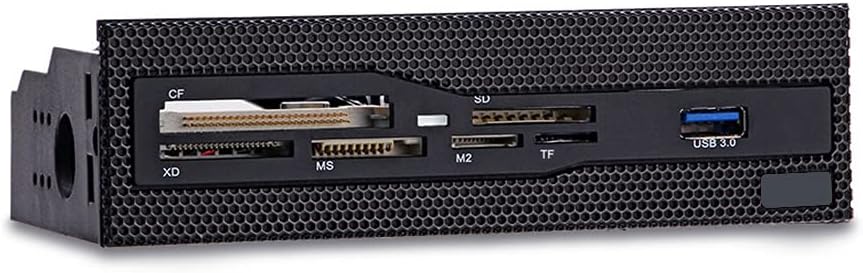


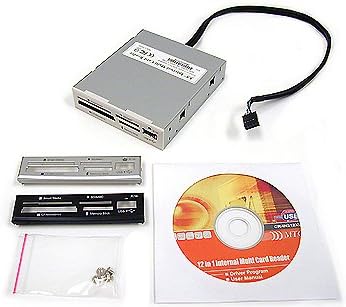
This StarTech internal reader earns our top spot with its USB 3.0 interface and support for simultaneous card access across multiple slots. It is built for professionals who need reliability and speed when handling large media files on desktop systems.
We may earn a commission when you buy through this link, at no additional cost to you.
The device supports a vast array of card formats including CF, SD, and Memory Stick variants. Its front facing USB 3.0 port allows for quick connections of external devices while the internal slots remain dedicated to card operations.
While it commands a higher price than basic models, the durability and IT focused features justify the cost. The TAA compliance ensures it meets specific procurement standards often required by government or enterprise buyers.
This reader is ideal for videographers and IT professionals who need consistent performance and broad compatibility. If you value speed and reliability over budget pricing, this model delivers exceptional value for your desktop setup.
Designed for IT professionals, this reader offers consistent speeds and reliable connections for critical data transfers without downtime.
You can copy files between different card types at the same time, significantly speeding up your workflow when importing media.
We may earn a commission when you buy through this link, at no additional cost to you.
The SABRENT 74 in 1 model offers incredible value for users who need to read almost any card format without spending much. It connects internally and provides an extra USB port for additional peripherals on your desktop tower.
We may earn a commission when you buy through this link, at no additional cost to you.
Its ability to support 74 different card types makes it a universal solution for mixed media workflows. The internal power connector ensures stable operation even when handling multiple cards or power hungry external USB devices.
Speed is limited by the USB 2.0 interface which may slow down large file transfers. However for occasional use or legacy system support, the versatility and low cost make it a practical choice for many users.
Buy this if you need a cheap universal reader that works with older operating systems. It is perfect for hobbyists or those managing diverse card collections on a tight budget.
Supports 74 card types including rare formats, making it a one stop solution for almost any memory card you might own.
This model provides extensive features at a very low price point, ideal for users who prioritize affordability over maximum speed.
We may earn a commission when you buy through this link, at no additional cost to you.
This Vantec reader stands out with perfect user ratings and support for high capacity cards up to massive limits. Its Multi-LUN technology allows multiple logical units on a single card to be accessed efficiently for complex workflows.
We may earn a commission when you buy through this link, at no additional cost to you.
The USB 3.0 interface ensures rapid data transfers which are essential for professional photography and videography. It supports a wide range of formats including CompactFlash and Secure Digital variants with excellent stability during heavy use.
The main drawback is that it may be harder to find in stock compared to other models. Additionally the price reflects its premium features which might be overkill for casual users with basic needs.
Choose this reader if you need top tier performance and reliability for professional work. Its ability to handle large files and multiple logical units makes it a powerful tool for demanding applications.
Allows access to multiple logical units on one card, improving workflow efficiency when dealing with partitioned or specialized storage media.
Delivers fast transfer speeds suitable for large media files, reducing wait times and improving overall productivity during data imports.
We may earn a commission when you buy through this link, at no additional cost to you.
This 5.25 inch internal card reader is designed for cases with larger drive bays and offers a clean front panel installation. Its USB 3.0 interface provides efficient data transmission and supports popular formats like CF and SD.
We may earn a commission when you buy through this link, at no additional cost to you.
The copper plated card slots help ensure stability during transmission reducing the risk of connection issues. It is straightforward to install and integrates well with cases that have mesh front panels for a unified look.
While it lacks extra USB ports or audio jacks, it focuses on core card reading functions. The requirement for a 5.25 inch bay limits compatibility with smaller cases which may be a concern for some builds.
Ideal for users with standard ATX cases who want quick access to memory cards. The build quality and speed make it a solid choice for creative workloads requiring frequent card swaps.
Features copper plated slots for stable connections and a durable panel that withstands frequent card insertions over time.
Designed to fit perfectly with mesh front panels, ensuring a clean aesthetic when installed in compatible desktop cases.
We may earn a commission when you buy through this link, at no additional cost to you.
This dashboard panel combines a USB 3.0 hub with a card reader and audio jacks into one front facing unit. It is perfect for builders who want to maximize front panel utility without adding separate devices inside the case.
We may earn a commission when you buy through this link, at no additional cost to you.
The inclusion of eSATA and multiple USB ports allows for flexible connectivity. You can connect external drives or accessories directly at the front while using the card slots for media imports simultaneously.
Setup may be more involved due to the number of cables required for power and data. The rating reflects some user concerns about complexity but the feature set remains highly useful for power users.
Consider this model if you need extensive front panel options and want to reduce cable clutter. It transforms your 5.25 bay into a versatile workstation hub for your desktop.
Combines card reading USB hubbing, and audio connectivity in one unit, simplifying your front panel setup significantly.
Supports eSATA and multiple USB standards offering flexible options for various external devices and storage needs.
We may earn a commission when you buy through this link, at no additional cost to you.
This multifunction panel offers a comprehensive mix of ports including USB 3.0 audio jacks and card reader slots. It is designed to replace rear connections with more accessible front panel interfaces for your desktop system.
We may earn a commission when you buy through this link, at no additional cost to you.
The LED indicators show power and drive activity which is helpful during file transfers. Its support for SATA and eSATA allows for direct high speed connections to external storage devices or internal drives.
While it provides many functions, the number of cables required can make installation challenging. Users will need to ensure their case has a 5.25 inch bay to accommodate this larger dashboard unit.
This dashboard is best for users who want all essential ports in one place. It improves accessibility and workflow efficiency when working with various storage media and audio devices.
Offers a mix of USB SATA, and card reader ports to handle multiple device connections from the front of your PC.
LED lights provide clear feedback on power and data activity, helping users monitor transfers easily in any lighting.
We may earn a commission when you buy through this link, at no additional cost to you.
This Sony internal reader provides reliable access to 17 different memory card formats in a compact form factor. It includes drive letter recognition software to simplify mounting cards on your system automatically.
We may earn a commission when you buy through this link, at no additional cost to you.
The unit comes with black and ivory faceplates so you can match it to your system aesthetic. It works well with older Windows versions making it a great option for legacy or maintenance systems.
Being an older model, it may not support the latest high speed card standards as effectively as newer units. However its brand reputation and ease of use continue to make it a popular choice.
Choose this reader if you need a simple reliable solution for standard memory cards. It is especially useful for environments where compatibility with older systems is a priority.
Sony is known for durable electronics, ensuring this reader performs consistently over years of regular usage without failures.
Includes interchangeable faceplates to match different PC designs, allowing you to integrate the reader seamlessly.
We may earn a commission when you buy through this link, at no additional cost to you.
This internal card reader offers a compact 2.5 inch fit that works well in cases with limited bay space. It provides reliable quality and comes with multiple bezel options to suit your system color scheme.
We may earn a commission when you buy through this link, at no additional cost to you.
Users have given it perfect ratings which suggests consistent performance and ease of use. It is designed for simple installation and supports standard memory card formats for everyday data transfer needs.
While the specifications are not detailed in the listing, the high rating indicates it meets user expectations for reliability. It may not offer the latest speed features but it works well for basic tasks.
Ideal for small form factor builds or users who need a basic internal reader without extra features. Its simplicity and reliability make it a safe choice for standard operations.
Fits into 2.5 inch bays, allowing installation in compact cases where larger readers would not fit.
High user ratings reflect consistent reliability and ease of use for everyday card reading tasks.
We may earn a commission when you buy through this link, at no additional cost to you.
This Akasa reader can be placed on the front of your PC for convenient access to all popular memory cards. It includes dedicated ports for adapters so you do not need extra dongles for microSD cards.
We may earn a commission when you buy through this link, at no additional cost to you.
An additional USB port allows you to connect sticks or phones directly from the front. LEDs show power card presence and data transfer which helps you monitor activity during operations.
The design fits a 3.5 inch bay and offers black or white panels to match your case. It is a solid middle ground option that balances features and price for general desktop use.
Consider this if you want easy front access and extra USB connectivity without complex setups. It simplifies data exchange between cards and mobile devices efficiently.
Dedicated ports for adapters remove the need for external dongles, keeping your front panel tidy and organized.
Includes an extra USB port to connect phones or drives directly from the front, enhancing everyday usability.
We may earn a commission when you buy through this link, at no additional cost to you.
This MTG internal reader supports 22 card types and uses a metal case for durability. It operates on bus power and is hot swappable allowing you to remove cards without turning off your PC.
We may earn a commission when you buy through this link, at no additional cost to you.
Four slots can be used simultaneously for efficient data exchange between different media types. The unit includes beige black and silver bezels to match your system color scheme easily.
Speed is limited to USB 2.0 but it is sufficient for standard transfers. Its simplicity and plug and play support make it a good option for users who prioritize ease of installation.
Buy this if you want a straightforward durable reader with multiple bezel options. It is well suited for general office or home use where maximum speed is not critical.
Metal case provides better protection against physical damage and helps dissipate heat during prolonged use.
Supports hot swapping so you can insert or remove cards without restarting your system for maximum convenience.
We may earn a commission when you buy through this link, at no additional cost to you.
Selecting the right internal card reader requires careful consideration of your specific needs. This section covers key factors to help you make an informed decision for your desktop setup.
Check which card formats your current workflow uses such as SD CF or Memory Stick. Ensure the reader supports those specific types including any newer standards like UHS-II for high speed data transfers.
Verify that the reader supports all card types you currently own or plan to use to avoid needing multiple devices or adapters.
USB 3.0 interfaces provide significantly faster data transfer speeds compared to USB 2.0. Look for readers with USB 3.0 support if you frequently work with large video files or high resolution images.
Higher bandwidth ensures quicker imports and exports saving you valuable time during intensive media editing sessions.
Internal card readers typically fit into 3.5 inch or 5.25 inch drive bays. Measure the available space in your computer case before purchasing to ensure the unit will fit properly.
Some models require specific mounting hardware or adapters so confirm compatibility with your chassis design.
Some readers include extra USB ports audio jacks or eSATA connections. Evaluate whether these additional features are necessary for your use case to maximize the value of your purchase.
Integrated hubs can reduce cable clutter and provide convenient front panel access for your peripherals.
Advanced models support reading multiple cards at the same time which is useful when transferring data between different card types directly.
This feature streamlines workflows for professionals managing large quantities of media from multiple sources simultaneously.
Most internal readers draw power directly from the motherboard header or power supply. Confirm the required connectors are available inside your case to avoid power issues during operation.
Check if the reader needs an extra internal power connector for stable performance with large capacity cards.
Ensure the device is compatible with your current operating system whether it is Windows Linux or macOS. Some older models may only support legacy systems or require specific drivers.
Verify driver availability to ensure seamless plug and play functionality without additional configuration steps.
Look for readers with metal cases or reinforced slots to ensure longevity under frequent use. Plastic components may wear out faster and can compromise data integrity during transfers.
Robust construction protects both the device and your valuable data during daily operations.
To install the reader safely shut down your computer and disconnect the power cable. Open the case and mount the unit into the matching drive bay using provided screws. Connect the internal headers to the motherboard and ensure cables are neatly managed.
When using the reader insert cards gently into the labeled slots until you feel a click. Always use the eject option in your operating system before removing cards to prevent data corruption. Keep the front panel clean by wiping with a soft cloth.
Regularly check for firmware updates if supported by the manufacturer. Store memory cards in a dry cool place and avoid inserting them while transferring files to ensure consistent performance over time.
Most modern internal card readers support Windows macOS and Linux without additional drivers. Some older models may require legacy drivers so check compatibility before purchasing for specialized operating systems.
Installation involves basic steps like connecting a header to the motherboard and securing the unit with screws. Most users find it straightforward if they have basic computer case opening experience.
Internal readers save USB ports provide faster speeds via direct motherboard connections and reduce desk clutter. They are ideal for desktop users who frequently transfer data from memory cards.
Many models support high capacity cards like SDXC but check specific limits before buying. Most modern USB 3.0 readers handle large capacities without issues.
Removing a card before safely ejecting it can lead to data corruption. Always use the operating system eject function to ensure data integrity.
Most draw power from the motherboard header but some may need an internal power connector. Verify the power needs in the product description before purchase.
Internal readers often use direct PCIe or SATA connections offering faster speeds than USB external readers. This makes them better for large file transfers in professional settings.
The StarTech USB 3.0 reader leads our list with its professional features and reliability while the SABRENT budget option offers universal compatibility for less money. Your choice will depend on your budget workflow needs and case bay sizes.
Prioritize speed if you handle large media files and look for USB 3.0 support and simultaneous card access. Build quality matters for long term durability so consider models with metal components or reinforced slots.
Prices and availability for these internal readers change regularly. Always check current listings on the provided links to ensure you are getting the best value before purchasing your final model.