
Flashforge Creator 5 Pro
4.0Editor score
Four independent toolheads system
65 degree active heated chamber
CoreXY motion structure stability
Near-zero waste printing system
This guide compares the top 3D printer for figurines and models focusing on speed precision and multi-color capabilities to help you choose the right machine
Finding the right 3D printer for figurines and models requires balancing speed precision and material versatility. Modern machines now offer advanced features like automatic leveling and multi-color printing to simplify the creative process for hobbyists and professionals alike.
We evaluated ten leading models based on build quality print accuracy ease of use and overall value. Our analysis focuses on how well each device handles intricate details and vibrant colors essential for bringing custom figurines and scale models to life effectively.
Each pick highlights unique strengths such as rapid printing speeds or industrial-grade heating chambers. Keep in mind that prices and availability change frequently so verify current deals before making your final decision to ensure you get the best value for your investment.
4.0Editor score

4.7Editor score

4.0Editor score
This side-by-side comparison highlights the key specifications and unique capabilities of each model to help you quickly identify which printer aligns best with your specific modeling needs and budget constraints.





The Bambu Lab A1 stands out as the top recommendation for anyone seeking a reliable 3D printer for figurines and models. With a rating of 4.7 stars it delivers exceptional speed and precision without requiring extensive technical knowledge to operate effectively.
We may earn a commission when you buy through this link, at no additional cost to you.
Its standout feature is the impressive acceleration of 10000 mm/s2 which allows for blazing-fast printing while maintaining high accuracy for detailed miniatures. The full-auto calibration ensures every print starts perfectly by handling Z-offset and bed leveling automatically for consistent results.
While it excels in speed and ease of use the open frame design means it is less suited for materials requiring high temperatures like ABS unless enclosed. Additionally the AMS lite for multi-color printing is an optional extra which might add to the initial cost.
This printer is ideal for hobbyists and beginners who want professional-quality results without the hassle of manual tuning. If you prioritize speed and reliability for intricate models the A1 offers a seamless experience that justifies its position as the best overall choice.
The high acceleration allows rapid printing without sacrificing detail making it perfect for creating multiple figurines in a short time.
Automatic calibration processes remove the guesswork from bed leveling ensuring successful prints from the very first attempt.
We may earn a commission when you buy through this link, at no additional cost to you.
The Bambu Lab P2S Combo takes precision and versatility to the next level with its dedicated AMS 2 Pro system. This setup ensures that multi-color printing is seamless and reliable making it a strong contender for complex figurine designs requiring vibrant details.
We may earn a commission when you buy through this link, at no additional cost to you.
Key strengths include the PMSM Servo Extruder which maintains sharp corners and smooth layers even at high speeds of 600 mm/s. The built-in filament drying ensures materials are ready for printing reducing the risk of issues caused by moisture in the filament.
However the premium price point may be a consideration for budget-conscious buyers. Furthermore multi-color printing only works with the Combo version meaning the base printer lacks this specific capability on its own which could limit flexibility if not planned ahead.
For users focused on high-quality multi-color projects and engineering-grade materials the P2S Combo offers a robust solution. Its smart airflow and rapid setup make it a powerful tool for advanced creators who need consistent performance and color fidelity.
The AMS 2 Pro enables smooth transitions between colors allowing for intricate designs without manual intervention during prints.
Built-in drying keeps spools ready for flawless prints ensuring high quality results especially with sensitive engineering filaments.
We may earn a commission when you buy through this link, at no additional cost to you.
The Flashforge Creator 5 Pro is designed for industrial engineering and advanced users who need maximum versatility. With four independent toolheads it can switch materials without flushing which drastically reduces waste and operational costs over time.
We may earn a commission when you buy through this link, at no additional cost to you.
Its fully enclosed frame with an active heated chamber up to 65C ensures that advanced filaments like ABS and PC print without warping. The CoreXY motion structure delivers stability and speed up to 600mm/s without sacrificing accuracy on detailed models.
Despite its capabilities the complexity of managing four toolheads might be overwhelming for casual hobbyists. The system is robust but requires more calibration and understanding compared to simpler single-nozzle printers which may slow down initial adoption.
This printer is best suited for professionals or workshops that produce industrial parts or complex multi-material prototypes. If you need a machine that handles engineering materials and multi-color printing with minimal waste the Creator 5 Pro delivers top-tier performance.
Four toolheads allow printing with different materials in one job enabling complex prototypes without manual filament swaps.
The 65C chamber enables reliable printing with high-temperature materials ensuring robust and dimensionally accurate parts.
We may earn a commission when you buy through this link, at no additional cost to you.
The Bambu Lab P1S offers a balanced mix of speed and enclosure benefits making it versatile for various filament types. Its fully enclosed body improves performance for engineering materials while maintaining the ease of use known in the Bambu family.
We may earn a commission when you buy through this link, at no additional cost to you.
Key features include the ability to print up to 500mm/s with true high-speed acceleration. The auto bed leveling simplifies the setup process ensuring a perfect first layer every time without manual intervention from the user.
While it supports up to 16 colors it requires the AMS unit to be connected for multi-color functionality. The enclosed design limits physical access during prints compared to open-frame models which some users might find restrictive for adjustments.
This model is ideal for users who need to print ABS or ASA regularly and want reliable speed without breaking the bank. Its robust build and quick setup make it a strong choice for both hobbyists and professionals seeking consistent results.
The enclosure maintains stable temperatures for advanced materials ensuring warping-free prints for robust engineering parts.
With speeds up to 500mm/s you can produce models faster without compromising the quality of fine details.
We may earn a commission when you buy through this link, at no additional cost to you.
The Flashforge AD5X stands out for its Independent Filament System which makes multi-color printing accessible without excessive waste. This system allows four colors simultaneously enabling vibrant models with ease for artistic and functional projects alike.
We may earn a commission when you buy through this link, at no additional cost to you.
Its high-temperature nozzle reaching up to 300C allows for a wide range of filaments including high-performance materials. Combined with a large build volume of 220mm on all axes it offers plenty of room for detailed figurines or multiple parts.
The fully automatic leveling system ensures consistent print quality by removing the need for manual adjustments. However the IFS technology may require specific filament setups which could limit flexibility for users preferring standard spools.
For those looking to experiment with color without breaking the bank the AD5X is a compelling option. Its speed and temperature capabilities make it suitable for both prototyping and final production of intricate designs efficiently and reliably.
The IFS enables four colors at once allowing vibrant models without complex manual changes during the print process.
A 300C nozzle supports a wide variety of materials giving you the freedom to tackle diverse engineering projects.
We may earn a commission when you buy through this link, at no additional cost to you.
The Snapmaker U1 simplifies multi-material printing with its SnapSwap system that changes toolheads in just five seconds. This reduces waste significantly and allows for complex parts using flexible or water-soluble materials in a single print run.
We may earn a commission when you buy through this link, at no additional cost to you.
Key features include a rigid CoreXY motion system supporting speeds up to 500mm/s with excellent stability. The built-in model library and Orca slicer make it user-friendly for both beginners and professionals looking to expand their capabilities.
While the toolhead system is efficient the initial investment is higher than standard printers. Additionally managing multiple materials requires careful calibration though the automatic toolhead offset calibration helps mitigate potential alignment issues.
This printer is ideal for makers who want to experiment with different materials like TPU or PVA supports without manual swaps. Its robust locking mechanism and smart calibration ensure reliable prints for functional parts and detailed prototypes alike.
Swapping toolheads in five seconds minimizes waste and speeds up multi-material projects compared to traditional purging methods.
Supports rigid flexible and engineering materials enabling complex prototypes like colorful shoes with varied hardness ratings.
We may earn a commission when you buy through this link, at no additional cost to you.
The Creality SPARKX i7 introduces unique AI capabilities that allow users to upload portraits and generate 3D models in seconds. This feature makes it perfect for personalized gifts and custom figurines without needing advanced modeling skills.
We may earn a commission when you buy through this link, at no additional cost to you.
Key features include a 95% pre-assembled unit allowing setup in just five minutes. The multicolor system reduces waste by 50% compared to traditional systems and the smart AI camera detects failures to save filament and time during prints.
However the AI modeling tools are still evolving and may not match professional software yet. The build volume of 260mm is generous but limits very large prints requiring scaling or segmentation for bigger projects.
This printer is best for beginners who value ease of setup and unique features like AI modeling. If you want to create custom gifts quickly and want reliable failure detection the SPARKX i7 offers a fun and accessible experience.
Upload a portrait to generate a unique 3D model instantly turning photos into custom figurines with minimal effort.
The built-in AI camera monitors prints in real time sending alerts to prevent wasted filament on failed projects.
We may earn a commission when you buy through this link, at no additional cost to you.
The Flashforge Adventurer 5M Pro delivers robust performance with its all-metal CoreXY frame ensuring stability at high speeds. It reaches up to 600mm/s with vibration compensation algorithms that eliminate ghosting for smooth high-precision surface finishes.
We may earn a commission when you buy through this link, at no additional cost to you.
A standout feature is the tool-free quick-release nozzle mechanism allowing replacements in just three seconds across multiple sizes. The high nozzle temperature of 280C and heated bed enable printing of engineering materials like ABS and ASA reliably.
The build volume is moderate which limits very large models to a single print requiring splitting for bigger pieces. Additionally while auto leveling is included users might need to verify calibration for the best results on the first print.
This printer is ideal for users who want professional performance in a compact package. Its smart camera and mobile control make it easy to monitor progress remotely ensuring efficient workflow for home offices or classrooms.
The all-metal CoreXY structure combined with vibration compensation ensures smooth prints even at 600mm/s speeds.
The quick-swap nozzle system allows effortless tool changes in three seconds reducing downtime during print sessions.
We may earn a commission when you buy through this link, at no additional cost to you.
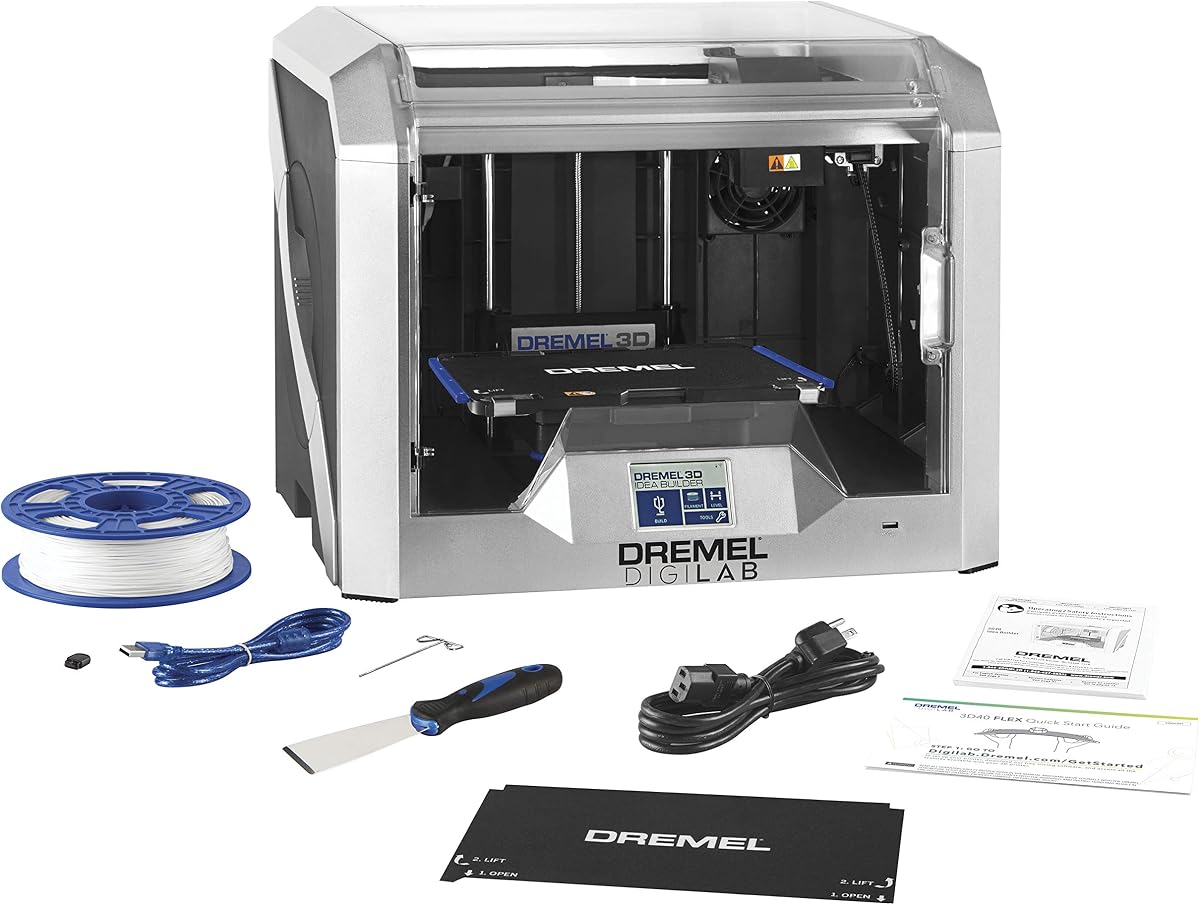
The Dremel DigiLab 3D40 Flex is designed for reliability and ease of use making it perfect for educational environments. Its flexible build plate makes removing printed models a snap without tools ensuring safety and convenience for users of all ages.
We may earn a commission when you buy through this link, at no additional cost to you.
Key features include an automated 9-point leveling sensor that ensures consistent prints by detecting bed variations. The fully enclosed housing provides a safe environment suitable for classrooms with a simple touchscreen interface for easy operation.
While it supports up to 230C nozzle temperature which limits high-performance materials compared to industrial options. The smaller build volume also restricts larger projects requiring segmentation which might add time to certain tasks.
This printer is best for beginners and schools that prioritize safety and support over raw speed. With Dremel's lifetime customer service and robust warranty it offers peace of mind for long-term classroom or home use.
The flexible build plate allows easy removal of prints without damaging models or requiring tools during the process.
Enclosed housing and network compatibility make it safe and easy to integrate into classroom settings securely.
We may earn a commission when you buy through this link, at no additional cost to you.
The Bambu Lab A1 Combo delivers speed and print quality with an open frame design enhanced by the new AMS Lite. This package makes multi-color 3D printing accessible to everyone without requiring separate purchases for full functionality.
We may earn a commission when you buy through this link, at no additional cost to you.
Key features include active flow compensation that measures pressure to extrude accurately and fully automatic calibration for every print job. The quick change nozzle and active motor noise cancellation ensure maintenance is easy and the environment stays quiet.
The open frame design limits printing with materials requiring high temperatures compared to enclosed options. Additionally the multi-color capability relies on the AMS Lite which while included in this combo may still limit certain high-temp engineering applications.
This model is ideal for enthusiasts seeking versatility and color options without extra setup. If you want a seamless experience for vibrant models with minimal hassle the A1 Combo offers a complete solution for modern creators.
The AMS Lite included provides reliable multi-color printing capabilities out of the box for vibrant and detailed models.
Flow compensation ensures accurate extrusion by measuring nozzle pressure for flawless results across every print.
We may earn a commission when you buy through this link, at no additional cost to you.
Choosing the right printer involves balancing speed precision and material compatibility to meet your specific project needs.
High acceleration and print speed reduce the time spent waiting for intricate models to finish. Look for accelerations over 10000 mm/s2 and speeds near 600mm/s to ensure rapid production of multiple figurines.
Prioritize printers with high-speed capabilities to maximize productivity without sacrificing detail in your final models.
Multi-color printing allows for vibrant figurines without manual painting. Systems with AMS or IFS enable up to six colors in one print reducing waste and complexity during the process.
Choose a model with integrated multi-color support if you want detailed colorful prints without post-processing efforts.
An enclosed heated chamber is essential for engineering materials like ABS and ASA which warp at low temperatures. Temperatures up to 65C ensure consistent prints for durable and professional results.
Ensure your printer has an active heated chamber if you plan to use high-performance filaments regularly for your models.
Build volume determines the size of models you can print without splitting. A range of 220mm to 270mm offers flexibility for most hobbyist and professional figurine projects.
Check that the dimensions align with your largest anticipated projects to avoid unnecessary segmentation during design.
Features like auto bed leveling and quick-swap nozzles simplify setup and maintenance. These reduce manual errors and save time allowing you to focus on creativity rather than calibration.
Look for fully automatic calibration and intuitive interfaces to streamline your workflow from design to finished print.
Low noise levels ensure that printing does not disturb your home or workspace. Models with active motor noise canceling operate quietly allowing for uninterrupted focus on your work.
Select a printer with noise-canceling technology if you plan to print overnight or in shared spaces.
Built-in cameras and smart software allow remote monitoring of prints. AI failure detection and real-time alerts help prevent wasted material and improve success rates.
Ensure the printer supports remote control and real-time monitoring to keep your projects on track without constant supervision.
Prices vary significantly based on features like multi-color systems and enclosed chambers. Evaluate the total cost including necessary accessories like AMS units to understand true value.
Balance your budget with the features you need most to avoid overspending on capabilities you will not use.
Start by calibrating the bed and nozzle offset to ensure proper adhesion. Follow the manufacturer's instructions for auto-leveling to avoid initial print failures and improve accuracy.
Use high-quality filaments and keep them dry with a dedicated dryer. Moisture in the filament can cause bubbles and weak layers affecting the final detail of your figurines.
Regularly clean the nozzle and bed to prevent clogs and residue buildup. Check belts and screws for tightness to maintain print quality and stability over long periods of use.
Yes using a printer with an AMS or IFS system allows multi-color prints without manual painting. These systems handle color changes automatically ensuring clean transitions between parts. It is ideal for complex designs requiring multiple hues in one model.
PLA is excellent for detailed figurines due to its ease of use and high accuracy. PETG offers more durability and heat resistance if you need sturdier models. Choose based on whether you prioritize detail or durability for your project.
Use adhesion aids like glue sticks or build plates designed for specific materials. Ensure the bed is level and the nozzle height is correct to avoid detachment during printing. Monitoring the print with a camera also helps catch issues early.
Not for PLA which works well in open frames. Enclosed chambers are necessary for ABS or ASA to prevent warping and maintain temperature. Decide based on the materials you plan to use for your specific projects.
Clean the nozzle every few prints to remove residue and prevent clogs. Use a cleaning filament or brush to remove debris from the tip regularly. Consistent maintenance ensures smoother prints and extends the life of the printer.
A standard 10cm figurine takes between four to twelve hours depending on height and detail. Higher resolutions and slower speeds increase quality but extend duration. Consider print speed settings to balance time and detail effectively.
The top three picks offer a range of capabilities from speed to multi-color versatility. The Bambu Lab A1 provides excellent value while the Creator 5 Pro leads in engineering versatility.
Prioritize features like build volume and material support based on your specific project goals. Investing in the right capabilities ensures you can produce high-quality models efficiently.
Prices and availability change frequently so verify current deals before purchasing. Always check warranty terms and support options to ensure long-term satisfaction with your new printer.