
Guermok Video Capture Card
4.4Editor score
Ultra low latency performance
Plug and play setup
Wide software compatibility
Finding the right HDMI recorder can transform how you capture gameplay, lectures, or home media. A quality device ensures crisp video, reliable storage, and seamless playback across your favorite screens without complex setups.
We evaluated ten leading HDMI recorders based on resolution support, latency, portability, and ease of use. Each model was assessed for its ability to handle diverse sources like consoles, cameras, and set-top boxes effectively.
Each pick highlights standout features, pros, and cons to match your specific needs. Prices and availability may change, so verify details before purchasing to ensure you get the best value for your setup.
4.4Editor score
4.0Editor score

4.1Editor score
As an Amazon Associate we earn from qualifying purchases.
The following table offers a side-by-side comparison of all ten selected HDMI recorders, highlighting key specifications and unique capabilities to streamline your decision-making process.





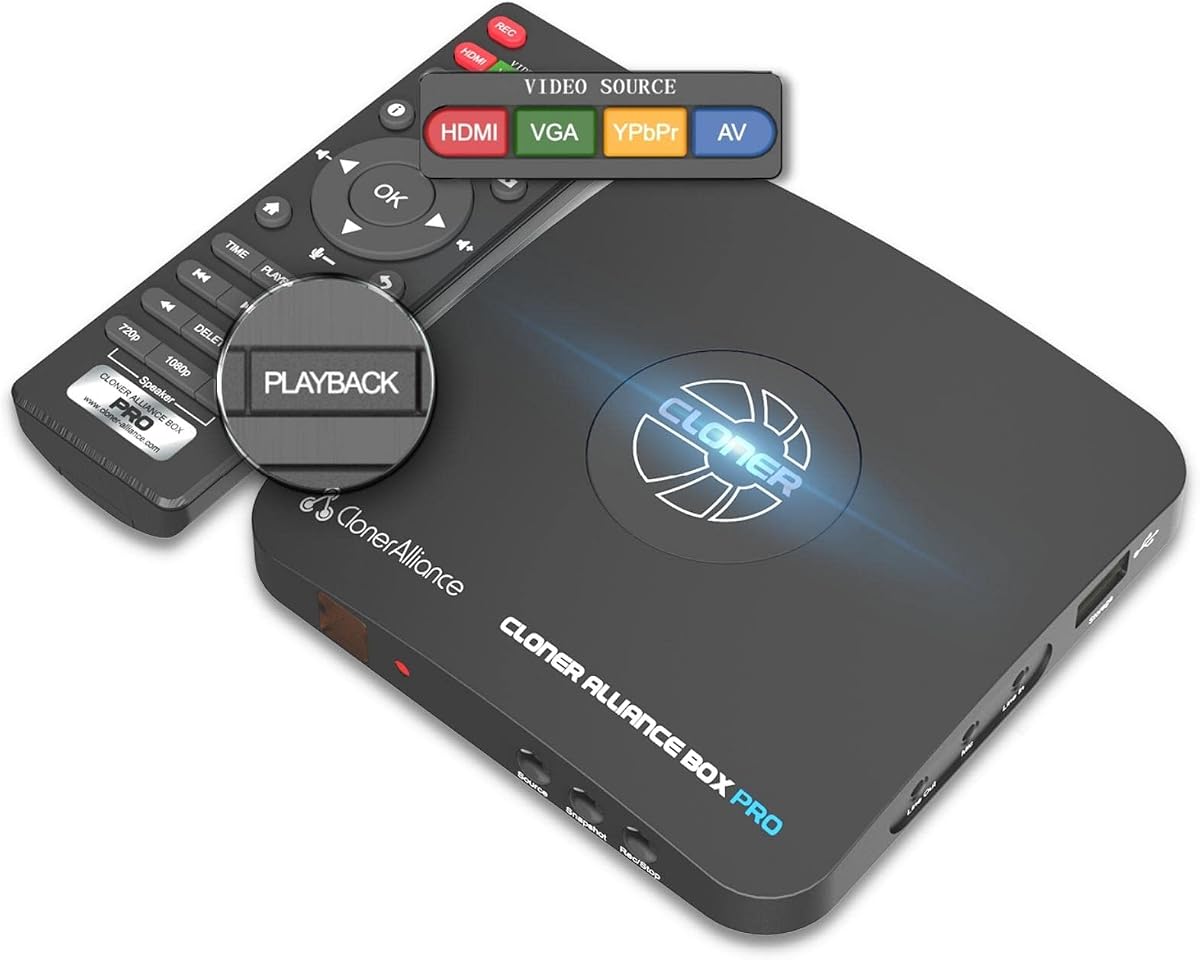
The ClonerAlliance Box Pro stands out as a versatile standalone HDMI recorder designed for capturing video without relying on a computer. It supports 1080p at 60fps and handles various analog inputs, making it ideal for archiving old VHS tapes or capturing console gameplay seamlessly.
We may earn a commission when you buy through this link, at no additional cost to you.
Its ability to record directly to USB storage while displaying output on a TV via HDMI ensures you never miss a moment. The device includes a remote for playback control and supports multiple file systems, allowing easy transfer of recordings to other devices for editing or sharing.
While it lacks HDCP support which prevents recording from protected streaming services, this limitation is common in affordable recorders. Additionally, the included video editing software only works on Windows, which might inconvenience Mac users looking for immediate post-production tools.
This recorder is perfect for hobbyists needing to capture analog content or record live TV from set-top boxes. Its user-friendly interface and reliable performance make it a top choice for anyone seeking a dedicated capture solution without PC complexity.
Record and playback directly on TV using the included remote, eliminating the need for a computer entirely.
Supports HDMI, RCA, VGA, and component inputs, allowing you to connect almost any video source.
We may earn a commission when you buy through this link, at no additional cost to you.
The Guermok Video Capture Card delivers impressive performance for its price point, making it an excellent entry-level choice for streamers and content creators. It supports 1080p at 60fps with low latency and connects via USB 3.0 or Type-C, ensuring compatibility with a wide range of computers and mobile devices.
We may earn a commission when you buy through this link, at no additional cost to you.
Its aluminum alloy body helps dissipate heat during extended recording sessions, maintaining stable performance without overheating. The plug-and-play design means no drivers are needed, and it works seamlessly with popular software like OBS Studio, Zoom, and VLC for immediate use.
However, it supports only one-way transmission, so you cannot use it to output video from your computer to a monitor. Additionally, audio setup requires a restart in some software like OBS, which can be a minor hurdle during initial configuration.
This card is ideal for gamers and educators looking to share their screen or gameplay without investing in expensive hardware. Its portability and reliable connection make it a solid budget-friendly option for daily recording needs.
Constructed from quality aluminum alloy to ensure effective heat dissipation during long streaming sessions.
Works with Windows, Mac, Linux, and Android, and supports various software platforms for flexible use.
We may earn a commission when you buy through this link, at no additional cost to you.
The ClonerAlliance UHD Pro is a powerful standalone recorder capable of capturing 4K Ultra HD video, making it a top choice for high-fidelity content preservation. It supports H.265 and H.264 codecs, offers 4K passthrough, and allows for cinematic 24fps recording, providing flexibility for various video styles.
We may earn a commission when you buy through this link, at no additional cost to you.
You can record directly to USB storage or a TF card without needing a PC, and the device includes a 4K passthrough feature so you can watch your source content uninterrupted while recording. Additional features like pause/resume and scheduled tasks enhance usability for long sessions.
Similar to other models from this brand, it does not support HDCP, meaning protected content from streaming devices won't record. The editing software is Windows-only, which may limit immediate post-production capabilities for users on other operating systems.
This recorder is perfect for professionals or enthusiasts who need reliable 4K capture for gameplay, conferences, or home media archiving. Its robust feature set and ease of use make it a premium option in the standalone recorder category.
Supports cinematic frame rates up to 24fps, allowing for professional-looking video capture.
Dual support for H.265 and H.264 ensures high quality with optimized file sizes.
We may earn a commission when you buy through this link, at no additional cost to you.
This Capture Card offers solid performance for gamers and streamers needing to capture 1080p at 60fps without breaking the bank. It features an HDMI loop-out for real-time monitoring without lag and includes a microphone input for adding live commentary during gameplay or presentations.
We may earn a commission when you buy through this link, at no additional cost to you.
The device is plug-and-play with automatic detection, meaning you can start recording or streaming immediately with software like OBS or VLC. Its USB 3.0 connection ensures high-speed data transfer, keeping your streams smooth and responsive even during intense gaming sessions.
However, while it accepts 4K input, it only outputs up to 2K at 30Hz, limiting resolution for those needing full 4K display. Additionally, users should note that it does not support 4K at 120Hz or 144Hz, which might affect high-refresh-rate setups.
Ideal for console gamers and educators, this card balances affordability with essential features for effective content creation. Its compatibility with various systems and devices makes it a versatile choice for casual and semi-professional recording needs.
HDMI loop-out ensures you can play your game without delay while capturing the video.
Microphone input allows you to add your voice directly to the stream for engaging content.
We may earn a commission when you buy through this link, at no additional cost to you.
The Audio Express AXHDCAP is a compact capture card designed for seamless video recording with crystal-clear sound. It supports 1080p at 30fps output with a 4K input, making it suitable for conferences, teaching, or gaming where portability and simplicity are priorities.
We may earn a commission when you buy through this link, at no additional cost to you.
Its anti-static aluminum design ensures durability during frequent travel, and the plug-and-play functionality means no driver installations are required. You can preview your video in real time without lag, which is crucial for maintaining quality during live broadcasts or meetings.
The main limitation is its reliance on USB 2.0, which caps performance at 1080p at 30fps and prevents higher-resolution formats. Users should be aware that it does not support USB 3.0 speeds, which might limit frame rates for those needing faster capture.
This card is excellent for educators and remote workers needing reliable, straightforward video capture tools. Its broad compatibility and solid build quality make it a dependable choice for everyday streaming and recording tasks.
Advanced thermal dissipation and anti-static design ensure reliability during frequent use.
Ultra-low latency technology ensures instant preview of your video feed during streaming.
We may earn a commission when you buy through this link, at no additional cost to you.
This lightweight capture card is designed for content creators on the go, offering seamless 1080p at 60fps video capture via USB 3.0. It works effortlessly with popular streaming software like OBS Studio, Streamlabs, and XSplit, making setup quick and stress-free for beginners.
We may earn a commission when you buy through this link, at no additional cost to you.
The device includes HDMI pass-through so you can monitor your gameplay without lag while recording or streaming. It supports a wide range of devices including PS5, Xbox, and Switch, ensuring compatibility across different gaming platforms and cameras.
While it accepts 4K input, the output is limited to 1080p, which might be a consideration for those needing high-resolution display. However, the low latency performance ensures smooth streaming and recording suitable for competitive gaming and live broadcasts.
Ideal for travelers and LAN party enthusiasts, this capture card combines portability with reliable performance. Its plug-and-play design and compact form factor make it an excellent tool for anyone needing to record content on the move.
Lightweight and portable design fits easily in your bag for streaming anywhere.
Compatible with PS5, Xbox, Switch, and DSLR cameras for versatile capture options.
We may earn a commission when you buy through this link, at no additional cost to you.
This video capture box stands out with two HDMI inputs, allowing you to switch between sources or display them in a picture-in-picture layout on its built-in 7-inch screen. It supports 4K60 input and 1080p60 output, making it versatile for multi-source recording scenarios.
We may earn a commission when you buy through this link, at no additional cost to you.
The inclusion of battery power options and USB/SD storage provides flexibility for on-the-go recording without needing a constant power source. It is compatible with Windows, Mac, and Linux, and allows seamless connection to consoles, cameras, and PCs.
However, it does not support recording from copyrighted HDMI sources, which means protected content from streaming devices will not display. Additionally, while it accepts 4K input, the recording resolution is limited to 1080p at 60fps, which might limit quality.
This recorder is best suited for presentations or events requiring multiple video sources. Its screen preview and flexible power options make it a practical choice for scenarios where a monitor is not readily available.
PIP/POP functionality lets you view and capture multiple video sources simultaneously.
Supports battery operation for use in locations without easy access to power outlets.
We may earn a commission when you buy through this link, at no additional cost to you.
The ZowieREC 4K HDMI Video Recorder features a sleek premium aluminum design and supports standalone 4K recording without needing a PC. It includes features like pause/resume functionality and scheduled recording, giving you precise control over your capture sessions.
We may earn a commission when you buy through this link, at no additional cost to you.
With 4K pass-through and support for TF card or USB storage, you can watch content uninterrupted while saving high-quality footage. It works seamlessly with various HDMI devices, ensuring compatibility with consoles, DSLRs, and media players.
Despite its premium build, it does not support HDCP, meaning protected content won't record. Additionally, its lower rating compared to peers suggests potential reliability or feature issues that might affect long-term satisfaction.
This recorder is ideal for users who value design and standalone functionality. It suits professionals or enthusiasts looking for a robust tool to capture 4K video without computer dependency.
One-piece molded silver casing offers durability and style for professional environments.
Pause and resume features allow instant control over recording sessions for easier editing.
We may earn a commission when you buy through this link, at no additional cost to you.
The ClonerAlliance ViewPro is a portable HDMI recorder equipped with a 7-inch LCD screen and built-in speaker, allowing you to preview and playback videos without needing a TV. It supports 1080p at 60fps and captures video to USB or SD card storage easily.
We may earn a commission when you buy through this link, at no additional cost to you.
With analog inputs like VGA and AV, it works for capturing from surgical cameras or older camcorders. It also includes software for live streaming to platforms like Twitch and YouTube, and an IR remote makes navigation convenient.
HDCP is not supported, so streaming protected content will not display. Additionally, the bundled software and editing tools are Windows-only, which may limit accessibility for users on other operating systems.
This recorder is perfect for mobile presentations or educational purposes where portability and immediate playback are essential. Its robust input support makes it ideal for specialized cameras or legacy video sources.
Large LCD screen and speaker let you view and share recorded content anywhere.
Includes software to stream instantly to major platforms, enhancing interactive capabilities.
We may earn a commission when you buy through this link, at no additional cost to you.
The Blackmagic Design UltraStudio Express is a professional-grade recorder featuring SDI inputs and multiple outputs, designed for high-performance video production environments. It supports data rates up to 12G, ensuring it can handle the most demanding broadcast workflows.
We may earn a commission when you buy through this link, at no additional cost to you.
Its loop outputs allow for flexible routing of video signals, making it suitable for live production setups. While it excels in professional settings, it lacks the consumer-friendly features like HDMI inputs found in other recorders on this list.
The specialized nature of this device means it requires compatible SDI gear and professional knowledge to utilize effectively. This can be a barrier for casual users looking for simple plug-and-play HDMI capture solutions.
Best suited for broadcast professionals and studios, this recorder delivers unmatched reliability and speed. If you need industry-standard SDI capture, it is a top choice, but it is overkill for general home use.
Designed for high-end production with robust SDI input and output capabilities.
Supports up to 12G data rates for capturing the highest quality video without compression.
We may earn a commission when you buy through this link, at no additional cost to you.
Selecting the right HDMI recorder involves balancing resolution support, connectivity options, and portability based on your specific needs.
Check if the recorder supports 1080p, 4K, or higher to match your source devices. Higher resolutions ensure sharper recordings but may require faster interfaces like USB 3.0.
Prioritize models with 4K passthrough if you want to monitor without interrupting your source video.
Look for multiple input types like HDMI, USB, or analog to connect various devices. Ensure loop-out features if you need real-time monitoring during capture.
Verify compatibility with your specific consoles, cameras, or set-top boxes to avoid connectivity issues.
If you plan to travel or record on the go, choose compact and lightweight models with battery support. Larger units may be better for fixed setups requiring more connectivity.
Consider whether a built-in screen is necessary for previewing content without an external monitor.
Evaluate features like scheduled recording, pause/resume, and bitrate options. Standalone models offer convenience without relying on a computer for processing.
Ensure the device supports your preferred file systems for easy storage and transfer of recorded video.
Plug-and-play models reduce setup time and avoid driver issues. Check if included software supports your operating system for editing or streaming.
Look for broad compatibility with platforms like OBS or VLC if you plan to stream content online.
Models with aluminum bodies or heat dissipation features are better suited for long recording sessions. Check for robust warranties and customer support options.
Consider whether the device is designed for heavy-duty professional use or casual home applications.
Balance cost with essential features like resolution and latency. Budget models may lack premium features but still meet basic needs effectively.
Avoid overpaying for specs you do not need, such as 4K recording if you only require 1080p output.
Verify support for USB drives, SD cards, or both to ensure flexibility in recording storage. Check file system compatibility to avoid formatting issues.
Consider how much storage you need based on your typical recording duration and resolution preferences.
Connect your source device to the recorder using the appropriate HDMI cable and ensure the device is powered on. Select the correct input on the recorder using the remote or onboard controls if available.
Choose your storage media and format it if necessary before starting a recording session. Use the menu to set resolution, recording mode, or scheduling options according to your needs.
Regularly clean the connectors and vents to prevent dust buildup, and store the recorder in a dry place when not in use. Avoid overheating by ensuring proper ventilation during long recording sessions.
Not all models support 4K. Some are limited to 1080p. Check specifications carefully to ensure the device supports the desired resolution for your capture needs.
Standalone recorders work independently without a computer. PC-based ones require software on a computer to capture and process video, offering more features but less portability.
This is likely due to HDCP content protection preventing recording of protected sources. Try disabling HDCP on your source device or use a compatible capture device.
Many capture cards support smartphones via USB-C. Check device compatibility to ensure your phone can output video over HDMI or USB for recording.
Most recorders save video as MP4 or MKV files. Ensure your computer can play these formats or convert them if needed for editing or sharing.
Higher resolutions like 4K or 60fps usually require USB 3.0 for fast data transfer. USB 2.0 may limit recording to lower resolutions or frame rates.
The top picks include the ClonerAlliance Box Pro for its standalone versatility, the Guermok Video Capture Card for budget streaming, and the ClonerAlliance UHD Pro for premium 4K capabilities.
Consider your specific needs such as resolution, input types, and portability when making your decision. Features like schedule recording and pass-through can enhance your workflow significantly.
Prices and availability may fluctuate, so verify current options before purchasing to ensure you get the best value and performance for your setup.