
Creality Laser Engraver Enclosure 2.0
4.4Editor score
Dual-window design
Flame-retardant fabric
4000 RPM fan
Foldable assembly
Choosing the right laser engraver enclosure is essential for maintaining a safe and clean workspace. These protective covers help contain smoke, dust, and noise generated during cutting and engraving tasks.
We evaluated ten highly rated enclosures focusing on ventilation efficiency, material durability, and compatibility with popular desktop machines. Each product was assessed for ease of assembly and real-world performance.
Every pick highlights key features and potential trade-offs to help you find the best fit for your needs. Please note that prices and availability may change over time.
4.4Editor score
4.2Editor score

4.4Editor score
As an Amazon Associate we earn from qualifying purchases.
The following table provides a side-by-side comparison of all ten selected models to help you quickly identify the right fit for your machine.


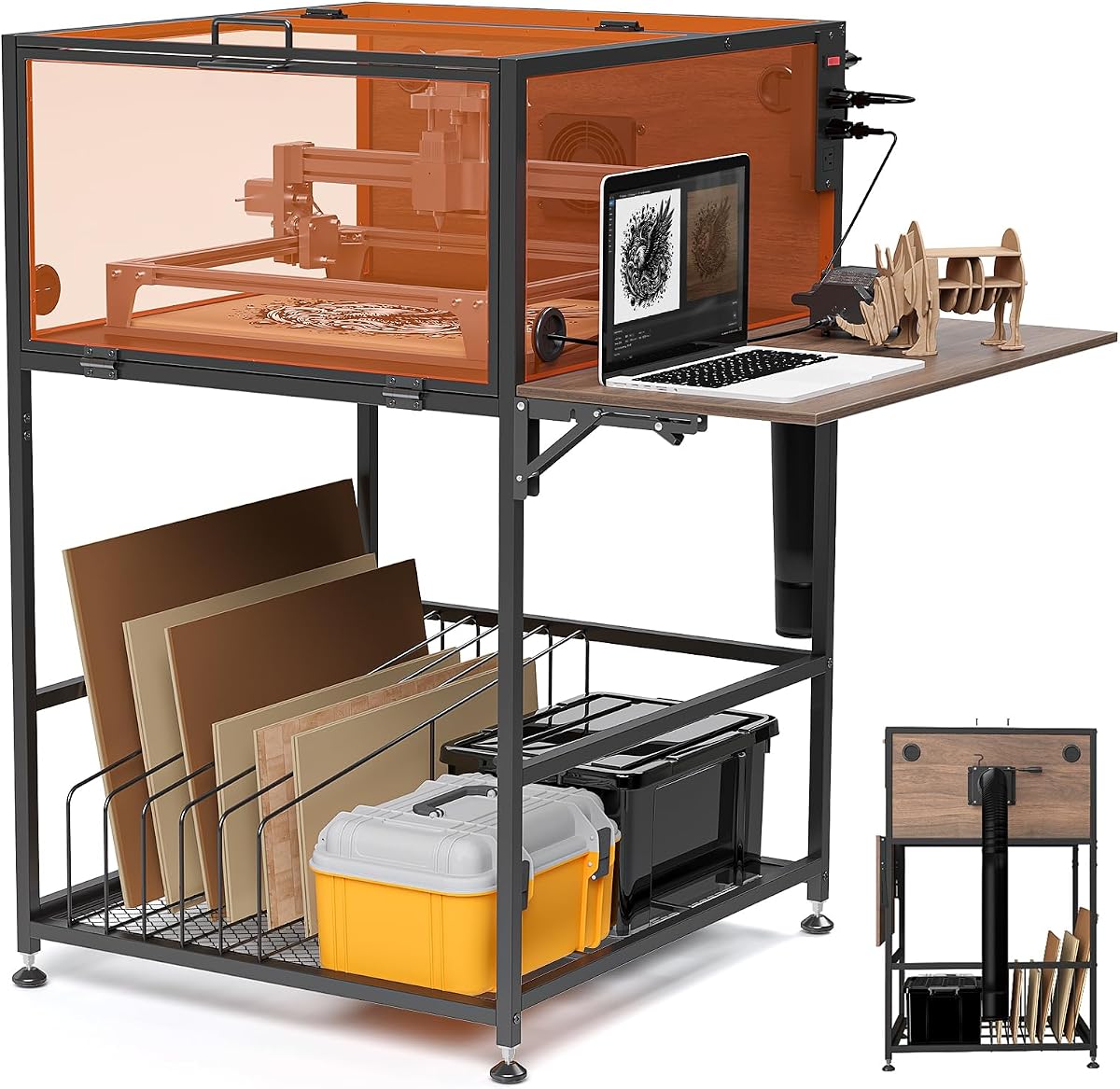
The Crafit Laser Engraver Enclosure Cabinet stands out with its robust build and thoughtful features. Rated 4.2 stars, it offers a spacious interior that accommodates a wide range of desktop laser engravers.
We may earn a commission when you buy through this link, at no additional cost to you.
Its 20W ventilation fan effectively removes smoke and particles, while the light-filtering panels allow safe observation without glare. The foldable side panel adds versatility by supporting tools or laptops during operation.
While setup takes time, the included hardware and instructions simplify the process. The power strip integration is a unique convenience that reduces outlet clutter on your workbench.
This enclosure is ideal for hobbyists and professionals seeking a balance of safety, visibility, and storage. It delivers reliable containment for sparks and dust during extended use.
The ventilation system helps maintain fresher air by extracting harmful particles and odors during engraving sessions.
The partitioned storage rack and foldable side panel keep your tools and materials organized and within reach.
We may earn a commission when you buy through this link, at no additional cost to you.
The Creality Laser Engraver Enclosure 2.0 offers excellent value for budget-conscious users. With a 4.4 rating, it provides universal compatibility with most engraving machines while effectively isolating noise and fumes.
We may earn a commission when you buy through this link, at no additional cost to you.
Its dual-window design with blue light-blocking PVC ensures eye protection during operation. The high-efficiency fan extracts smoke quickly, keeping the workspace clean and comfortable.
Although made of fabric rather than hard panels, the material is durable and fireproof. It folds flat for storage, making it ideal for shared spaces or smaller studios.
This model is perfect for beginners or those seeking a simple containment solution. It combines safety features with affordability to meet basic enclosure needs.
The PVC material filters blue light to protect your eyes while allowing clear visibility of the engraving process.
When not in use, the enclosure folds flat to save valuable workspace and simplify transportation.
We may earn a commission when you buy through this link, at no additional cost to you.
The LONGER Laser Engraver Large Size Enclosure is built for those needing extra room for larger materials or rotary tools. It holds a 4.4 rating and features fire-retardant materials for added safety.
We may earn a commission when you buy through this link, at no additional cost to you.
Its transparent design allows real-time observation, and the built-in fan ensures air circulates freely. The sturdy construction isolates fumes and noise, creating a cleaner workshop environment.
Long-term reliability is supported by one year of free parts replacement and professional customer service. This commitment to quality justifies its premium positioning.
Ideal for professionals or enthusiasts working with large formats, this enclosure balances size, safety, and service. It offers a secure environment for demanding engraving projects.
The generous dimensions accommodate bigger projects and allow space for rotary rollers or additional accessories.
Free parts replacement and permanent technical service provide peace of mind for long-term ownership.
We may earn a commission when you buy through this link, at no additional cost to you.
This enclosure features an integrated bottom seal to prevent smoke escape and collect debris. Rated 4.4 stars, it includes an LED light strip for better visibility during engraving.
We may earn a commission when you buy through this link, at no additional cost to you.
The thickened PVC window filters blue light, ensuring eye safety. An upgraded 4000 RPM fan and composite exhaust pipe efficiently remove smoke and reduce lingering odors.
The aluminum mold Oxford cloth and iron support provide stability. While the bottom seal improves containment, it may require adjustment for optimal airflow.
Best suited for users prioritizing lighting and containment, this model offers practical features. It combines ventilation with enhanced visibility for a better workflow.
The LED strip ensures consistent illumination inside the enclosure, helping you monitor engraving accuracy.
The sealed bottom and upgraded exhaust system minimize smoke leakage and improve air quality.
We may earn a commission when you buy through this link, at no additional cost to you.
This enclosure uses green acrylic panels to reduce smoke diffusion and dust. Its aluminum alloy frame provides stability for desktop engraving and workshop use.
We may earn a commission when you buy through this link, at no additional cost to you.
A front hinged door with magnetic stop simplifies access, while cable threading holes keep wiring organized. The green panels help maintain a cleaner workspace during operation.
Note that the narrow width limits material size and no fan is included. It works best with smaller machines that already have ventilation solutions.
Ideal for users wanting a sturdy, semi-rigid cover, this model adds safety. It offers reliable containment without requiring external power for the frame.
The black aluminum alloy frame supports thickened acrylic panels for a stable protective environment.
Cable threading holes allow neat wire management to prevent tangles during engraving.
We may earn a commission when you buy through this link, at no additional cost to you.
This version emphasizes noise cancellation, reducing fan noise from engraving machines. It includes a built-in smoke ventilation system to keep internal air clean.
We may earn a commission when you buy through this link, at no additional cost to you.
The transparent design filters blue light to protect eyes during observation. Installation is simple, and the unit folds for easy storage and transport.
While effective at containing noise and fumes, the ventilation power may vary. Still, it offers a solid balance for casual users needing a quieter workspace.
Great for shared living spaces, this enclosure helps minimize disruption. It combines safety with practical features for everyday engraving tasks.
The enclosure significantly dampens noise from cooling fans and cutting operations.
Only a few steps are needed to complete installation, saving time for your projects.
We may earn a commission when you buy through this link, at no additional cost to you.
The V2.0 upgrade includes metal support rods and faster fans, rated 4.5 stars. Its height allows installing rotary rollers for cylindrical engraving tasks.
We may earn a commission when you buy through this link, at no additional cost to you.
Dual windows and anti-blue light material ensure clear visibility. The 4000 RPM fan quickly extracts smoke, keeping air fresh during long sessions.
Metal support rods make the structure stable and firm. While slightly heavier, it remains foldable for storage and easy operation.
This enclosure is perfect for users needing height for rotation attachments. It delivers reliable performance for both flat and curved projects.
The extra height allows installation of rotary rollers to engrave cylindrical objects easily.
All metal support rods provide a sturdy frame that resists deformation over time.
We may earn a commission when you buy through this link, at no additional cost to you.
This model offers high compatibility with most engraving machines. It isolates noise, fire, smoke, and odors effectively while featuring a large viewing design.
We may earn a commission when you buy through this link, at no additional cost to you.
The built-in smoke ventilation system keeps internal air clean during operation. Installation requires pressing pipes tightly, but customer service resolves issues quickly.
Rated 4.5 stars, it provides a comfortable engraving experience at a fair price. The transparent window filters blue light for eye protection.
A great value for general users, it balances features and cost. It meets essential safety and ventilation needs for most home workshops.
The fully enclosed design prevents smoke leakage and isolates noise for a cleaner workspace.
Issues are solved within 24 hours via direct support contact for peace of mind.
We may earn a commission when you buy through this link, at no additional cost to you.
Constructed with high-quality flame retardant material, this enclosure withstands up to 1000°C. It effectively isolates smoke, odors, and noise for safety.
We may earn a commission when you buy through this link, at no additional cost to you.
The viewing window filters blue light to protect eyes during engraving. An exhaust fan and pipe keep internal air clean during cutting.
No tools are needed for installation, and it folds for storage. It is lightweight and durable, making it easy to move.
Users prioritizing heat safety and eye protection will find this model valuable. It balances fire resistance with practical ventilation features.
The material can withstand extreme temperatures to prevent burning risks during operation.
Designed for easy movement, it folds quickly without requiring re-installation.
We may earn a commission when you buy through this link, at no additional cost to you.
This enclosure offers sufficient interior space and adjustable storage strips on each side. Rated 4.1 stars, it is flame retardant and isolates smoke and noise.
We may earn a commission when you buy through this link, at no additional cost to you.
The high-speed fan eliminates smoke and stench quickly. Exhaust ports on both sides allow flexible placement for ventilation setup.
Its foldable design saves space and is easy to carry. While assembly takes effort, the storage options provide unique convenience.
Ideal for users needing to store tools nearby, it combines capacity with ventilation. It offers a practical solution for active workshops.
Fastener strips on each side allow hanging tools and accessories within easy reach.
Exhaust ports on both sides offer multiple routing options for your workspace layout.
We may earn a commission when you buy through this link, at no additional cost to you.
Selecting the right enclosure depends on your machine size, safety needs, and workspace constraints. Consider these key factors before purchasing.
Measure your engraver's width, depth, and height carefully before selecting an enclosure. Ensure there is enough clearance for your machine plus any accessories like air assist kits or rotary rollers.
Always verify product dimensions match your machine to avoid fit issues during operation.
Effective smoke extraction is critical for health and workspace cleanliness. Look for enclosures with built-in fans rated 4000 RPM or higher to ensure particles and odors are removed quickly.
A high-efficiency fan paired with a flexible exhaust pipe maximizes air flow and reduces residue buildup.
Choose materials that are flame-retardant and heat-resistant to withstand the hazards of laser engraving. Metal frames offer more rigidity, while fabric tents provide portability.
Durable construction ensures long-term reliability and protection against sparks and debris.
Blue light filtering panels are essential for safe observation during engraving. Transparent windows should block harmful wavelengths while allowing clear visibility of your work.
Prioritize models with semi-transparent or dual-window designs to monitor progress safely.
Consider how much time and tools you have for setup. Foldable designs and included hardware reduce installation effort and help you start using the enclosure sooner.
Models with clear instructions and magnetic doors simplify daily access and maintenance.
Some enclosures include built-in storage racks or hooks for tools and blanks. This feature helps keep your workspace organized and ensures materials are within easy reach.
Look for partitioned bottoms or side panels that can hold essential accessories securely.
Enclosures that insulate against noise improve comfort in shared spaces or small workshops. Check if the model includes sound-dampening fabric or rigid panels to block fan and machine sounds.
Reducing ambient noise makes longer engraving sessions more pleasant and less disruptive.
Prices vary widely based on build quality and included features. Balance your budget against essential safety features to ensure you do not compromise on protection.
Higher cost often means better durability and ventilation, but basic models can suffice for occasional use.
Set up the enclosure in a well-ventilated area away from flammable materials. Connect the exhaust pipe to an open window or outdoor vent to direct smoke safely outside.
Regularly clean the interior surfaces and fan blades to prevent dust accumulation. This maintains optimal airflow and reduces fire hazards over time.
Inspect the seals and panels periodically for wear or damage. Replace any damaged components immediately to ensure continued safety and containment.
Yes, a fan is essential for removing smoke and odors generated during operation. Most high-quality enclosures include a built-in ventilation system to ensure air quality and prevent residue buildup.
Many enclosures use flame-retardant materials that resist ignition, but they are not fully fireproof. Always supervise your laser engraver while in use and follow safety guidelines to minimize risks.
Most enclosures offer universal compatibility, but you must check dimensions before buying. Ensure the interior space accommodates your specific machine model and any accessories you plan to use.
Detach the pipe from the enclosure and wipe the interior with a dry cloth or mild solution. Regular cleaning prevents residue buildup and maintains efficient smoke extraction during engraving.
No, many models feature light-filtering windows that allow clear visibility while protecting your eyes. These panels block harmful blue light without obstructing your view of the engraving process.
Most enclosures come with hardware and instructions for DIY assembly. Some foldable models require minimal setup, while rigid acrylic versions may take longer to construct properly.
The material and closed design insulate sound from fans and machine operations. This noise reduction makes the workspace quieter and more comfortable for extended engraving sessions.
Flame-retardant fabric and heat-resistant acrylic are common choices. Fabric offers portability, while acrylic provides better durability and heat containment depending on your needs.
The Crafit and Creality models lead the pack with strong ventilation and safety features. For larger projects, the LONGER option offers ample space and professional support.
Prioritize ventilation efficiency and material durability when selecting your enclosure. A well-chosen unit will significantly improve workspace safety and air quality.
Remember to check current prices and availability before purchasing. Conditions change frequently, and verifying details ensures you get the best value for your investment.