
Creality Ender 3 V3 SE
3.8Editor score
CR Touch auto leveling
250mm/s print speed
Direct drive extruder
Discover the top auto bed leveling 3D printers for beginners comparing speed, ease of use, and reliability to help you start printing with confidence.
Finding the right 3D printer can be overwhelming for newcomers. Auto bed leveling technology simplifies the process by ensuring your first layer adheres perfectly every time. This guide explores models designed to reduce calibration hassles and get you creating faster.
We compared ten top-rated printers focusing on setup time, leveling accuracy, build volume, and user-friendly features. Our analysis highlights machines that balance performance with simplicity, ensuring beginners can succeed without advanced technical knowledge or tedious manual adjustments.
Each pick showcases specific strengths like high-speed printing, multi-color support, or compact designs. Prices and availability change frequently, so verify details before buying. Use this guide to find the perfect auto bed leveling printer that matches your workspace and project goals.
3.8Editor score

4.3Editor score

4.3Editor score
This table compares all ten printers side-by-side to highlight key differences. Use it to quickly identify which model fits your budget, space, and material needs for your beginner journey.


The FLASHFORGE Adventurer 5M is a standout choice for beginners seeking speed and reliability. With a 4.3 rating, it delivers consistent results thanks to its fully auto one-click leveling system. This feature ensures your bed is perfectly calibrated without manual tools, making it ideal for those new to 3D printing.
We may earn a commission when you buy through this link, at no additional cost to you.
Its high-speed Core XY motion system reaches up to 600mm/s with rapid acceleration. Vibration compensation eliminates ghosting, resulting in smooth surfaces. The direct extruder handles various materials like PLA and TPU well. Filament run-out sensors and power loss recovery prevent failed prints due to interruptions.
While powerful, the open design means it works best in ventilated areas. The PEI plate ensures easy print removal but may require occasional cleaning. Overall, the 5M balances performance with ease of use effectively.
Beginners who value speed and minimal setup will love this model. It reduces frustration by automating the trickiest part of printing. For hobbyists ready to print functional parts daily, the Adventurer 5M offers excellent value and performance.
Automated leveling saves time and guarantees perfect bed adhesion right out of the box.
Core XY structure with 600mm/s speed enables rapid project completion without sacrificing quality.
We may earn a commission when you buy through this link, at no additional cost to you.
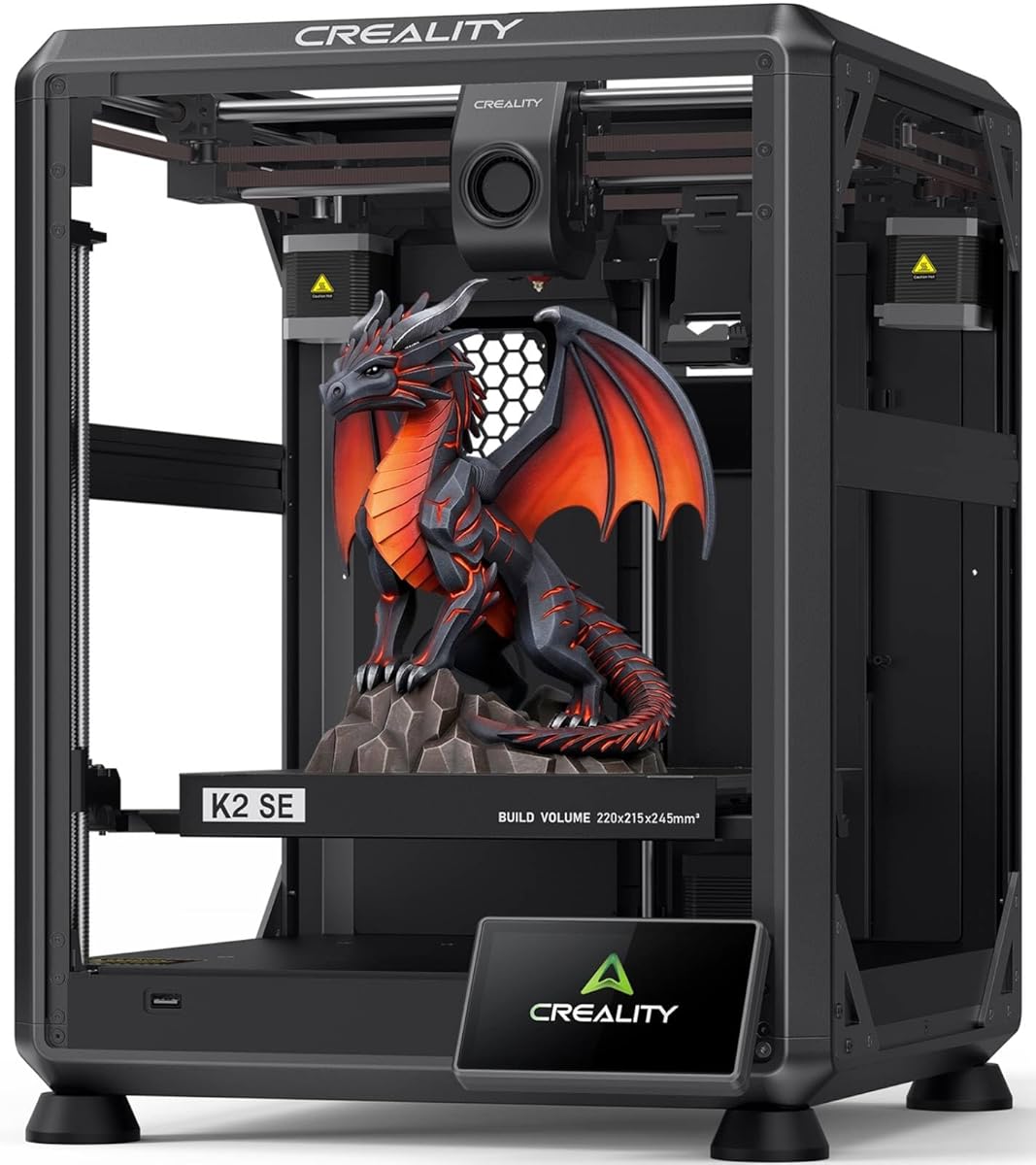
The Creality K2 SE offers a robust platform for beginners ready to expand their skills. Rated 3.8, it features a solid metal build that minimizes flex during high-speed prints. The auto leveling system simplifies setup, ensuring reliable first layers without manual calibration.
We may earn a commission when you buy through this link, at no additional cost to you.
Its CoreXY motion system runs at 500mm/s with active vibration reduction for sharp details. The direct drive extruder supports a wide material range. Compatibility with the Creality CFS opens doors to multicolor projects later, making it a scalable investment for growing hobbyists.
While the base model is great, adding multicolor requires buying the CFS separately. The touchscreen guide helps with setup, but assembly takes some time. Performance is strong, though ratings reflect typical early adoption variability.
This printer suits users planning to advance quickly. Its sturdy build and upgrade path mean you won't outgrow it soon. For those wanting a professional feel with room to add features, the K2 SE is a smart long-term choice.
Optional CFS integration allows seamless transition to multicolor printing when you're ready.
Built-in algorithms reduce ringing and resonance for cleaner surfaces at high speeds.
We may earn a commission when you buy through this link, at no additional cost to you.
The E-Leveler 2 is a helpful tool rather than a full printer, designed to assist with manual bed leveling. With a 4.3 rating, it provides visual LED feedback when the bed is properly adjusted. This makes it easier for beginners to achieve a level surface on older or manual machines.
We may earn a commission when you buy through this link, at no additional cost to you.
Its improved design features stronger battery holders and simplified nozzle targets. It works with most manually adjustable beds, excluding resin or Delta printers. The balancing end cap ensures stability during adjustments. While not a printer, it enhances precision for those sticking with traditional setups.
It does not replace auto-leveling hardware but bridges the gap for DIYers. Users still need to turn knobs manually based on the LED signals. The device simplifies the process significantly compared to paper methods.
If you have an older printer without auto leveling, this tool adds value. It reduces frustration by giving clear visual cues. For beginners on a tight budget who can't upgrade their printer yet, the E-Leveler 2 is a practical accessory to improve print success.
LED lights show exact leveling status, removing guesswork from bed adjustments.
Fits most manually adjustable FDM printers to improve existing workflows.
We may earn a commission when you buy through this link, at no additional cost to you.
The FLASHFORGE AD5M combines speed with durability through its all-metal CoreXY structure. Rated 4.3, it offers reliable performance for both beginners and experts. The one-click auto leveling measures nozzle-to-plate distance accurately, ensuring flawless first layers without manual intervention.
We may earn a commission when you buy through this link, at no additional cost to you.
Its patent quick-release nozzle allows swapping in seconds, reducing downtime. The Orca-flashforge slicer supports efficient file management. Power loss recovery saves prints during outages. The flexible PEI plate makes removing models simple and prevents warping.
While robust, it lacks a built-in camera for monitoring. The price is competitive but higher than entry-level models. Maintenance is easy due to the tool-free design. Overall, it delivers precision engineering for consistent results.
Printers seeking a robust machine with minimal manual tweaks will appreciate the AD5M. Its speed and structural stability support demanding projects. For those prioritizing build quality and ease of maintenance, this model offers a strong balance of features.
Quick-swap nozzles let you switch sizes without tools, saving time on setup.
Precise automatic calibration ensures consistent Z-height for every print job.
We may earn a commission when you buy through this link, at no additional cost to you.
The QIDI Q2 redefines beginner capability by supporting engineering materials out of the box. With a 4.3 rating, its 370°C nozzle and 65°C heated chamber unlock tough filaments like carbon-fiber composites. The nozzle acts as the leveling sensor, ensuring unmatched first-layer accuracy without extra tools.
We may earn a commission when you buy through this link, at no additional cost to you.
It features a triple filtration system for safe indoor use and AI monitoring. The QIDI BOX enables up to 16-color printing with dry-while-print tech. Vibration reduction belts ensure ultra-smooth surfaces. Power loss recovery and filament sensors prevent interruptions.
While premium, the cost may be steep for casual users. Setup involves managing chamber temperatures properly. Yet, for those needing industrial-grade materials, it delivers professional results reliably.
This printer suits users aiming for functional parts from strong polymers. Its safety features and material versatility make it a powerhouse. If you plan to print beyond basic plastics, the QIDI Q2 offers unmatched value and capability.
High temp nozzle and chamber enable printing with advanced, durable materials easily.
Drying and color features ensure stable extrusion and vibrant, consistent prints.
We may earn a commission when you buy through this link, at no additional cost to you.
The FLASHFORGE 5M Pro is ideal for shared spaces due to its quiet, enclosed design. Rated 4.0, it offers speeds up to 600mm/s with a dual filtration system for safe air quality. The auto-leveling system ensures consistent layers, while the HEPA filter blocks particulate matter.
We may earn a commission when you buy through this link, at no additional cost to you.
Its auxiliary cooling supports a wider material range including ABS and ASA. Remote monitoring via Flash Maker APP adds convenience. The nozzle bundle provides versatility for different detail levels. Low-speed silent mode keeps noise minimal during work.
While pricier, the enclosed structure protects prints from drafts. The filtration makes it safer for bedrooms or offices. It balances speed with comfort effectively. This makes it a solid choice for home environments where noise and fumes matter.
Families or remote workers needing a discreet printer will value the Pro model. Its enclosed nature reduces environmental impact on prints. For those prioritizing quiet operation and safety alongside speed, the 5M Pro is a refined choice.
Silent modes allow printing during work without noise distractions.
HEPA filtration reduces harmful emissions, making indoor printing safer.
We may earn a commission when you buy through this link, at no additional cost to you.
The Ender 3 V3 SE offers incredible value for beginners on a budget. With a 3.8 rating, it includes CR Touch auto leveling and a proven Sprite direct extruder. Assembly takes just 20 minutes, and automatic filament loading makes swapping materials effortless for new users.
We may earn a commission when you buy through this link, at no additional cost to you.
Its dual Z-axis ensures stability during prints. Speed reaches 250mm/s, which is fast enough for most hobby projects. The build plate allows easy removal without damaging models. It is a reliable upgrade from older Ender models.
While it lacks advanced features like enclosures, it covers core needs well. Performance matches its price point. For those testing 3D printing waters, it minimizes risk while delivering quality results.
Budget-conscious beginners should start here. It removes calibration stress with auto leveling. Once skills grow, you can upgrade. For entry-level reliability, the V3 SE is an unbeatable starting point.
Minimal assembly and auto leveling get you printing in minutes.
Sprite direct drive ensures smooth feeding of various flexible materials.
We may earn a commission when you buy through this link, at no additional cost to you.
The CR Touch kit turns compatible Ender printers into auto-leveling machines. Rated 4.4, it performs multi-point detection to build a virtual bed plane. Users save manual z-offset adjustments by following sensor data. It extends the life of existing setups affordably.
We may earn a commission when you buy through this link, at no additional cost to you.
Installation involves updating firmware and mounting brackets. It works with most Ender models but requires specific boards. The sensor records height points for accurate compensation. With proper setup, it ensures consistent first layers reliably.
While not for all printers, it is ideal for owners of older Ender devices. The learning curve exists but is manageable. It avoids the cost of buying a new unit while adding essential convenience.
Owners of Ender 3 series printers should consider this kit. It brings modern convenience to legacy machines. For DIY enthusiasts willing to tinker, it provides an affordable path to auto leveling without replacing the whole printer.
Multi-point detection calculates bed tilt for accurate automatic compensation.
Updating firmware enables full sensor functionality and easy calibration.
We may earn a commission when you buy through this link, at no additional cost to you.
The FLASHFORGE AD5X brings multicolor printing within reach for beginners. Rated 4.0, it handles up to four colors via an Intelligent Filament System that manages refills automatically. Full auto leveling simplifies setup, while 600mm/s speeds keep projects moving quickly.
We may earn a commission when you buy through this link, at no additional cost to you.
Its CoreXY structure ensures stability during multi-material transitions. The 300°C nozzle supports a decent range of plastics including TPU. The 220mm build volume suits most creative projects. Users avoid frequent filament changes thanks to smart management.
It is more affordable than 16-color systems but limits palette size. Setup is streamlined but requires space for four spools. For simple designs, four colors often suffice. The price makes multicolor accessible.
Artists wanting vibrant prints without high costs will love this. It simplifies complex designs by automating color switching. If four colors meet your needs, the AD5X offers the best balance of price and multicolor capability.
Auto refill and detection minimize interruptions during multi-color prints.
Four-color capability enables intricate artistic and functional models easily.
We may earn a commission when you buy through this link, at no additional cost to you.
The second listing for Ender 3 V3 SE emphasizes its beginner-friendly design. Rated 4.1, it focuses on ease of use with CR Touch auto leveling and automatic z-offset calibration. Assembly is quick, and the Sprite extruder handles common materials smoothly.
We may earn a commission when you buy through this link, at no additional cost to you.
Dual Z-axis lead screws reduce wobble for consistent alignment. The quiet mainboard keeps noise low for home offices. Flexible spring steel plates allow simple model removal. It prioritizes reliability over cutting-edge speed.
While slower than high-end models, it suits steady printing well. The price remains accessible for entry-level buyers. Its simplicity reduces learning curves significantly. Overall, it is a dependable workhorse for new users.
Beginners prioritizing ease of setup should choose this model. It removes technical hurdles immediately. For those wanting a straightforward printer without complexity, the Ender 3 V3 SE is a trusted choice.
Streamlined setup and auto leveling remove friction for new users.
Dual Z-axis ensures consistent layering without manual intervention.
We may earn a commission when you buy through this link, at no additional cost to you.
Selecting the right printer involves checking several factors beyond auto leveling. Use this guide to evaluate speed, build volume, and material support for your needs.
Auto leveling simplifies setup significantly. Most modern printers use CR Touch or capacitive sensors. These tools measure bed height automatically. This ensures consistent adhesion without manual tweaks.
Look for one-click calibration for easiest use. Sensors should support multiple points to detect tilt. Avoid machines requiring paper-based adjustments as beginners.
CoreXY motion systems allow faster speeds and better stability. Aim for at least 250mm/s for reasonable project times. Higher acceleration reduces vibration artifacts.
Check for input shaping features to improve quality at speed. Fast printers save time but ensure quality matches your needs.
Choose a size fitting your projects. Common beginner beds range from 220mm to 300mm. Larger volumes allow bigger single-piece prints.
Measure your space and project needs. Compact printers save desk space but limit model size.
Standard printers handle PLA well. For ABS or TPU, check nozzle and chamber support. Enclosed units help with temperature-sensitive materials.
Ensure the extruder matches your intended filaments. Higher temp nozzles unlock more advanced options.
Enclosed printers reduce noise and fumes. Filtration systems improve indoor air quality. Safety features like fire retardants add protection.
Select based on your environment. Bedrooms need quieter, cleaner units for daily use.
Look for pre-assembled or minimal assembly designs. Touchscreen guides assist with calibration. Auto leveling reduces manual work.
Quick start times help beginners stay motivated. Avoid machines needing extensive manual leveling.
WiFi and app support enable remote printing. Cameras let you track progress safely. SD card slots allow offline use.
Consider convenience features that save time. Smart controls simplify long prints.
Check manufacturer warranty length. Active communities help with troubleshooting. Customer service response times matter for issues.
Reliable support ensures quick fixes. Choose brands with strong user feedback.
Start by assembling the printer carefully using the included guide. Ensure all cables are secure and the bed is clean. Use the auto leveling feature via the touchscreen or software interface. This calibrates the bed automatically.
Load filament through the extruder until it extrudes smoothly. Select your material type in settings. Adjust temperature if needed for different plastics. Begin with a test print to verify first layer adhesion. Use a brim if necessary for stability.
After printing, let the bed cool before removing parts. Clean the PEI plate gently with isopropyl alcohol. Lubricate rails monthly if specified. Keep firmware updated for bug fixes and new features. Regular maintenance ensures consistent performance over time.
Auto leveling removes the need for manual calibration, which is error-prone. It ensures consistent first layers every time. This reduces frustration and failed prints significantly. Beginners can focus on designing rather than adjusting.
Most printers take less than a minute to calibrate. One-click processes streamline this step. It happens before every print or on demand. This small delay prevents hours of wasted filament.
Not strictly for basic PLA. But enclosures help with ABS and reduce noise. They also improve safety in shared spaces. Choose based on your material needs.
CoreXY is a belt-driven setup moving both axes. It allows higher speeds with better stability. It reduces vibrations for cleaner prints. This design is standard in modern high-speed printers.
Yes, CR Touch kits exist for older printers. However, integrated systems are more reliable. Upgrading requires technical skill and compatibility checks. Integrated leveling is recommended for beginners.
Use isopropyl alcohol for PEI or glass plates. Remove residue to prevent poor adhesion later. For textured plates, use mild soap. Always let the bed dry before printing again.
Our top picks highlight models balancing ease and performance. The FLASHFORGE Adventurer 5M leads with speed and reliability. The Ender 3 V3 SE offers unbeatable entry value. For advanced needs, QIDI Q2 supports strong materials.
Prioritize auto leveling to avoid manual headaches. Choose a size and speed matching your projects. Consider noise and safety for shared spaces. These factors ensure smooth operation from day one.
Prices change quickly, so verify current listings before buying. Compare specs carefully to match your goals. With the right auto leveling printer, your creative journey starts successfully.