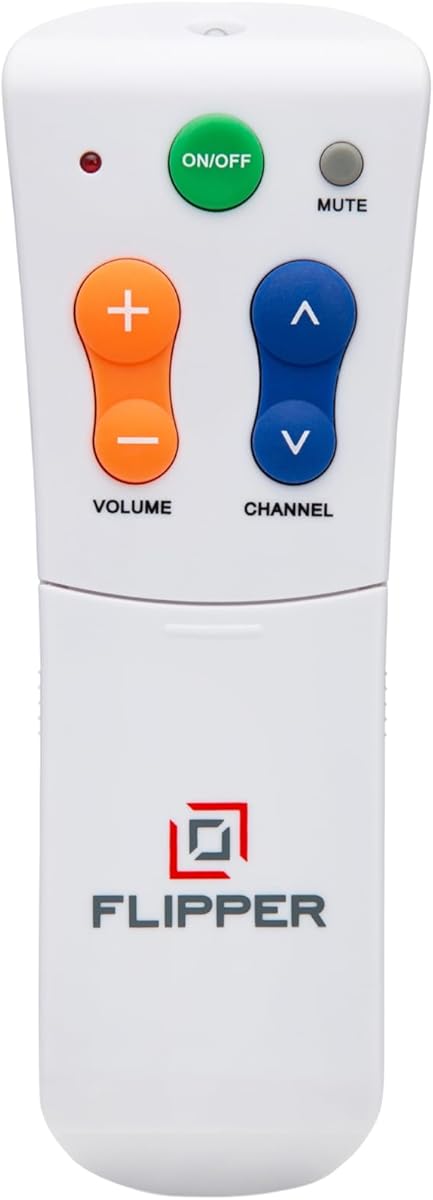
Flipper Big Button TV Remote for Seniors
4.2Editor score
Four main buttons on face
Hides extra customization buttons
Pre programs up to twenty five favorites
This guide compares the top ten easy to use TV remote for seniors options focusing on button size layout simplicity and compatibility to help you choose the
Finding a remote that is easy to handle can make watching television much more enjoyable for older adults. Large buttons and simple layouts help reduce confusion and frustration during daily use.
We evaluated ten popular models based on button size, ease of programming, and compatibility with major television brands. Our goal is to highlight devices that prioritize accessibility and independence.
Each pick shows unique features like backlit keys or color coding to assist with vision challenges. Please note that availability and pricing may change over time as markets evolve.
4.2Editor score

4.3Editor score

4.4Editor score
The following table provides a side by side look at each model to help you compare features and capabilities at a glance.


The GE BigEZ OneTouch stands out with its fully backlit keypad which is essential for low light environments. It holds a strong rating for its ability to simplify TV control without sacrificing functionality.
We may earn a commission when you buy through this link, at no additional cost to you.
Its design includes a blue volume button and orange channel button which helps users distinguish functions quickly. The white body makes it hard to lose in a dark room and the preset buttons cover most common brands.
While it is excellent for basic control the range of supported brands is smaller than some universal options. This limitation is acceptable if the user has one of the five supported models and values simplicity over breadth.
This remote is ideal for seniors who need visual cues to operate their television. The combination of backlit keys and color coding makes it a top choice for accessibility and independence.
The fully backlit keys ensure that buttons are visible even in the dark which reduces the need for external light sources.
Distinct colors for volume and channels help users with low vision or cognitive decline find the right button faster.
We may earn a commission when you buy through this link, at no additional cost to you.
The Flipper remote is designed with a strict focus on simplicity by featuring only four buttons on the front. It receives high marks for helping users with dementia regain control over their entertainment without frustration.
We may earn a commission when you buy through this link, at no additional cost to you.
This model uses color coding for On Off Volume and Channel to make daily tasks intuitive. The hidden buttons allow caregivers to customize settings without exposing the user to complex menus or extra options.
It does not support navigation within streaming apps like Netflix which limits its use to traditional broadcast or cable. This trade off ensures the interface remains clean and avoids overwhelming the user with too many choices.
Best for those who watch cable or satellite TV this remote offers peace of mind for caregivers. The limited button count and clear labeling make it a budget friendly and highly effective solution.
With only four main buttons on the face the user is less likely to press the wrong key and experience frustration.
Caregivers can pre program up to twenty five favorite channels so the user can simply cycle through them easily.
We may earn a commission when you buy through this link, at no additional cost to you.
This remote offers a premium experience with backlit buttons that stay lit for thirty seconds which helps users find controls in the dark. It is highly rated for its ease of use with Samsung smart TVs right out of the box.
We may earn a commission when you buy through this link, at no additional cost to you.
The package includes a soft silicone cover to protect against drops and a mount hook to keep the remote accessible. These accessories add significant value and ensure the device remains in good condition over time.
It is limited to Samsung TVs which restricts its universal appeal but ensures perfect compatibility for those owners. The trade off is worth it for Samsung users who want a dedicated device with extra protection and convenience.
Ideal for Samsung owners who need extra accessibility this remote provides a complete package. The built-in hook and protective cover make it a premium choice for long term reliability and ease of use.
The keys stay illuminated for thirty seconds after pressing which gives users enough time to see and press without fumbling.
The soft silicone cover prevents cracks and spills while the hook keeps the remote off the couch and within reach.
We may earn a commission when you buy through this link, at no additional cost to you.
The EZclicker Big Button Remote features tactile feedback which helps users confirm when a button is pressed. It is well rated for its comfortable feel and ease of handling for those with limited dexterity.
We may earn a commission when you buy through this link, at no additional cost to you.
It includes an extra large enter button that simplifies navigation within menus for smart TVs. The black body provides a high contrast look that is easy to spot on a light surface.
Users should note that this model is not designed for cable boxes or streaming sticks which limits its scope to TVs only. This limitation is acceptable for users who primarily need TV power and volume control.
Best for seniors needing tactile confirmation this remote offers a sturdy and simple interface. The compact size and universal compatibility make it a solid choice for daily home entertainment.
The buttons provide physical feedback when pressed which helps users with reduced sensation know they have successfully activated a function.
It works with top brand TV models ensuring broad compatibility without requiring complex pairing or setup steps.
We may earn a commission when you buy through this link, at no additional cost to you.
This model is similar to the first EZclicker option but focuses on an extra simple layout. It is rated well for its lightweight build which makes it easy to hold and store when not in use.
We may earn a commission when you buy through this link, at no additional cost to you.
The design includes tactile feedback and universal controls that cater to seniors with limited vision. The programming process is straightforward allowing users to get started quickly without technical help.
It is important to note that this remote does not support streaming apps or cable boxes which limits its use to basic TV functions. This makes it a specialized tool rather than an all in one solution.
Best for those who need a very simple backup remote this device offers comfort and ease of use. The compact design and universal compatibility make it a practical addition to any living room.
The lightweight design reduces hand fatigue which is beneficial for users with arthritis or limited grip strength.
Simple programming instructions allow users to set up the remote in minutes without needing complex code entry.
We may earn a commission when you buy through this link, at no additional cost to you.
This remote is popular for its no programming requirement for Samsung TVs which saves time and effort during setup. It is highly rated for its ease of use right out of the box without any pairing process.
We may earn a commission when you buy through this link, at no additional cost to you.
The design includes extra large buttons and tactile feedback to ensure reliable presses. It supports a wide range of brands including LG Vizio and Sony which makes it versatile for different households.
It does not work with streaming devices or cable boxes which means it is best suited for traditional TV sets. This focus on simplicity ensures the user does not get lost in complex menus or settings.
Best for Samsung owners or those who dislike setup this remote offers immediate functionality. The wide brand support and tactile design make it a practical and accessible choice for daily use.
No programming is needed for Samsung TVs which means you can start using the remote as soon as batteries are inserted.
Compatible with many brands such as LG Vizio and Sony ensuring it fits most common television setups in the home.
We may earn a commission when you buy through this link, at no additional cost to you.
This remote focuses on a traditional layout with large clearly marked buttons that are easy to see and press. It is rated highly for its ergonomic design which provides a comfortable grip for extended use.
We may earn a commission when you buy through this link, at no additional cost to you.
The simplicity of the layout reduces confusion by eliminating unnecessary buttons that often frustrate elderly users. It works with most major TV brands ensuring it can replace a broken remote effectively.
It is designed for traditional TV use and does not support advanced features like streaming apps or complex input switching. This limitation ensures the device remains simple and easy to understand for all ages.
Best for users who prefer a classic remote look this model offers clarity and comfort. The ergonomic build and large buttons make it an excellent choice for seniors with low vision or dexterity challenges.
The lightweight body provides a comfortable grip which helps users hold the remote steadily without straining their hand or wrist.
Buttons are arranged in a familiar pattern that mimics older remotes making the transition to a new device easier for seniors.
We may earn a commission when you buy through this link, at no additional cost to you.
The Philips BigEZ OneTouch features a fully backlit keypad which is helpful for navigating in dark rooms. It has a unique OneTouch setup process that simplifies the initial pairing for supported brands.
We may earn a commission when you buy through this link, at no additional cost to you.
Like the GE model it uses color coding for volume and channels to aid visibility. The design is intended to be simple and easy to use for seniors and those with visual impairments.
This model has received a lower rating compared to others which may indicate some issues with consistency or reliability. However the inclusion of U.S. based technical support offers reassurance to users facing setup difficulties.
Best for those who value technical support this remote offers a backlit interface and simple setup. The color coding and brand presets make it a decent option for basic TV control despite the rating.
The OneTouch setup allows users to program supported TVs with a single button press which reduces complexity significantly.
The keypad lights up fully ensuring that users can see all buttons clearly even in low light conditions.
We may earn a commission when you buy through this link, at no additional cost to you.
This model offers a straightforward design with extra large buttons that help reduce misclicks for elderly users. It is positioned as a reliable traditional remote replacement without complex features like voice control.
We may earn a commission when you buy through this link, at no additional cost to you.
The layout is simplified to include only essential controls which helps prevent confusion. It is compatible with most major TV brands making it a versatile option for many households.
It has received a lower user rating which might suggest issues with durability or long term performance. Users should weigh the simplicity against potential reliability concerns when making a purchase decision.
Best for those needing a basic replacement this remote prioritizes clarity over advanced features. The large buttons and simple layout make it accessible though users may want to check recent feedback before buying.
The oversized buttons make it easier to press accurately which reduces frustration caused by misclicks or missed inputs.
By limiting the buttons to essentials the device avoids overwhelming users with unnecessary options that complicate daily use.
We may earn a commission when you buy through this link, at no additional cost to you.
The Anderic RR1004 features glow in the dark keys which make it highly visible in low light settings. It is rated well for its minimalist design that focuses on essential controls to reduce confusion.
We may earn a commission when you buy through this link, at no additional cost to you.
It includes a learning function that allows users to copy commands from their existing remote for custom setup. This adds flexibility for those who need specific functions that are not pre programmed.
The device does not work with RF or Bluetooth systems which limits its compatibility to traditional IR TVs. This is a key consideration for users with modern streaming devices or smart TV boxes.
Best for users with IR TVs this remote offers visibility and simplicity. The glow in the dark keys and learning function provide practical benefits for those who need a straightforward control solution.
The keys glow in low light which ensures visibility without needing a separate light source or bright room.
The learning technology allows copying commands from an existing remote so users can access custom features easily.
We may earn a commission when you buy through this link, at no additional cost to you.
Selecting the right remote involves considering several factors to ensure comfort and accessibility for older adults.
Larger buttons are essential for seniors with limited dexterity or vision as they reduce the chance of accidental presses. A clear layout with minimal unnecessary buttons helps prevent confusion and frustration.
Look for remotes with oversized buttons and a simple arrangement that focuses on essential functions like power volume and channel.
Backlit or glow in the dark buttons are valuable for use in dark rooms or at night. High contrast colors and distinct shapes help users differentiate between controls quickly.
Prioritize remotes that offer visual aids like backlit keys or color coding to assist with navigation and visibility.
Buttons that provide a clear click or tactile response confirm that an input has been registered. This is helpful for users who may not have full sensation in their fingertips.
Choose models that emphasize tactile feedback to ensure users feel confident when pressing buttons.
Ensure the remote supports your specific TV brand and any satellite or cable boxes if needed. Simple setup processes or no setup requirements reduce the burden on users or caregivers.
Check that the remote works with your devices and offers an easy pairing method if required.
Remotes that use standard AA or AAA batteries are easier to replace in emergencies. Long battery life reduces the frequency of changes which is important for users with limited mobility.
Select a remote with efficient power usage and standard battery types for convenience.
A lightweight remote with an ergonomic shape prevents hand fatigue during extended use. It should be easy to grip and hold securely without slipping.
Choose a model that is comfortable to hold and does not add unnecessary weight to the hand.
For those with dementia or memory issues remotes with fewer buttons are more effective. Customization options allow caregivers to limit functionality to only what is needed.
Consider remotes that offer simplified interfaces or customizable buttons for users with cognitive challenges.
Durable construction and protective cases can extend the life of the remote especially in busy households. Shock resistant materials prevent damage from accidental drops.
Look for remotes that are built to withstand daily use and include protective accessories if possible.
When you first receive the remote check the packaging for instructions on battery installation. Insert the batteries with the correct orientation to ensure proper function and press a button to test the response.
If setup is required follow the simple steps provided in the manual or on the manufacturer website. Align the remote with the TV and press the necessary buttons to pair or program the device.
To maintain the remote keep it clean and dry and avoid exposing it to extreme temperatures. Store it in a consistent location to prevent loss and replace batteries when the signal weakens.
Most remotes in this guide support a wide range of popular brands but compatibility can vary. Always check the product specifications to confirm it works with your specific TV model before purchasing.
Many of these remotes are designed for traditional TV use and do not support streaming apps. Check the product details to see if it supports your specific streaming box or stick.
Programming usually involves pressing a combination of buttons to search for codes or copying commands from another remote. Follow the included instructions or online guide for step by step pairing.
Try replacing the batteries first as power issues are common. If problems persist check for debris under the buttons or contact the manufacturer for support or replacement.
Some models support cable boxes but others are designed only for TV control. Verify the product description to ensure it supports your specific cable or satellite provider.
Yes these remotes are typically easy to wipe down with a soft dry cloth. Avoid using harsh chemicals or excess water that could damage the electronics inside.
Store the remote in a consistent and accessible location such as a side table or a remote holder. This helps prevent loss and makes it easier to find when needed.
Most remotes in this guide use standard AA or AAA batteries which are widely available. Check the product details for the specific battery type required for your model.
Choosing the right remote can significantly improve the daily viewing experience for seniors by reducing confusion and effort. The top picks offer a range of features to suit different needs and budgets.
Prioritize accessibility features like large buttons backlit keys and simple layouts to ensure the device meets the user's needs. Compatibility with your existing setup is also a key factor to consider.
Prices and availability may change over time so check the latest listings before making a purchase. We hope this guide helps you find the perfect remote for your household.