
ASUS TUF Gaming GT502 ATX Mid Tower Gaming PC Case
4.6Editor score
Dual-chamber design for clean builds
Vertical GPU mounting option included
High-speed connectivity on front panel
Discover the top dual system PC cases for 2026. Our guide compares airflow, cooling, and design to help you build efficient multi-machine workstations.
Dual system PC cases offer a unique solution for enthusiasts and professionals needing multiple machines in one footprint. These specialized chassis support parallel operations, independent cooling zones, and optimized airflow for complex builds.
We evaluated ten leading models based on thermal performance, build quality, and flexibility. Each option provides distinct advantages for housing separate systems or maximizing component density within a single tower design.
Our selections highlight top picks for budget, premium, and overall value. Prices fluctuate frequently, so verify current listings before purchasing to ensure you secure the best deal available today.
4.6Editor score

4.3Editor score
This side-by-side comparison highlights key specifications for each dual system case to help you quickly identify the model that best fits your specific hardware requirements and budget constraints.


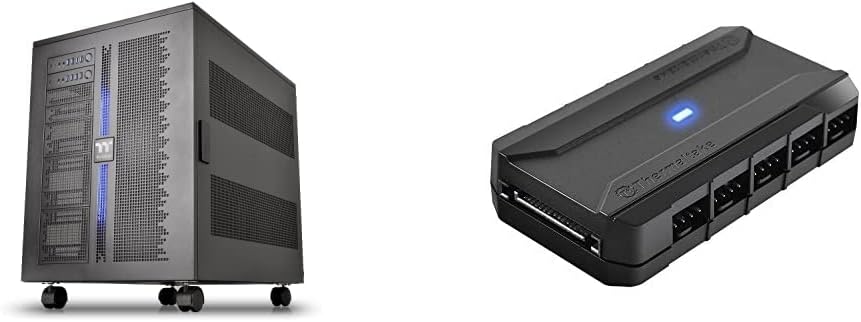
The Thermaltake Core W200 stands out as a truly unique option for users needing two independent systems in one chassis. This dual system computer case supports installing two separate setups back to back, maximizing desk space efficiency. While it lacks a traditional user rating, its innovative design makes it a top choice for advanced builders.
We may earn a commission when you buy through this link, at no additional cost to you.
Its fully modular and dismantle design allows for incredible flexibility during assembly and maintenance. You can break down the construction completely to access components easily. The included Commander FP hub powers up to ten PWM fans simultaneously, providing expandable cooling capabilities. Furthermore, it supports up to two 600mm radiator applications for extensive custom liquid cooling builds.
Trade-offs include the large size needed for such a complex build. The assembly might be daunting for casual users due to the intricate nature of housing two systems. However, the included cable ties and velcro tabs help keep everything neat. This case is ideal for professionals or enthusiasts needing parallel compute power.
If you require a dual system setup without doubling your footprint, this is the definitive choice. It balances high-end cooling potential with unique architectural design. Ensure your room has space for the chassis dimensions before purchasing to avoid fit issues.
Housing two systems allows for separate work and gaming environments within a single tower.
Supporting 600mm radiators ensures top-tier thermal performance for demanding overclocked components.
We may earn a commission when you buy through this link, at no additional cost to you.
The Cooler Master HAF II 500 is engineered for high airflow performance with its oversized Mighty40 cooling system. It features two massive 220mm intake fans and one 180mm rear exhaust fan to ensure components stay cool. With a 4.8 rating, users praise its ability to handle heat effectively. The low airflow resistance design improves throughput significantly.
We may earn a commission when you buy through this link, at no additional cost to you.
Split-level cable management optimizes routing space and creates room for the oversized rear exhaust cooling. The MasterRail mounting system supports multiple fan and radiator sizes at the front and top of the case. This flexibility allows for diverse build configurations. Additionally, a dual-mode GPU holder clamps a single GPU or supports two GPUs for high-end setups.
While the large fans are impressive, they may limit compatibility with certain accessories or filters. The case is also on the pricier side compared to standard ATX models. However, the flexible storage cage supports both 3.5-inch and 2.5-inch drives in various orientations. This makes it a robust choice for high-performance gaming rigs.
For users prioritizing thermal performance above all else, this case is a strong contender. The included fans reduce the need for immediate upgrades. Ensure your PSU length matches the storage cage options before finalizing your build plan.
The oversized 220mm fans move significant air volume to cool powerful components.
Supports two GPUs up to 3.6 slots thick for multi-card configurations.
We may earn a commission when you buy through this link, at no additional cost to you.
The NZXT H9 Flow RGB+ features a dual-chamber design that separates main components from the PSU and drives. This separation improves thermal performance and simplifies cable management significantly. It includes pre-installed RGB fans and an NZXT Control Hub for easy lighting control. The perforated steel panels ensure efficient cooling for high-performance builds.
We may earn a commission when you buy through this link, at no additional cost to you.
With a ten-fan capacity, it supports up to nine 140mm fans across the top, front-right, and bottom. A 120mm fan sits in the rear for balanced exhaust. The panoramic view showcases every detail of your build with seamless wraparound tempered glass. Large radiator support fits up to a 420mm radiator on the top and front-right.
Cable management is effortless with extra-wide channels and built-in Velcro straps. The case is back-connect ready, compatible with motherboards like ASUS BTF and MSI Project Zero. While the included fans are good, users might want more lighting customization later. The glass panels add aesthetic appeal but require careful installation.
This case is excellent for those wanting clean aesthetics and solid cooling. The dual-chamber concept reduces heat soak on sensitive components. Verify motherboard compatibility for rear-connect features to fully utilize the design benefits.
Separating the PSU chamber keeps hot air away from the CPU and GPU.
Back-connect ready design supports motherboards that route cables behind the board.
We may earn a commission when you buy through this link, at no additional cost to you.
The Antec Flux Pro combines metal, glass, and wood to create a high-quality texture. This unique blend sets it apart visually from standard cases. It supports up to 12 fans simultaneously, with six pre-installed PWM fans for immediate cooling. The multi-directional vent design optimizes airflow paths throughout the chassis.
We may earn a commission when you buy through this link, at no additional cost to you.
An innovative iShift PSU mount allows 90-degree rotation, saving vertical space. The CPU and GPU dual temperature display provides real-time thermal data. Removable cooling brackets on the top, front, and PSU shroud offer flexibility. It supports simultaneous installation of a 420mm radiator and a 360mm radiator for dual-loop cooling.
While the wood elements look great, they might require more care than metal or glass. Some users may find the included accessories overwhelming. However, the build quality feels premium. The dual temperature display is a standout feature for monitoring system health without software.
This case is perfect for builders wanting a unique look without sacrificing performance. The cooling potential is massive. Ensure the wood finish matches your setup before buying to avoid style clashes.
The mix of metal, glass, and wood creates a unique aesthetic for home offices.
Dual temperature display lets you monitor CPU and GPU heat instantly.
We may earn a commission when you buy through this link, at no additional cost to you.
The ASUS TUF Gaming GT502 offers a dual-chamber design that divides internals into main and rear sections. This allows for independent cooling zones for CPU and GPU. It includes a vertical mount for graphics cards to banish sag. Tool-free side panels make access simple by pressing a hidden button.
We may earn a commission when you buy through this link, at no additional cost to you.
Panoramic views are provided by tinted tempered glass on the front and side. While tinted, it still showcases the build aesthetically. The front panel includes USB 3.2 Gen 2 Type-C and two USB 3.0 ports for fast connectivity. A bundled support bracket helps stabilize heavy GPUs.
The main trade-off is the tinted glass, which limits full visibility compared to clear options. Assembly might require care to align the dual chambers correctly. However, the included vertical mount and support bracket add significant value. This case is a top budget choice for gamers.
For users needing clean builds and fast connectivity, this model is ideal. The dual chamber reduces clutter and heat soak. Check the USB port configuration to ensure it meets your device requirements.
Separate zones for CPU and GPU allow for targeted fan placement.
Front USB 3.2 Gen 2 Type-C supports fast data transfer speeds.
We may earn a commission when you buy through this link, at no additional cost to you.
The ASUS ROG Strix Helios II is made for showcase builds with an aluminum front panel featuring a diamond-grille design. It comes with four pre-installed 140x28mm performance fans for optimal thermal performance. Support for EATX motherboards and graphics cards up to 450mm long makes it future-proof. Cable management is effortless with a multifunction cover and PSU shroud.
We may earn a commission when you buy through this link, at no additional cost to you.
The advanced I/O panel features two USB 20Gbps Type-C ports and four USB-A 3.0 ports. An ARGB lighting control button and fan-speed PWM control button are located here too. A detachable PSU bracket and graphics card slot clamp ensure stability. The 3D-structured filter supports effective cooling while maintaining style.
The main downside is the weight due to the robust materials. The price point is higher than average for an ATX case. However, the included braces and controls add convenience. It feels like a true flagship product for serious enthusiasts.
If budget is not the main concern, this case offers top-tier build quality. The large GPU support handles next-gen cards easily. Ensure your desk can support the weight before installation.
Support for 450mm graphics cards ensures compatibility with future hardware.
Direct access to RGB and PWM controls simplifies system tweaking.
We may earn a commission when you buy through this link, at no additional cost to you.
The HAVN HS 420 features a hybrid structure designed to direct cool air onto the centrally positioned GPU. It fits a total of eleven 140mm fans, providing massive cooling capacity. The heat-formed uni-sheet glass panel offers a clear panoramic view with minimal distortion. A PWM fan hub is included for easy fan control.
We may earn a commission when you buy through this link, at no additional cost to you.
The SimpliCable routing system uses top-to-bottom grooved guides to route cables cleanly. Custom space fits combinations of storage, fans, radiators, and portable displays. The 3-way adjustable support bracket handles a wide range of graphics cards. Fan brackets have flexible rubber pads to avoid resonance build-up.
The curved glass can be challenging to clean or replace. It is a newer brand, so long-term support is unproven. However, the cooling capacity is outstanding for the price. This model is excellent for high-density fan setups.
Users needing extreme airflow and cable management options should consider this case. The hybrid design reduces GPU heat significantly. Check the included hub for compatibility with your specific fan types.
Directing air to the central GPU improves thermal performance significantly.
Rubber pads on brackets reduce vibration noise during operation.
We may earn a commission when you buy through this link, at no additional cost to you.
The NZXT H6 RGB+ features a dual-chamber design that isolates power and cables from the main build. It uses seamless curved glass bent to a tight radius for minimal distortion. High-airflow mesh across panels improves cooling efficiency. The case ships without fans so you can fully customize your lighting.
We may earn a commission when you buy through this link, at no additional cost to you.
Ten 120mm fan mounts provide flexible cooling across top, front-right, bottom, and rear. An integrated adjustable anti-sag bracket keeps heavy GPUs aligned properly. The nylon bottom filter keeps dust out without restricting intake. This compact case brings large case benefits to smaller spaces.
Shipping without fans increases the initial cost for buyers who want RGB lighting. The curved glass is stylish but may be more expensive to replace. However, the build quality is consistent with NZXT standards. It is great for minimalist builds.
If you want a clean look in a compact form, this is a top pick. The anti-sag bracket handles modern heavy GPUs well. Plan your fan purchases separately to complete the build.
Dual chamber benefits in a size that fits smaller desks.
Shipping without fans allows for total control over lighting choices.
We may earn a commission when you buy through this link, at no additional cost to you.
The Thermaltake Capo X delivers parallel operation from a single chassis. It houses two independent mATX systems simultaneously while minimizing footprint. Each system has its own I/O with power, reset, and USB ports. Hidden connector support works with motherboards like ASUS BTF and MSI Project Zero.
We may earn a commission when you buy through this link, at no additional cost to you.
Cooling is configurable with support for up to 13 fans and large radiators. Two detachable GPU braces mount directly to the chassis frame for top and bottom support. Cutouts allow for clean hidden cable management. The top system I/O is at the top, while the bottom is at the front foot.
The complexity of managing two systems means more cabling. It requires specific motherboard types to utilize hidden features fully. However, the 5.0 rating indicates high satisfaction. It saves space compared to two separate towers.
For advanced users needing dual workstations, this is a unique solution. The individual I/O prevents confusion between systems. Ensure both motherboards fit mATX before buying.
Two independent systems allow for simultaneous work and gaming.
Separate I/O ports make accessing each system simple and organized.
We may earn a commission when you buy through this link, at no additional cost to you.
The Thermaltake View 380 features a pillarless front and side tempered glass panel for a seamless view. It supports hidden-connector motherboards for a cleaner look. Four hydraulic bearing ARGB fans are pre-installed for cooling and lighting. The I/O ports include USB 3.2 Gen 2 Type-C and two USB 3.0 ports.
We may earn a commission when you buy through this link, at no additional cost to you.
It supports up to a 360mm radiator and graphics cards up to 415mm. The dual chamber design helps organize components neatly. This case prioritizes aesthetics without sacrificing functionality. The included fans provide decent stock cooling for most builds.
Glass panels require careful handling to avoid cracks during installation. Airflow may be restricted if not configured properly with mesh panels. However, the warranty provides peace of mind for hardware. It offers a great balance of style and utility.
For builders wanting an uninterrupted view, this case is perfect. The pillarless design enhances the visual impact. Verify motherboard compatibility if planning a hidden-connector build.
Pillarless glass removes barriers to viewing your internal components.
Pre-installed ARGB fans provide both style and immediate cooling.
We may earn a commission when you buy through this link, at no additional cost to you.
Selecting the right dual system case requires understanding specific features that support multiple hardware setups or complex single systems. We break down the essential factors to consider.
Dual chamber designs separate the power supply and drives from the main components. This separation reduces heat transfer and improves cable management. Look for cases that physically isolate hot zones.
Prioritize models with dedicated rear or lower chambers for your PSU.
High airflow is crucial when housing multiple systems or high-performance components. Check for support of large radiators and high-volume fans. Dual system cases need more airflow than standard units.
Select cases that allow large fan sizes like 220mm or multiple 140mm units.
Hidden connector motherboards allow cables to route behind the board for a clean look. Not all cases support the cutouts needed for these boards. Verify if the case supports features like Project Zero or BTF.
Choose cases explicitly stating hidden-connector motherboard support.
Modern GPUs are heavy and can sag without support. Dual system cases may house multiple GPUs or longer cards. Look for vertical mounts or detachable braces that secure the card.
Opt for cases with included GPU support brackets to prevent sag.
If running two systems, you need distinct I/O access for each. Look for individual ports on both top and front. For single systems, ensure enough USB ports are available.
Check the USB Type-C availability and placement on the front panel.
Dual system cases often have larger footprints to accommodate extra hardware. Measure your desk space before buying to ensure a fit. Consider vertical vs horizontal orientation options.
Verify the overall dimensions against your available room space.
Install your power supply first before mounting the motherboard. This ensures easier cable routing behind the PSU shroud. Keep all screws organized in a small container.
Clean filters regularly to maintain optimal airflow. Dust buildup restricts airflow in dual chamber designs. Remove panels every few weeks to vacuum internal dust.
Monitor fan curves using software tools. Dual systems generate more heat than standard builds. Adjust fan speeds based on temperature readings rather than fixed settings.
A dual system PC case allows you to install two separate computer systems within a single chassis. This setup saves desk space and provides a unified power and cooling solution. It is ideal for users who need a dedicated work and gaming environment.
Most dual system cases support standard ATX or mATX motherboards depending on their size. Some specific models like the Thermaltake Capo X support two mATX boards. Always check the motherboard compatibility list before purchasing.
Dual chamber cases feature dedicated spaces for routing power cables and drive cables. Use the included straps and tie-downs to keep the main chamber clean. Route power cables through the rear chamber for a tidy look.
Yes, dual system cases require more cooling due to increased heat output. Ensure the case supports multiple large fans or radiators. Proper airflow is critical to prevent overheating in confined spaces.
Many modern dual chamber cases support vertical GPU mounting. This allows for better visibility and cable management. Check if the case includes a vertical bracket or if it needs to be purchased separately.
Dual system cases often support large radiator sizes like 360mm or 420mm. Some high-end models support 600mm radiators for extreme cooling. Check the front and top support lists for details.
Our top picks highlight the Thermaltake Core W200 for its unique dual system capability and the ASUS TUF Gaming GT502 for budget-conscious builders. Each case offers specific strengths in cooling and design.
Prioritize airflow and motherboard compatibility when making your final decision. Dual system setups demand more thermal management than standard builds. Choose models with fan support that matches your cooling needs.
Prices for these cases fluctuate often, so check current listings before buying. Verify dimensions and specs against your components. A well-chosen case ensures your system runs efficiently for years.