
Crucial P310 1TB
4.7Editor score
Up to 7100MB/s read speed
Compatible with laptops and desktops
Includes Acronis recovery software
Compare the top Crucial Internal NVME SSD models for speed and capacity in this detailed 2026 guide covering P310, T500, and T710 drives.
Selecting the right storage solution is critical for modern computing needs. Crucial Internal NVME SSDs offer blazing fast speeds and reliable performance for gamers and creators alike.
We evaluated ten top models based on speed, compatibility, and value. Our analysis focuses on real-world performance metrics and user feedback to ensure informed decisions.
Each pick highlights key strengths and ideal use cases. Note that prices fluctuate frequently so check current listings before purchasing to secure the best available deal.
4.7Editor score
4.8Editor score

4.6Editor score
This side by side comparison lists all ten models with key specifications to help you find the exact drive that fits your system and budget requirements.


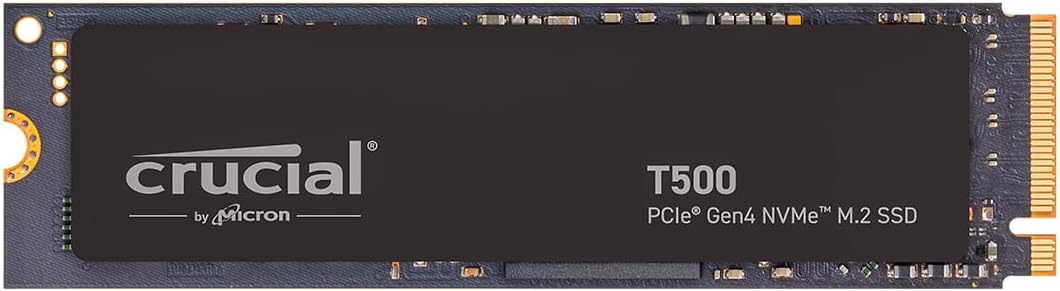
The Crucial T500 1TB SSD stands out as a top performer with a 4.8 rating. It delivers exceptional Gen4 NVMe speeds ideal for modern gaming and creative workflows.
We may earn a commission when you buy through this link, at no additional cost to you.
Its 7300MB/s read speed significantly reduces load times while TLC NAND ensures longevity. The included Adobe Creative Cloud month adds real value for content creators.
Although it costs more than budget options, the performance gain justifies the investment. Gen4 is mature and stable compared to early Gen5 drives.
Buy this if you want a reliable balance of speed and durability without Gen5 heat issues. It fits most laptops desktops and consoles perfectly.
The Adobe CC bundle supports photo and video editing tasks right out of the box.
TLC offers better endurance than QLC making this drive ideal for heavy daily writing workloads.
We may earn a commission when you buy through this link, at no additional cost to you.
The Crucial P310 1TB is a stellar budget choice rated 4.7 by users. It offers 7100MB/s read speeds at an accessible price for everyday users.
We may earn a commission when you buy through this link, at no additional cost to you.
Acronis recovery software adds safety for data transitions. Handheld consoles like ROG Ally benefit from its compact size and Gen4 performance.
While QLC variants exist the standard model provides solid endurance for typical use. A heatsink may be needed for sustained heavy loads.
Choose this for cost effective performance in laptops desktops and gaming handhelds. It handles AAA titles and apps smoothly without breaking the bank.
Acronis software helps secure your files during OS transitions or drive replacements.
Perfect for Steam Deck or Ally upgrades where size and speed are critical.
We may earn a commission when you buy through this link, at no additional cost to you.
The Crucial T710 1TB delivers near 15000MB/s read speeds rated 4.6 by enthusiasts. It targets high-end users needing raw throughput for 8K video.
We may earn a commission when you buy through this link, at no additional cost to you.
AES256 encryption protects sensitive data while TLC NAND ensures stability. It pairs with Intel 14th Gen and AMD Ryzen 7000 series effectively.
Without a heatsink thermal throttling can occur during sustained loads. Ensure your motherboard supports Gen5 M.2 slots before purchase.
Buy this for professional workloads where seconds matter. It is a premium investment for those who demand the absolute fastest consumer storage available.
Hardware encryption keeps files secure without impacting system performance.
Always use a heatsink to maintain peak speeds during long gaming sessions.
We may earn a commission when you buy through this link, at no additional cost to you.
The Crucial P310 2TB offers vast storage at a 4.7 rating. It handles large game libraries and media files efficiently on a single drive.
We may earn a commission when you buy through this link, at no additional cost to you.
Gen4 speeds remain consistent for everyday tasks. 3D NAND provides durability needed for large data storage over years.
No extra software is bundled but that keeps the focus on raw capacity. Ensure your system supports Gen2 NVMe for full speed.
Ideal for users tired of managing multiple partitions. It simplifies your setup while providing ample room for future projects and games.
Keep all apps and games on one drive for simpler system management.
Perfect for storing 4K movies and large photo collections efficiently.
We may earn a commission when you buy through this link, at no additional cost to you.
The Crucial P510 1TB brings Gen5 speed to budget conscious buyers with a 4.7 rating. It delivers 11000MB/s read speeds at a competitive price.
We may earn a commission when you buy through this link, at no additional cost to you.
TLC NAND ensures reliability while the Adobe bundle adds value. It fits well in desktops and laptops supporting Gen5 M.2 slots.
Write speeds are impressive at 8500MB/s but cooling is still required for sustained loads. Check system compatibility before upgrading from Gen4.
Buy this for a cost effective Gen5 upgrade path. It balances next-gen speed with reasonable pricing better than most alternatives on the market.
Get future proof speeds without paying flagship premium prices.
Access Adobe apps for a month to enhance your workflow immediately.
We may earn a commission when you buy through this link, at no additional cost to you.
The Crucial E100 480GB is a reliable entry drive rated 4.5. It offers 4700MB/s read speeds ideal for refreshing older laptops.
We may earn a commission when you buy through this link, at no additional cost to you.
It replaces mechanical HDDs with silent solid state performance. Boot times improve drastically making it a great starter SSD for basic users.
Capacity is modest so heavy gamers might run out of space quickly. The 3-year warranty provides basic peace of mind for the price.
Choose this for office PCs or light home use. It brings modern speeds to older systems without needing expensive high-end specs.
Noiseless performance replaces spinning hard drives for quiet work environments.
Perfect for giving an old laptop a speed boost without new hardware.
We may earn a commission when you buy through this link, at no additional cost to you.
The Crucial P310 1TB QLC is an economical option with a 4.6 rating. It uses Micron 232L QLC NAND for storage efficiency and speed.
We may earn a commission when you buy through this link, at no additional cost to you.
Gen4 performance remains consistent for reading data. QLC architecture allows for affordable storage making it great for media libraries.
Sustained write speeds may drop under heavy loads compared to TLC. Keep it for read-heavy workloads or archival data storage.
Ideal for budget builds needing decent capacity. Ensure you manage your write workload to maintain performance over years.
QLC technology packs more data into the same physical space efficiently.
Great for storing photos and videos where write frequency is lower.
We may earn a commission when you buy through this link, at no additional cost to you.
The Crucial T500 1TB PS5 is designed for console gaming with a 4.8 rating. It meets strict PS5 requirements with a built-in heatsink.
We may earn a commission when you buy through this link, at no additional cost to you.
TLC NAND ensures stable performance during long sessions. Game load times improve significantly compared to internal storage.
While usable in PCs the heatsink adds bulk and cost. Only buy this if you need verified PS5 expansion immediately.
Ideal for PS5 owners wanting reliable storage. It installs easily and delivers smooth gameplay without compatibility issues.
Tested specifically for PlayStation 5 system requirements and thermal limits.
Built-in heatsink eliminates the need for third-party cooling solutions.
We may earn a commission when you buy through this link, at no additional cost to you.
The Crucial T700 1TB offers high Gen5 throughput rated 4.6. It delivers 11700MB/s read speeds for demanding computing environments.
We may earn a commission when you buy through this link, at no additional cost to you.
It supports both Intel and AMD platforms effectively. TLC NAND ensures durability while Adobe software adds creative value.
Gen5 requires specific motherboard slots and cooling. Without adequate airflow the drive may throttle speed during extended writes.
Buy this for workstation tasks requiring speed. It balances performance and price better than flagship models.
Works reliably with both Intel and AMD modern processor architectures.
Always use a compatible heatsink to maintain peak performance.
We may earn a commission when you buy through this link, at no additional cost to you.
The Crucial P310 1TB Heatsink is a versatile drive rated 4.7. It combines Gen4 speed with a built-in cooler for stable performance.
We may earn a commission when you buy through this link, at no additional cost to you.
Works on PS5 laptops and desktops alike. It removes the guesswork of pairing an SSD with an external cooling solution.
The heatsink adds size so check clearance in compact cases. TLC variants offer better endurance than QLC options if available.
Ideal for users wanting ready-to-install performance. It delivers reliable speeds across multiple platforms without extra costs.
Works seamlessly across PCs, Macs, and gaming consoles.
No need to buy separate heatsinks for thermal management.
We may earn a commission when you buy through this link, at no additional cost to you.
Selecting the right drive requires understanding interface speeds and compatibility with your system hardware.
Gen5 drives offer faster speeds over 10000MB/s but cost more and run hotter. Gen4 offers balanced performance up to 7500MB/s.
Ensure your motherboard supports Gen5 before buying top avoid wasted performance.
TLC NAND provides better endurance and sustained write speeds than QLC. It is ideal for active gaming or creative workloads.
QLC is cost effective for storage heavy but read heavy tasks like media libraries.
1TB is standard for most users balancing cost and space. 2TB suits libraries with many AAA games or large media files.
Match capacity to your expected storage growth over the next few years.
Gen5 drives often need external cooling to prevent throttling. Many Crucial models include built-in heatsinks for convenience.
Check your case airflow before assuming passive cooling will work.
PlayStation 5 requires drives meeting strict size and speed specs. Look for specific PS5 labeled drives to avoid fitting issues.
Ensure your console firmware is updated to support new SSD models.
Most Crucial drives include a 5-year limited warranty covering hardware defects. Check specific terms for endurance limits.
Reliable support is critical for long-term peace of mind and data safety.
M.2 2280 is the standard size for desktops and most laptops. Verify your slot supports this length before buying.
Smaller form factors may be needed for compact devices like handheld consoles.
Adobe Creative Cloud and Acronis cloning tools add value for creators. These inclusions often justify higher prices.
Check if the bundle meets your specific workflow needs.
Install the drive firmly in the M.2 slot ensuring the heatsink does not block airflow. Secure the drive with the provided standoff and screw.
Initialize the drive in Disk Management and create partitions before first use. Format to NTFS for Windows systems for best performance.
Avoid exposing the drive to extreme heat or physical shocks. Maintain clean airflow around the drive to prevent thermal throttling during usage.
Most work in M.2 slots but Gen5 drives need specific motherboard support. Check your motherboard manual for NVME and PCIe generation compatibility.
Yes TLC offers better endurance and sustained performance under load. QLC is fine for storage but may throttle during large writes.
Only models with built-in heatsinks meeting PS5 specs work. Look for the PS5 labeled options for guaranteed compatibility.
The T500 1TB and T710 offer high speeds and Adobe bundles. TLC models ensure stability for long rendering sessions.
Most come with a 5-year warranty rated by TBW capacity. TLC models offer higher endurance than QLC for long-term use.
Not always but it helps sustained workloads. Many Crucial models include them for ease of installation and thermal stability.
The Crucial T500 1TB remains our top pick for balanced speed and value across most users.
Prioritize TLC NAND and correct interface generation for long-term reliability and performance.
Always check current pricing before purchasing as deals often fluctuate daily on major retailers.