
Hercules DJControl Inpulse 200 MK3
4.6Editor score
Includes Serato DJ Lite software
Compact and portable design
Beatmatch Guide LEDs included
Discover the best Dj Controller for Serato in 2026. We compare top models for beginners and pros to help you choose the right mixing gear for your sets.
Finding the right Dj Controller for Serato can transform your mixing experience. Whether you are just starting out or looking for professional tools, the right hardware ensures smooth transitions and creative control.
We evaluated ten top-rated controllers based on build quality, software compatibility, and feature sets. Our analysis focuses on how well each unit integrates with Serato DJ Lite and Pro for seamless performance.
Each pick highlights key strengths and potential trade-offs to help you decide. Prices and availability may change, so check current listings before purchasing your new mixing setup.
4.6Editor score

4.6Editor score

4.6Editor score
This table provides a side-by-side overview of the top controllers. Compare key specifications to find the unit that matches your performance needs and budget constraints.




The Pioneer DJ DDJ-FLX4 stands out as the top pick for beginners and intermediate DJs. It carries a strong 4.6 rating and offers a user-friendly layout that mirrors professional gear.
We may earn a commission when you buy through this link, at no additional cost to you.
Its standout feature is the Smart Fader which auto-adjusts volume and bass during transitions. This makes blending tracks effortless even if you lack beatmatching skills. You can also stream from Apple Music directly.
While it lacks four channels, the two-deck setup is sufficient for most home and mobile gigs. The only drawback is the absence of motorized platters for scratching purists.
We recommend this controller for anyone starting their journey in digital DJing. It balances affordability with professional features that grow with your skills over time.
This feature adjusts EQ and volume automatically when you move the crossfader, simplifying transitions for new users.
Connect via USB or Bluetooth to iPhone or iPad, allowing you to mix anywhere without needing a laptop.
We may earn a commission when you buy through this link, at no additional cost to you.
The Hercules DJControl Inpulse 200 MK3 is the ideal choice for budget-conscious beginners. With a 4.6 rating, it offers essential features without breaking the bank.
We may earn a commission when you buy through this link, at no additional cost to you.
It includes Beatmatch Guide LEDs that light up to show when tracks align. This visual aid helps you learn timing quickly. You also get access to DJ Academy tutorials.
The construction feels light but durable enough for home use. The smaller jog wheels might lack precision for scratching but suffice for standard mixing.
Buy this if you want to start mixing immediately with minimal investment. It provides a gentle learning curve and supports your growth into more advanced setups.
Visual indicators near the jog wheels help you align tempos perfectly, removing guesswork during your early learning phase.
Break tracks into vocals and instrumentals to create unique mashups live without needing complex software tools.
We may earn a commission when you buy through this link, at no additional cost to you.
The Pioneer DJ DDJ-FLX10 is a flagship device for serious professionals and mobile DJs. It holds a 4.6 rating and brings club-standard features to your home studio.
We may earn a commission when you buy through this link, at no additional cost to you.
Its Track Separation technology splits songs into stems like vocals and drums instantly. This allows live mashups that were previously impossible. The layout mirrors CDJ and DJM setups for seamless booth transfer.
The price is significant and requires a robust computer to run smoothly. The multicolor displays on jog wheels add visual flair and tracking precision.
Choose this if you are ready to invest in a long-term professional tool. It offers unmatched flexibility for creative control and high-performance mixing sets.
Split any track into isolated stems like vocals or drums to create dynamic remixes live without prepping files.
Multicolor on-jog displays show waveforms and BPM, giving you immediate visual cues for cue points and track parts.
We may earn a commission when you buy through this link, at no additional cost to you.
The Hercules DJControl Inpulse 500 is a solid choice for intermediate users who want more pads. It rates 4.6 stars and offers robust hardware mixing capabilities.
We may earn a commission when you buy through this link, at no additional cost to you.
You get 16 backlit RGB pads for hot cues and samples. The large jog wheels support touch detection for scratching. There is also a dedicated filter and FX area.
The build is sturdy but slightly heavy for portable gigs. Some users find the software integration less intuitive than other brands.
Buy this if you prefer hardware controls over touch screens. It offers a tactile experience that enhances performance in live house party settings.
Sixteen backlit pads let you trigger cues, loops, and samples with visual feedback for a dynamic performance.
A dedicated hardware input mixer ensures clear sound routing for audio inputs alongside your digital tracks.
We may earn a commission when you buy through this link, at no additional cost to you.
The Pioneer DJ DDJ-REV1 is designed specifically for scratchers and hip-hop DJs. With a 4.5 rating, it mimics turntable layout for authentic performance feel.
We may earn a commission when you buy through this link, at no additional cost to you.
Its tall pitch faders and quick effect controls put battle techniques within reach. The scratch tracking feature lets you trigger routines with a single motion.
It is limited to two decks and lacks advanced looping features. But for its intended purpose it performs exceptionally well for beginners.
This is the go-to for anyone focused on battle DJing. It offers the right tools for scratch techniques at an affordable price point.
Trigger complex scratch routines with simple hand motion to build confidence fast during live performances.
Extended faders allow for finer pitch adjustments, crucial for precise beatmatching in scratch-oriented genres.
We may earn a commission when you buy through this link, at no additional cost to you.
The Numark Mixtrack Platinum FX offers excellent visual feedback with its color displays. Rated 4.6 stars, it supports four decks of control for advanced mixing.
We may earn a commission when you buy through this link, at no additional cost to you.
Large 6-inch jog wheels let you see track info and BPM clearly. Paddle triggers allow quick launch of FX without navigating menus. It connects well via USB.
The build quality is decent but feels lighter than competitors. Some users report occasional software bugs requiring restarts.
Choose this if you rely on visuals to guide your sets. The four-deck control gives you flexibility to manage multiple tracks simultaneously.
High-resolution displays on jog wheels show BPM and waveforms, making track identification faster during sets.
Dual paddle triggers launch effects instantly, allowing you to add energy to tracks without interrupting flow.
We may earn a commission when you buy through this link, at no additional cost to you.
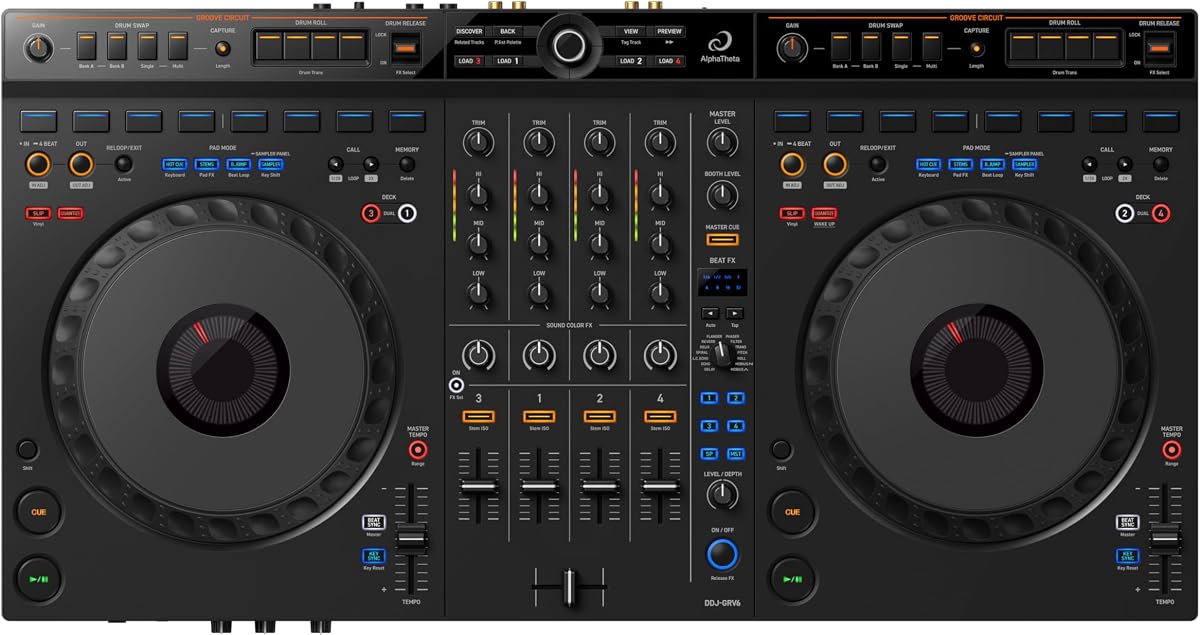
The AlphaTheta DDJ-GRV6 is designed to mimic the layout of professional club decks. It carries a 3.7 rating but offers robust tools for advanced users.
We may earn a commission when you buy through this link, at no additional cost to you.
Groove Circuit lets you swap drum parts for loops on the fly. The rotary selector makes browsing tracks fast. It works with Serato DJ Pro and rekordbox.
It may feel complex for beginners due to its feature density. Some users find the layout adjustment period long.
Buy this if you want to prepare for club environments. Its layout transfers directly to CDJ-3000 setups for seamless transitions.
Swap drum parts with loops live to remix tracks on the fly and keep your sets fresh and unique.
A smart rotary selector helps you browse libraries quickly without cluttering the layout with too many buttons.
We may earn a commission when you buy through this link, at no additional cost to you.
The Numark Mixtrack Pro FX provides an authentic turntable feel for scratching and cueing. It holds a 4.6 rating and offers great value for money.
We may earn a commission when you buy through this link, at no additional cost to you.
Its capacitive-touch jog wheels allow precise cue placement. Six quick-launch FX with paddle triggers help you customize sound. It supports streaming services well.
It is limited to two decks which restricts complex mixing. Software updates sometimes require manual intervention.
This is a great choice for mobile DJs needing portability and quality. It delivers reliable performance for gigs and streaming sessions.
Jog wheels respond to touch for intuitive scratching and precise track positioning without physical resistance.
Includes RCA outputs and microphone input, allowing seamless connection to speakers and vocal systems.
We may earn a commission when you buy through this link, at no additional cost to you.
The Hercules DJControl Inpulse 300 MK2 is a step up from the basic models. With a 4.5 rating, it offers full features for serious learning.
We may earn a commission when you buy through this link, at no additional cost to you.
Beatmatch light guides help you learn manual timing. Streaming support gives you access to large libraries. The build is robust for regular use.
It lacks motorized platters which limits scratching feel. The layout is standard but lacks advanced customization.
Buy this if you want to grow beyond entry-level gear. It balances price and functionality well for mobile and home DJs.
Built-in light guides assist in manual beatmatching, teaching you timing skills without relying on sync.
Access tracks from Beatport and TIDAL directly, expanding your library without downloading files locally.
We may earn a commission when you buy through this link, at no additional cost to you.
The Pioneer DJ DDJ-REV7 is the ultimate controller for turntablists and scratch DJs. Rated 4.3 stars, it features motorized platters for authentic vinyl feel.
We may earn a commission when you buy through this link, at no additional cost to you.
Its Magvel Fader Pro delivers the precise cut feel battle DJs demand. The on-jog color displays help keep routines tight. It ships with Serato DJ Pro.
The price is high and it is heavy to transport. It is overkill for casual users but essential for pros.
Choose this if scratch authenticity is your priority. It offers uncompromising performance for serious professionals and touring turntablists.
Motorized jog wheels give the authentic feel of vinyl for uncompromising scratch performance and feel.
A pro-grade crossfader delivers the durability and precise cut feel that battle DJs demand daily.
We may earn a commission when you buy through this link, at no additional cost to you.
Choosing the right controller depends on your experience level and performance goals. We break down the essential factors to consider before you buy.
Ensure the controller supports the version of Serato you plan to use. Some units work only with Lite while others unlock Pro features.
Check that the specific software version is officially supported to avoid connectivity issues.
Two-channel controllers are standard for beginners but four-channel units allow more complex mixing and layered effects.
Consider if you need 4 decks for advanced routines or if 2 decks suffice for your style.
Motorized jog wheels provide a true vinyl feel which is vital for scratch artists. Non-motorized wheels work fine for standard mixing.
Prioritize touch detection and size for better control over cue points and scratching.
If you move to gigs often, look for lightweight and compact designs that fit in standard backpacks easily.
Check the weight and dimensions to ensure easy transport without extra cases.
Look for features like Stem Separation or Smart Faders if you want to remix tracks live without prep.
Match features to your creative goals such as live remixing or vocal isolation.
Durable construction ensures the controller survives travel and frequent use. Metal accents add longevity.
Choose units with reinforced faders and sturdy knobs for long-term reliability.
Check for necessary outputs like RCA or USB audio to connect to speakers and mixers.
Verify inputs for microphones if you plan to host events or MC.
Balance cost with features to find the best value. Entry-level units are affordable while pro models cost more.
Avoid overspending on features you won't use by matching to your needs.
Connect your controller to your computer via USB and launch Serato DJ. Ensure drivers are installed for optimal performance.
Keep the controller clean by wiping dust with a soft cloth. Avoid liquids near knobs and faders to prevent damage.
Store the unit in a dry place and use a cover when not in use to extend its lifespan significantly.
Most controllers include Serato DJ Lite for free. Some higher-end models come with upgrades or support for Pro versions.
While designed for Serato, some controllers support other apps like VirtualDJ. Check manufacturer specs for cross-compatibility.
2-channel units mix two tracks. 4-channel units allow mixing four tracks and more complex layered effects.
Most require a laptop or PC. Some modern units support tablets or phones via Bluetooth or USB connectivity.
Download updates from the manufacturer website. Connect the controller via USB and follow the on-screen instructions.
Yes for scratch DJs who need vinyl feel. For basic mixing non-motorized wheels work well and save money.
We found the Pioneer DJ DDJ-FLX4 to be the best all-rounder for most users due to its balance of features and ease of use.
Prioritize your specific needs like portability or scratch capabilities when making your final decision to ensure satisfaction.
Remember to check current prices and availability before purchasing to get the best deal on your new DJ setup.