
Nulea M501
4.4Editor score
Adjustable DPI
Rechargeable battery
Wireless freedom
This comprehensive guide compares the top ten ergonomic trackball mice available in October 2026 to help you find the perfect device for comfort and productivit
Ergonomic trackball mice offer a unique solution for users seeking comfort during long hours of computer use. These devices reduce wrist strain by allowing precise cursor control through thumb movement rather than arm motion.
We have analyzed ten leading models based on ergonomic design, connectivity options, battery life, and user feedback. Our comparison highlights key features that distinguish each product in this competitive market landscape.
Each pick below showcases specific strengths tailored to different needs such as budget, premium features, or specific hand sizes. Please note that prices and availability may change frequently on retail platforms.
4.4Editor score
4.5Editor score

4.4Editor score
The following table provides a side-by-side comparison of all ten selected ergonomic trackball mice to help you quickly identify which model best fits your specific workflow and comfort requirements.




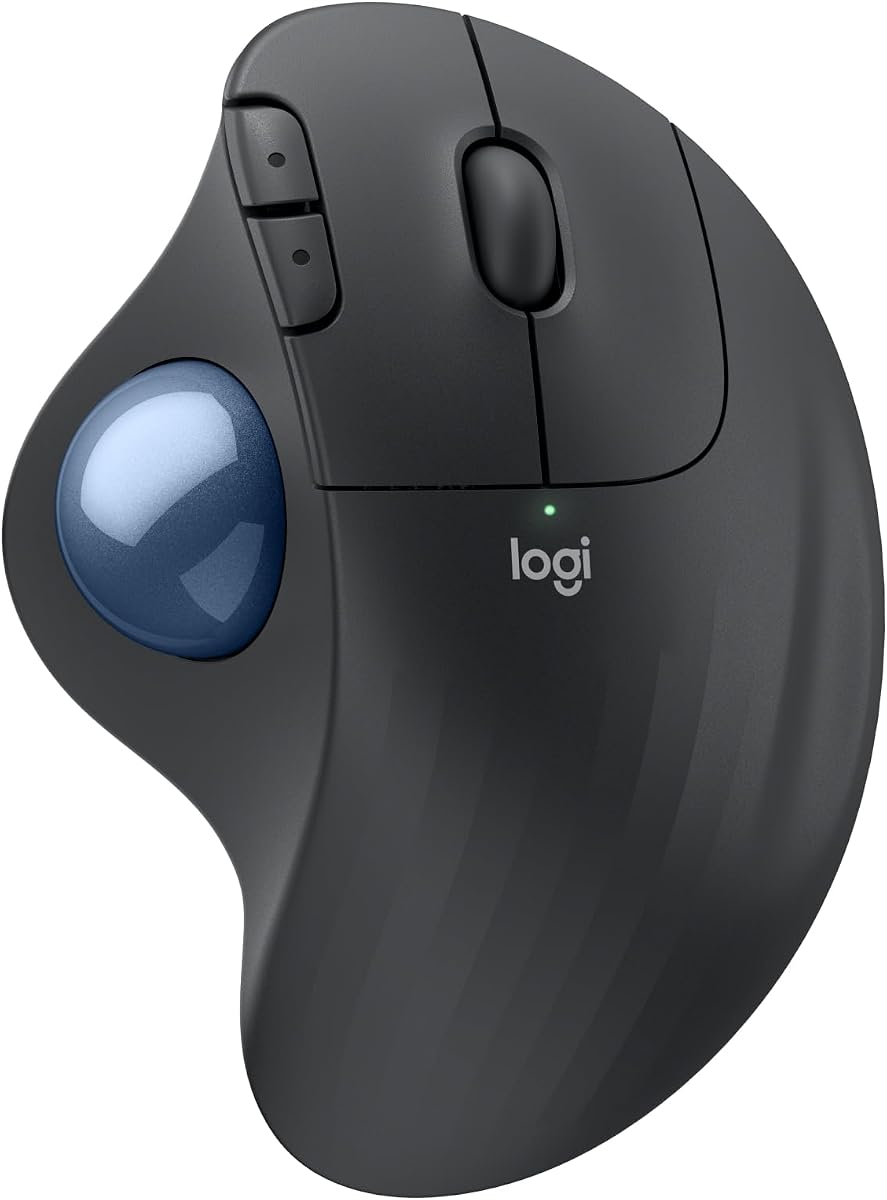
The Logitech Ergo M575S stands out as a top choice for users seeking ergonomic comfort without sacrificing performance. With a 4.5 rating from users, it delivers smooth tracking and reduced forearm strain through its sculpted shape.
We may earn a commission when you buy through this link, at no additional cost to you.
Its key strengths include a 25% reduction in muscle strain compared to standard mice, making it ideal for all-day use. The device supports both Bluetooth and Logi Bolt USB connectivity, ensuring versatility across different setups and operating systems.
While it lacks adjustable DPI levels, the cursor speed can be customized via the Logi Options plus App to suit individual preferences. The silent click feature is a notable addition for shared offices or quiet environments.
This mouse is best suited for professionals and home users who prioritize ergonomics and battery efficiency. The inclusion of recycled plastic aligns with sustainability goals while maintaining durability and comfort for most hand sizes.
The sculpted shape realigns the forearm into a natural posture, significantly reducing discomfort during extended work sessions.
Users benefit from up to 18 months of battery life and the flexibility to switch between Bluetooth and USB connections easily.
We may earn a commission when you buy through this link, at no additional cost to you.
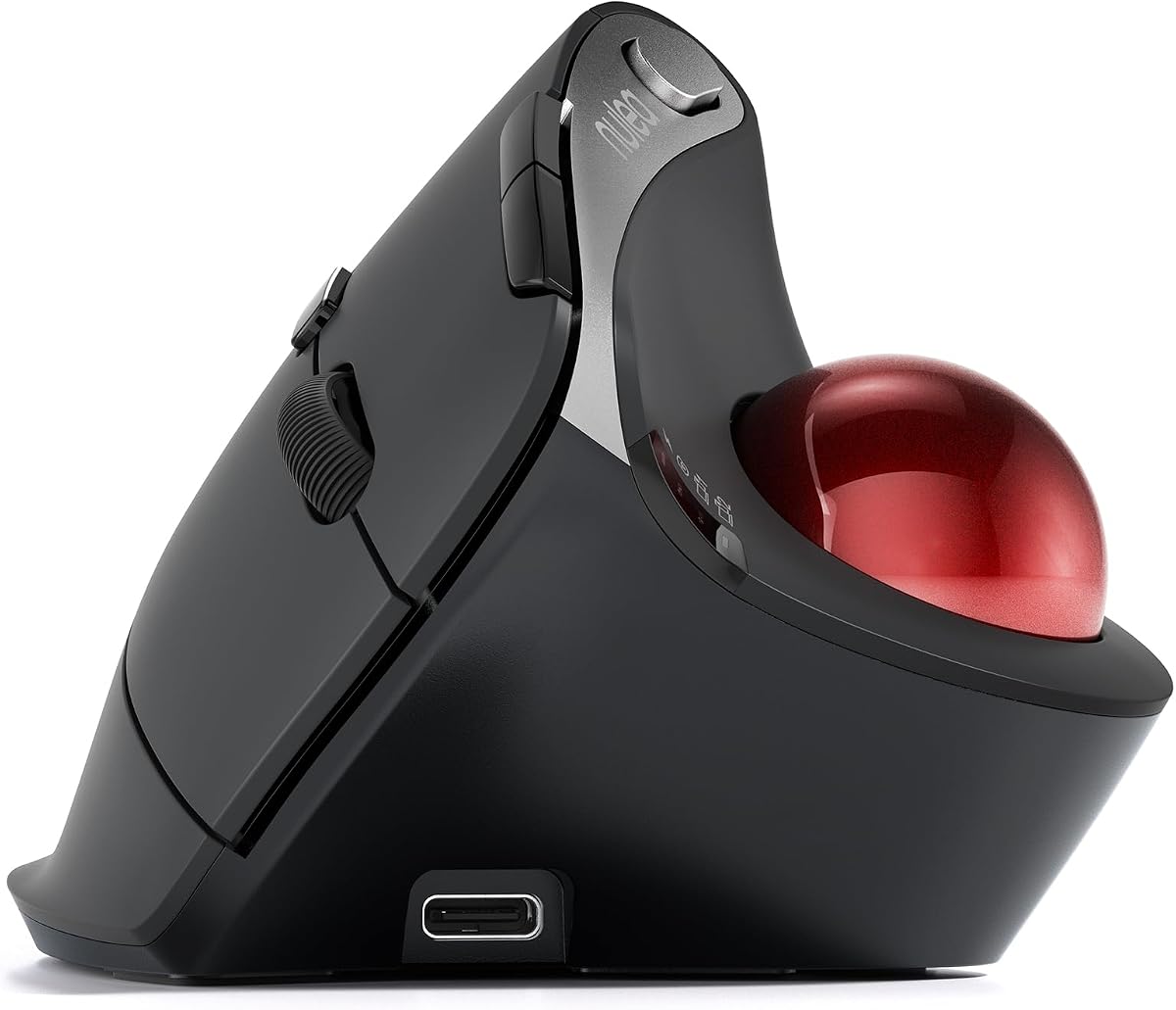
The Nulea M501 offers exceptional value for budget-conscious buyers seeking ergonomic features. With a 4.4 rating, it provides precise cursor movement and smooth thumb control suitable for various surfaces and working environments.
We may earn a commission when you buy through this link, at no additional cost to you.
Its standout feature is the rechargeable battery, eliminating the need for frequent disposable battery replacements. The mouse supports connection to three devices via Bluetooth or USB dongle, enhancing productivity for multi-device workflows.
Although the buttons are not programmable, the six-button layout includes essential functions like back and forward navigation. The adjustable DPI levels allow users to switch between precision and speed as needed for different tasks.
This model is ideal for students and casual users who need a reliable ergonomic mouse without a high price tag. Its compact design fits well in small spaces and makes it portable for travel or home office use.
Priced affordably, it delivers core ergonomic benefits and modern connectivity options that compete with higher-priced alternatives.
The built-in rechargeable battery ensures long usage periods between charges, reducing waste and ongoing costs for users.
We may earn a commission when you buy through this link, at no additional cost to you.
The Logitech 910007026 is a sleek black version of the popular M575S series, earning a high 4.6 rating for its reliability and comfort. It maintains the core ergonomic features that reduce forearm strain and promote natural hand positioning.
We may earn a commission when you buy through this link, at no additional cost to you.
Its primary strengths lie in its ability to save space and provide precise control without moving the hand. The wireless connectivity ensures a clutter-free workspace, and the long battery life minimizes interruptions during critical work periods.
While it shares similarities with other M575 models, the black finish offers a professional look suitable for office environments. Users appreciate the simplicity of setup and the consistent performance across different operating systems.
This mouse is recommended for office workers who need a dependable trackball mouse that prioritizes comfort and efficiency. Its design caters to medium-sized hands, making it accessible for a wide range of users in corporate settings.
The professional aesthetic and reliable performance make it an excellent choice for corporate deployments and daily office tasks.
Its ergonomic shape supports improved forearm posture throughout the day, helping to prevent strain during extended computer use.
We may earn a commission when you buy through this link, at no additional cost to you.
The Logitech MX Ergo S is a premium trackball mouse designed for advanced users requiring high precision and comfort. With a 4.4 rating, it features a 20-degree tilt angle that significantly reduces muscle strain and promotes better forearm posture.
We may earn a commission when you buy through this link, at no additional cost to you.
Its standout feature is the fast USB-C charging, providing up to 24 hours of use from a one-minute charge. The 80% quieter clicks enhance focus in shared environments, and the 6 customizable buttons boost productivity through shortcuts.
While the price is higher than standard models, the advanced features justify the investment for power users. The precision tracking mode switch allows seamless transition between speed and accuracy, catering to diverse tasks from design to browsing.
This mouse is best for professionals with medium to large hands who need a sophisticated ergonomic solution. Its premium build quality and extensive customization options make it a top choice for those seeking the ultimate in comfort and control.
The 20-degree tilt and certified ergonomic design reduce muscle strain by 27%, offering superior comfort for long workdays.
USB-C fast charging ensures minimal downtime, providing 24 hours of use from just a minute of charge for convenience.
We may earn a commission when you buy through this link, at no additional cost to you.
The TECKNET Wireless Trackball Mouse introduces a 16-degree vertical angle that reduces muscle strain by up to 50% for users prone to wrist discomfort. With a 4.5 rating, it delivers precise tracking and silent operation ideal for quiet environments.
We may earn a commission when you buy through this link, at no additional cost to you.
Key strengths include a 500mAh rechargeable battery that powers a full day with just 15 minutes of charging. The mouse supports up to three devices via Bluetooth or 2.4G, ensuring seamless workflow switching across different platforms.
Adjustable DPI levels provide flexibility for various tasks, though users with smaller hands may find the dimensions slightly large. The silent clicks and smooth tracking enhance the user experience during extended work sessions without noise distractions.
This mouse is recommended for professionals prioritizing vertical ergonomic design and fast charging capabilities. Its larger dimensions suit medium to large hands, making it a solid option for those needing significant strain reduction.
The unique 16-degree vertical angle promotes better forearm posture, reducing muscle strain significantly compared to flat mice.
A rapid 15-minute charge powers a full day of use, minimizing interruptions and ensuring consistent performance throughout work.
We may earn a commission when you buy through this link, at no additional cost to you.
The Nulea M506 boasts an impressive 4.7 rating for its 54-degree vertical design that keeps wrists and forearms in natural relaxed positions. The contoured shell and textured palm surface provide a comfortable grip suitable for office and design work.
We may earn a commission when you buy through this link, at no additional cost to you.
Its standout feature is the detachable trackball, allowing easy cleaning without tools to maintain precise cursor control. The battery runs continuously for up to 21 days after a single full charge, reducing the need for frequent recharging.
All essential functions are fingertip-controlled for one-click operation without breaking workflow, enhancing efficiency during browsing and multitasking. The 4 adjustable DPI levels offer versatility for different task requirements from detailed editing to general navigation.
This mouse is ideal for users experiencing wrist discomfort who need a highly rated vertical trackball solution. Its design prioritizes comfort and ease of maintenance, making it a strong choice for long-term daily use in various settings.
The 54-degree vertical structure maintains natural relaxed positions for wrists and forearms, significantly reducing strain during work.
A detachable trackball allows quick tool-free cleaning to remove dust and dirt, ensuring smooth rolling and precise control.
We may earn a commission when you buy through this link, at no additional cost to you.
The Nulea Wireless Ergonomic Vertical Trackball Mouse features a 65-degree angle that keeps the wrist and arm naturally relaxed for ultimate comfort. With a 4.3 rating, it minimizes strain and fatigue, making it perfect for long hours at the desk.
We may earn a commission when you buy through this link, at no additional cost to you.
Its infinite scroll wheel automatically switches between precise and fast modes based on scrolling speed, supporting smooth 4-way scrolling. The true silent control ensures a noise-free operation from trackball to buttons, ideal for shared or quiet spaces.
Multi-device connection via Bluetooth or USB receiver allows pairing with up to three devices without re-pairing for seamless workflow. The wave-textured surface fits the palm seamlessly, enhancing grip stability and control during daily tasks.
This mouse is recommended for users seeking a quiet vertical trackball option to reduce fatigue. Its design prioritizes comfort and silent operation, making it suitable for those who value focus and ergonomic health during work.
The perfect 65-degree ergonomic angle keeps the wrist and arm naturally relaxed, offering ultimate comfort throughout the day.
An advanced infinite scroll wheel switches between modes automatically, allowing effortless navigation through long pages with a gentle spin.
We may earn a commission when you buy through this link, at no additional cost to you.
The Nulea Wireless Trackball Mouse with a 21.7-degree tilt stand delivers a more natural wrist position for enhanced comfort. With a 4.4 rating, it fits the palm precisely and minimizes strain, making it ideal for long desk hours.
We may earn a commission when you buy through this link, at no additional cost to you.
Its ergonomic tilt stand elevates the mouse to provide a comfortable and effortless grip while supporting natural hand posture. True silent control ensures noise-free operation across all functions, suitable for shared environments or late-night work sessions.
The 6-button layout includes back and forward buttons for higher productivity, while 4 adjustable DPI levels offer flexibility for various tasks. Connection options include Bluetooth or USB receiver with easy switching between up to three devices for seamless workflows.
This mouse is best for users requiring additional wrist support and silent operation. Its design focuses on comfort and productivity, making it a solid choice for office workers needing reliable ergonomic assistance during extended use.
The 21.7-degree tilt stand provides a more natural wrist position, fitting the palm precisely for a comfortable and effortless grip.
A completely noise-free operation from trackball to buttons ensures focus without distractions, perfect for quiet or shared workspaces.
We may earn a commission when you buy through this link, at no additional cost to you.
The Logitech Ergo M575 for Business is an enterprise-grade wireless trackball mouse designed for scalable employee deployment. With a 4.4 rating, it reduces muscle activity by 25% and is certified by US Ergonomics for all-day comfort in corporate environments.
We may earn a commission when you buy through this link, at no additional cost to you.
Its standout feature is Logitech Sync support, enabling remote deployment and monitoring to streamline IT management. The mouse promotes better forearm posture and provides precise tracking on any surface, making it perfect for tight workspaces and busy desks.
Long battery life offers up to 18 months of use from a single AA battery, minimizing maintenance for large fleets. Personalizable shortcuts via Logi Options+ app enhance productivity, while recycled plastic materials align with sustainability initiatives.
This mouse is recommended for businesses prioritizing employee comfort and IT efficiency. Its robust features and certification make it a reliable choice for organizations deploying ergonomic solutions at scale across diverse workstations.
Remote deployment and monitoring via Logitech Sync simplify IT management for large-scale employee trackball mouse across offices.
Designed with experts and certified by US Ergonomics, it reduces muscle activity by 25% to support healthier daily work habits.
We may earn a commission when you buy through this link, at no additional cost to you.
The Logitech MX Ergo S Advanced offers enhanced control for professionals needing a versatile ergonomic trackball solution. With a 4.5 rating, it allows switching between speed and precision tracking at the touch of a button for diverse task requirements.
We may earn a commission when you buy through this link, at no additional cost to you.
Its key strengths include 6 programmable buttons customizable via Logi Options+ app, time-saving shortcuts, and smart actions to boost daily productivity. The 20-degree tilt angle reduces muscle strain by 27% and provides a sculpted ergonomic design for medium to large hands.
Fast USB-C charging delivers up to 24 hours of use from a one-minute charge, ensuring minimal downtime during critical work. The 80% quieter clicks and soft rubber grip further enhance comfort and focus in shared work environments throughout the day.
This mouse is best for advanced users requiring extensive customization and precision. Its combination of tilt comfort, fast charging, and programmable features makes it a top-tier option for professionals prioritizing efficiency and ergonomic health.
Six customizable buttons and Smart Actions via Logi Options+ app allow users to create shortcuts that streamline daily tasks significantly.
One minute of USB-C charging provides 24 hours of use, keeping users productive without frequent interruptions for recharging.
We may earn a commission when you buy through this link, at no additional cost to you.
Selecting the right ergonomic trackball mouse involves considering several key factors that impact comfort, usability, and productivity in your specific workflow environment.
The ergonomic design determines how well the mouse supports your hand, wrist, and forearm during extended use. Look for models with tilting angles or vertical structures that promote a natural position to reduce muscle strain effectively.
Prioritize mice certified by ergonomists with comfortable curves and textured surfaces to ensure sustained comfort throughout your workday.
Trackball mice typically use thumb control or finger control to navigate the cursor. Thumb control is common in many models and allows precise movement with minimal hand motion for improved efficiency.
Choose a trackball mechanism that feels natural to your hand size and movement style to prevent fatigue and enhance accuracy.
Modern trackball mice offer various connectivity options including Bluetooth and USB dongles for wireless operation. Multi-device connectivity allows seamless switching between computers or tablets for flexible workflows across different systems.
Ensure the mouse supports connection types compatible with your devices to maximize productivity without cable clutter or interruptions.
Battery life is crucial for uninterrupted work. Rechargeable batteries provide long usage periods and reduce environmental waste compared to disposable AA batteries that require frequent replacements.
Look for models with quick charging capabilities and long standby times to ensure the mouse remains operational without frequent recharging needs.
DPI settings control cursor speed and precision. Adjustable DPI levels let you switch between fast movement and high-precision tracking for tasks like design work or general browsing.
Select a mouse with multiple DPI options to tailor cursor sensitivity to your specific task requirements and preferences effectively.
Programmable buttons enhance productivity by allowing shortcuts and custom functions tailored to your workflow. Non-programmable mice limit flexibility but may be sufficient for basic navigation needs.
Consider software support for button customization to create time-saving shortcuts that streamline your daily digital interactions and tasks.
Durable materials and construction ensure long-term reliability. Many modern models include recycled plastics to support sustainability goals while maintaining robust performance and ergonomic comfort.
Check for solid build quality and comfortable grip materials to ensure the mouse withstands daily use without compromising on user experience.
Prices vary widely from budget-friendly options to premium models with advanced features. Determine your budget while balancing essential ergonomic needs against additional functionalities you may find useful.
Invest in a model that offers the best value for your specific usage needs rather than simply the cheapest or most expensive option available.
Proper setup begins with pairing the mouse correctly via Bluetooth or USB receiver and adjusting settings through manufacturer software. Customize DPI and button functions to match your workflow preferences for optimal performance and comfort right from the start.
Keep the trackball clean by removing and wiping it periodically to prevent dust buildup that can cause tracking issues. Most models allow easy detaching of the ball without tools, ensuring smooth rolling and precise cursor control for long-term use.
Recharge or replace batteries before they are fully depleted to maintain consistent wireless connectivity. Store the mouse on a flat surface when not in use to prevent wear on the rubber grips and ensure durability throughout its lifespan.
Yes, ergonomic trackball mice significantly reduce wrist strain because they require minimal arm movement compared to traditional mice. By using thumb or finger control on a stationary base, they keep your wrist in a neutral position, which helps alleviate discomfort during extended computer use.
Unlike standard optical mice, most ergonomic trackball mice work on any surface because they do not rely on a sensor to track motion across a desk. This makes them ideal for small workspaces, uneven surfaces, or situations where mouse pad space is limited or unavailable.
Many modern trackball mice support multi-device connectivity, allowing you to switch between up to three devices using a dedicated button. You can connect via Bluetooth or USB receiver simultaneously and switch instantly without re-pairing, enabling seamless workflows across different computers.
Most premium and mid-range models offer customizable buttons through companion software apps that let you assign shortcuts or functions. This allows you to personalize the mouse to your workflow, though some budget models may have fixed button functions without customization options.
Battery life varies by model, ranging from 21 days to 18 months depending on whether it uses rechargeable or disposable batteries. Rechargeable models often include quick charging features, while AA-powered options are designed for long endurance to minimize frequent maintenance interruptions.
For general office tasks, a DPI range between 800 and 1600 is typically ideal for balancing speed and precision. Higher DPI settings allow faster cursor movement for browsing, while lower settings offer more control for detailed tasks like selecting text or editing images.
We have reviewed ten top ergonomic trackball mice ranging from budget-friendly options to premium models with advanced features. Each product offers unique benefits such as tilt angles, vertical designs, or long battery life to suit different user needs and preferences effectively.
When choosing, prioritize ergonomics that match your hand size and comfort requirements over flashy features. Look for reliable connectivity, customizable controls, and battery efficiency to ensure the mouse supports your productivity and health throughout the workday.
Remember that prices and availability may change frequently on retail platforms. Always check current prices before purchasing to ensure you get the best value for your investment in ergonomic computing comfort today.