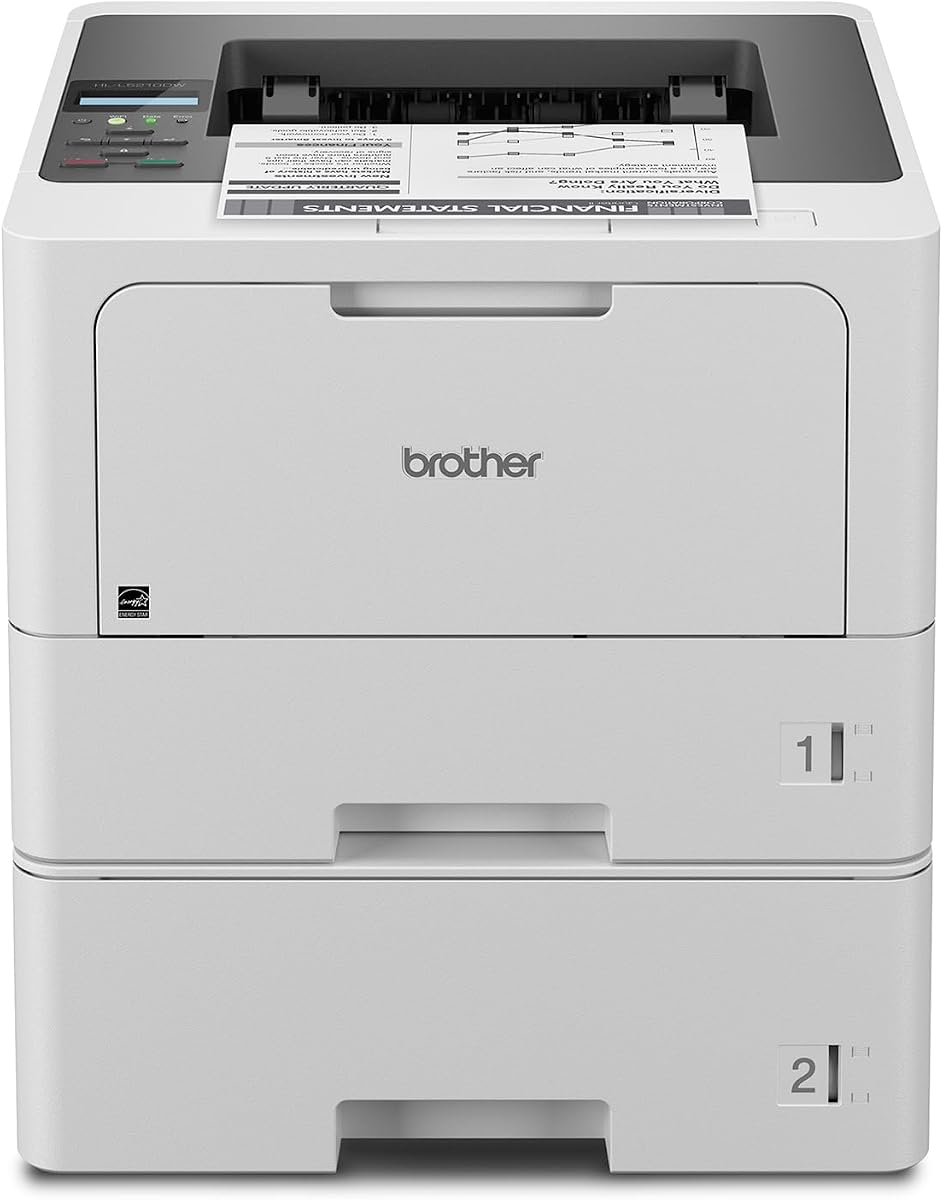
Brother HL-L5210DWT
4.3Editor score
Up to 48ppm speed
Dual paper tray setup
Built in Gigabit Ethernet
This guide compares the top laser printer for large workgroups by speed capacity security and cost efficiency to help businesses choose the right reliable
Finding the right laser printer for large workgroups requires balancing speed capacity and security features that meet demanding business needs without sacrificing reliability or output quality.
We evaluated ten top enterprise models based on print speed network connectivity paper handling capabilities and security protocols to identify the most reliable options for busy office environments.
Each pick highlights key strengths and trade-offs to help you match a device to your workflow needs and note that pricing and stock availability may change over time.
4.3Editor score

4.4Editor score

The following table provides a side by-side comparison of all ten reviewed models highlighting key specifications and features to help you quickly identify the best fit for your workgroup.


The Brother MFC-L8930CDW stands out as a top enterprise solution for large workgroups needing reliable color printing scanning and copying capabilities in a single robust device.
We may earn a commission when you buy through this link, at no additional cost to you.
It delivers professional output with sharp black and color prints while supporting fast duplex scanning up to 104ipm and features advanced security to protect sensitive business documents in transit.
While the upfront investment is higher than basic monochrome units the inclusion of high yield toner options and energy efficient design helps lower long term operating costs significantly.
Businesses requiring secure fast color workflows will find this model a strong investment with its NFC authentication and extensive customization options for frequently used tasks.
The integrated NFC card reader enables easy badge authentication ensuring only authorized staff can access printing and scanning functions securely.
A 7 inch color touchscreen supports up to 64 customized shortcuts allowing teams to automate repetitive scanning and printing tasks efficiently.
We may earn a commission when you buy through this link, at no additional cost to you.
The Brother HL-L5210DWT offers exceptional value for workgroups that need fast reliable monochrome printing without extra multifunction features or color capabilities.
We may earn a commission when you buy through this link, at no additional cost to you.
It prints up to 48 pages per minute and includes dual paper trays totaling over 750 sheets which can be expanded to 1390 sheets for continuous operation.
Operating costs are minimized with the option for super high yield toner cartridges making it a cost efficient choice for high volume document production.
Ideal for offices prioritizing speed and capacity this printer integrates seamlessly via Ethernet or dual band wireless to support mobile printing and network sharing easily.
With up to 48ppm speed and expandable paper capacity this model keeps busy teams productive without frequent refills or delays.
Compatible with high yield replacement toner cartridges this printer helps reduce cost per page over time for heavy usage environments.
We may earn a commission when you buy through this link, at no additional cost to you.
The HP LaserJet Enterprise M406dn is designed for teams needing straightforward fast monochrome printing with robust security and straightforward network management capabilities.
We may earn a commission when you buy through this link, at no additional cost to you.
It achieves print speeds up to 42ppm and includes automatic duplex printing to save paper and time on double sided documents regularly.
HP Wolf Enterprise Security provides defensive layers to detect self heal from malware and protect data ensuring a secure printing environment.
Businesses relying on wired networks will appreciate its ease of use and ability to update features via HP FutureSmart firmware for long term efficiency.
Defensive layers detect and self heal from malware keeping sensitive business data safe during every print job and document transmission.
FutureSmart firmware allows updates over time optimizing printer features and performance to extend the device useful lifespan effectively.
We may earn a commission when you buy through this link, at no additional cost to you.
The Brother MFC-L6810DW delivers enterprise level monochrome performance with fast scanning and advanced security features tailored for large workgroup environments.
We may earn a commission when you buy through this link, at no additional cost to you.
It prints at speeds up to 52ppm and scans two sided documents at up to 200ipm using an 80 page auto document feeder for quick batch processing.
With built in NFC authentication and triple layer security it safeguards documents during transit and ensures only authorized users can access sensitive operations.
This model suits teams requiring high volume printing and scanning while benefiting from Alexa voice commands and cloud services for streamlined workflows.
Single pass duplex scanning at 200ipm allows teams to digitize large document sets quickly without manual page turning delays.
Alexa compatibility enables voice commands for basic print tasks reducing physical interaction and improving accessibility for remote workers.
We may earn a commission when you buy through this link, at no additional cost to you.
The Brother HL-6210DW provides fast and reliable monochrome printing with high capacity paper handling ideal for teams needing consistent document production.
We may earn a commission when you buy through this link, at no additional cost to you.
It achieves speeds up to 50ppm and includes a 520 sheet main tray plus a 100 sheet multipurpose tray expandable to 1660 sheets total.
Advanced Triple Layer Security ensures network and document protection while dual band wireless supports seamless integration across mobile and desktop devices.
Office managers will appreciate the cost efficiency through ultra high yield toner options and the flexibility to scale paper capacity as demand grows.
Expandable paper trays up to 1660 sheets reduce refill interruptions and support continuous printing in high demand environments.
Dual band Wi-Fi and Gigabit Ethernet options allow flexible network setup for both wired and wireless mobile device printing.
We may earn a commission when you buy through this link, at no additional cost to you.
The Brother MFC-L5915DW combines fast monochrome printing with scanning and copying features making it a versatile all-in-one for busy office workgroups.
We may earn a commission when you buy through this link, at no additional cost to you.
It prints up to 50ppm and scans at 56ipm via a 70 page auto document feeder supporting legal size documents for comprehensive workflow automation.
Cost efficient output is supported through high yield toner cartridges reducing long term expenses while maintaining professional quality print and scan results.
This model is well suited for departments needing reliable multifunction performance with flexible networking options and straightforward document management tools.
Legal size document glass allows scanning of contracts and forms without manual trimming or cropping for professional results.
Compatible with high yield toner cartridges this printer minimizes cost per page for high volume document creation.
We may earn a commission when you buy through this link, at no additional cost to you.
The HP LaserJet Enterprise M507n emphasizes security and centralized management for organizations that prioritize data protection and device control.
We may earn a commission when you buy through this link, at no additional cost to you.
It features over 200 embedded security capabilities to protect sensitive information and stop attacks while supporting HP Web JetAdmin for easy configuration.
Teams benefit from consistent high quality print results and optional mobile printing capabilities without needing complex setup or apps.
Security focused businesses will value this device for its ability to enforce corporate policies and update security configurations efficiently across the network.
HP JetAdvantage Security Manager enables centralized application of corporate policies and security settings across all network printers.
Embedded security features detect and thwart malware ensuring device integrity and data safety during every print transaction.
We may earn a commission when you buy through this link, at no additional cost to you.
The HP LaserJet Enterprise MFP M634z is a premium high performance solution designed for large enterprises requiring maximum capacity speed and security.
We may earn a commission when you buy through this link, at no additional cost to you.
It delivers up to 55ppm speed and handles up to 2300 sheets total with optional trays reducing downtime for refilling during peak workloads.
Security is industry leading with embedded features that detect malware and protect sensitive data while the 150page ADF supports fast document digitization.
Organizations with high volume needs will benefit from the 3-bin stapler stacker and 9 inch touchscreen for streamlined document workflows and management.
Up to 2300 sheet input capacity with stapler stacker enables uninterrupted printing of large batch jobs without operator intervention.
Large touchscreen and advanced scanning features help detect errors automatically improving document quality and reducing manual corrections.
We may earn a commission when you buy through this link, at no additional cost to you.
The Brother HL-L8430CDWT is ideal for teams needing reliable color laser printing with secure features and sustainable design for modern offices.
We may earn a commission when you buy through this link, at no additional cost to you.
It prints at up to 33ppm in vibrant color with dual paper trays and supports high yield toner to reduce operational costs over time.
Security includes integrated NFC card readers and advanced layers to protect documents while sustainability features include recycled materials and energy efficiency.
This model suits workgroups requiring professional color documents without multifunction capabilities and values eco friendly and secure device options.
EPEAT Gold rating and post consumer recycled materials help organizations meet environmental goals while reducing waste impact.
Integrated NFC card readers ensure only authorized users print color jobs protecting sensitive branded and internal documents.
We may earn a commission when you buy through this link, at no additional cost to you.
The Brother HL-L6310DW is an enterprise grade monochrome printer designed for high efficiency large paper capacity and secure flexible operation.
We may earn a commission when you buy through this link, at no additional cost to you.
It prints up to 52ppm and supports expandable paper capacity up to 1660 sheets ensuring teams never face downtime due to empty trays.
Triple Layer Security and NFC authentication protect documents and networks while Alexa compatibility allows basic voice controlled task execution.
Businesses prioritizing speed security and scalability will find this model a robust fit for sustained high volume document workflows.
Triple Layer Security and integrated NFC card reader protect devices and documents from unauthorized access and malicious threats.
Expandable paper trays up to 1660 sheets enable continuous high volume operation with minimal operator intervention for refilling.
We may earn a commission when you buy through this link, at no additional cost to you.
Choosing the right laser printer for large workgroups involves evaluating several key factors that affect performance reliability and total cost of ownership.
For large workgroups fast print speeds are essential to prevent bottlenecks when multiple users send jobs simultaneously. Look for models with at least 40ppm for monochrome and 30ppm for color to ensure smooth operation. Sharp output quality ensures documents look professional and reduces waste from reprints caused by unclear text or graphics.
Prioritize printers that match your average monthly volume to avoid slowdowns or mechanical strain over time.
High capacity trays reduce the frequency of refills which keeps staff focused on core tasks rather than printer maintenance. Models offering expandable trays or optional feeders are ideal for teams handling large batch jobs or mixed media. Automatic duplex printing saves paper and costs while reducing manual handling effort during document preparation.
Choose a device with at least 500 sheets standard capacity and expansion options for long term flexibility.
Modern workgroups rely on seamless network integration to support mobile printing and remote access. Look for built-in Gigabit Ethernet and dual-band Wi-Fi options to ensure reliable connections across wired and wireless devices. Mobile printing capabilities allow staff to print from smartphones and tablets without complex setup or extra software.
Ensure the printer supports standard protocols like AirPrint and Mopria for broad device compatibility.
Enterprise printers must protect sensitive data from unauthorized access and malicious attacks. Features like Triple Layer Security encrypted data transit and network authentication safeguards ensure documents remain secure. NFC card readers and badge authentication add an extra layer of control limiting print access to authorized users only.
Verify that the device includes regular security firmware updates to address emerging threats proactively.
Operating costs are driven by toner capacity and yield rates so high yield replacement cartridges can significantly lower cost per page. Some printers include starter toners but check available super high-yield options for long term savings. Energy-efficient designs and low power consumption modes also contribute to reduced utility costs.
Compare estimated cost per page based on standard and high yield cartridges before purchasing.
All-in-One printers combine printing scanning copying and faxing to reduce hardware clutter and streamline workflows. High-speed document feeders enable quick digitization of large document sets while cloud scanning allows flexible storage options. Choose multifunction models if your workgroup frequently handles digital document processing tasks.
Ensure the scanner supports legal size documents and double-sided scanning for complete document processing needs.
User-friendly touchscreens and intuitive menus simplify daily operation and reduce training time. Device management solutions enable mass distribution of settings and automatic firmware updates for consistent performance across multiple devices. Look for voice assistant compatibility if your office uses smart home or business voice controls.
Evaluate the availability of centralized management tools like Web JetAdmin for streamlined IT oversight.
EPEAT Gold and ENERGY STAR certifications indicate devices meet environmental efficiency standards. Packaging free of polystyrene and inclusion of recycled materials show manufacturer commitment to reducing waste. Energy-saving sleep modes and efficient toner technologies reduce both power and resource consumption.
Selecting eco-friendly printers helps organizations meet sustainability goals and reduce carbon footprints.
Proper setup ensures optimal performance so place the printer on a stable flat surface near reliable power and network connections. Follow manufacturer instructions to initialize the device load paper correctly and install toner cartridges securely before the first print job.
Regular maintenance like cleaning the scanner glass checking for paper jams and replacing worn rollers extends the printer lifespan. Use recommended Genuine toner cartridges to maintain print quality and avoid internal component damage from inferior consumables.
Update firmware periodically to access new features and security patches while monitoring usage statistics to anticipate maintenance needs. Encourage staff to clear completed print jobs and release print hold queues regularly to prevent data buildup and improve workflow efficiency.
For large workgroups printers with at least 40ppm monochrome or 30ppm color speeds are recommended to handle multiple concurrent print jobs efficiently. This prevents bottlenecks and ensures smooth workflow during peak office hours.
Yes most modern laser printers for large workgroups include built-in Gigabit Ethernet and dual-band Wi-Fi for seamless network integration. Mobile printing capabilities allow staff to send jobs from smartphones or tablets effortlessly.
Use high yield or super high yield toner cartridges to lower cost per page and choose energy-efficient models that minimize power consumption. Regular maintenance and avoiding third-party consumables also prevent costly repairs and maintain output quality.
Look for Triple Layer Security NFC authentication and encrypted data transit to protect sensitive documents. Devices should include firmware updates and intrusion detection to safeguard networks from malware and unauthorized access.
Many enterprise models support legal size paper input and scanning but confirm this before purchase to match your workflow needs. Check the scanner glass size and tray capacity for oversized document handling requirements.
All-in-One printers consolidate printing scanning and copying which saves space and simplifies document workflows. They are especially beneficial for workgroups that require frequent digitization or centralized document management.
Regular cleaning of rollers and scanner glass plus prompt replacement of worn parts prevent jams and quality issues. Monitor paper trays and toner levels and schedule maintenance to avoid unexpected downtime during critical work hours.
Yes most reviewed models support mobile printing via AirPrint Mopria or manufacturer apps allowing staff to print from smartphones or tablets. Dual-band Wi-Fi ensures reliable connections without needing complex network configurations.
The Brother MFC-L8930CDW HP LaserJet Enterprise MFP M634z and Brother HL-L5210DWT represent top choices for large workgroups needing speed capacity and security balanced for diverse business needs.
Prioritize models with high paper capacity robust security features and flexible connectivity to ensure your printer supports current workflows and scales with future demands efficiently.
Always verify current stock and availability before purchasing as pricing and offers may change depending on vendor availability and seasonal promotions.